Converting a Serverless Instance to a Provisioned Resource Instance
ダウンロード
フォーカスモード
フォントサイズ
Scenarios
Serverless instances are billed based on actual compute consumption (CCU). This model suits scenarios with significant business load fluctuations and unstable traffic. When your business load gradually stabilizes, you can convert a Serverless instance to a provisioned instance, which is billed at a fixed rate according to the selected instance specification. For businesses with consistently high and stable loads over the long term, using provisioned instances typically delivers better cost performance. After the conversion, the instance specification is fixed to the CPU and memory configuration you selected. The billing method switches from CCU-based billing to billing based on the provisioned instance's specification and usage duration.
Prerequisites
Before performing the conversion, confirm that the instance meets the following conditions:
Check Item | Requirement |
Instance State | Running |
Instance Form | Serverless |
Kernel Version | 21.6.3.0 or later |
Node status | All nodes are running normally. |
Node Type | The instance must not contain CDC or columnar storage nodes. |
Limitations
After a Serverless instance is converted to a provisioned resource instance, the converted provisioned resource instance cannot be rolled back to a Serverless instance.
The operation involves an instance restart. During the restart, the database service will be unavailable, current connections will be interrupted, and uncommitted transactions will be rolled back. This may cause business interruption. Proceed with caution. The restart is expected to take several minutes. Ensure that your business has an automatic reconnection mechanism. It is recommended to perform this operation during off-peak hours.
During the conversion, DDL statements and data import operations such as BulkLoad are prohibited on the instance. Before the conversion, confirm that no backup tasks are currently running.
Steps
1. Log in to the TDSQL Boundless console.
2. In the left sidebar, select Instance List. Then, locate the target Serverless instance in the instance list.
3. Click the target Instance ID to go to the Instance Details page.
4. In the Specs Configuration section, click Convert to Provisioned Resource Instance next to Instance Form.
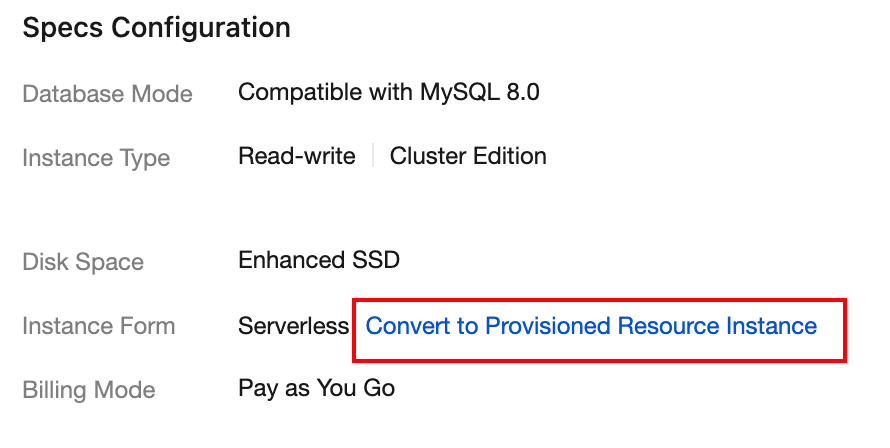
5. On the Convert Serverless Instance to Provisioned Resource Instance page, select the number of CPU cores for the compute node of the target provisioned resource instance.
6. Click OK to submit the conversion request.
After the conversion is completed, you can go to the Instance Details page to verify that the instance type has been changed to Pre-configured resource.
Changes After Conversion
After the conversion is completed, the instance will undergo the following changes:
Change Item | Before Conversion | After Conversion |
Instance Form | Serverless | Provisioned resource |
Billing Mode | Billed elastically based on CCU | Billed based on fixed specifications |
Specification Adjustment | Automatic AS | Manually adjust through configuration change |
Next Steps
After the conversion is completed, it is recommended that you perform the following verification operations:
1. On the Instance Details page, confirm that the Instance Form has been changed to Pre-configured resource and that the specifications and billing method have been updated.
2. Connect to the database to verify that business read and write operations are functioning normally.
3. On the Monitoring and Alarms > Monitoring tab, observe whether key metrics such as CPU utilization and memory utilization are stable.
4. If you need to adjust the specifications, see Modifying the Instance Configuration.
FAQs
Will Service Access Be Affected During the Conversion?
Yes. During the conversion, the instance will be restarted to complete route switching. During the restart, the database service will be unavailable, current connections will be interrupted, and uncommitted transactions will be rolled back. This may cause business interruption. The restart is expected to take several minutes. It is recommended that you perform this operation during off-peak hours and rely on the reconnection mechanism on the business side for automatic recovery. During the conversion, do not perform DDL statements or data import operations such as BulkLoad on the instance.
Can I Revert to a Serverless Instance After Conversion?
After a Serverless instance is converted to a provisioned resource instance, the converted provisioned resource instance cannot be rolled back to a Serverless instance.
How to Select a Suitable Target Specification
You can view the recent CCU usage of your Serverless instance on the Monitoring and Alarms > Monitoring tab. Use the actual peak usage as a reference to select appropriate CPU and memory specifications. It is recommended that you reserve a 20% - 30% buffer based on the business peak.
How Long Does the Conversion Take?
The conversion duration depends on the data volume of the instance. You can check the conversion progress in the console.
Can I Write Data During the Conversion?
Yes. Before route switching, database read and write operations are not affected. The system synchronizes newly generated data during this period through incremental backup. Read and write operations are interrupted only during the final brief restart phase.
How Does Billing Change After Conversion?
After the conversion is successful, CCU-based elastic billing stops immediately, and billing based on the target specifications (CPU cores and memory capacity) you selected begins. For specific billing rules, see Pricing Details.
フィードバック