Click DataInLong to enter the Offline Maintenance page. Offline Maintenance is a unified management center for all submitted offline synchronization tasks within Offline Synchronization, including Periodic Task Operations and Maintenance and Instance Operations and Maintenance.
Task Operation and Maintenance
The task list page displays all periodic tasks submitted to the scheduling system by the current account in a list format by default.
Parameter
Description
Task Name
Current record belongs to the task name
Owner
Name of the person in charge configured when the current task was created
Scheduling Cycle
Cycle scheduling frequency of the current task
Scheduling Plan
Detailed scheduling plan of the current task
Running Status
Scheduling operation status of the current task
Scheduling…: The task has been submitted for scheduling and is in normal scheduling
Paused: Temporarily interrupt the current task scheduling, can be restarted later
Stopped: The current task scheduling has been terminated
Stopping: The current task is in the process of being stopped, state is reversing
Expired: The task is in the "Expired" state and cannot be started, paused, or stopped.
Last submission time
The last time the task was submitted to the scheduling system
Operation
Running Details
Including task metric statistics, monitoring rule configurations, etc.: Metric statistics, monitoring rule configurations, etc.
View Instance
Click to go to the task instance information list for this task.
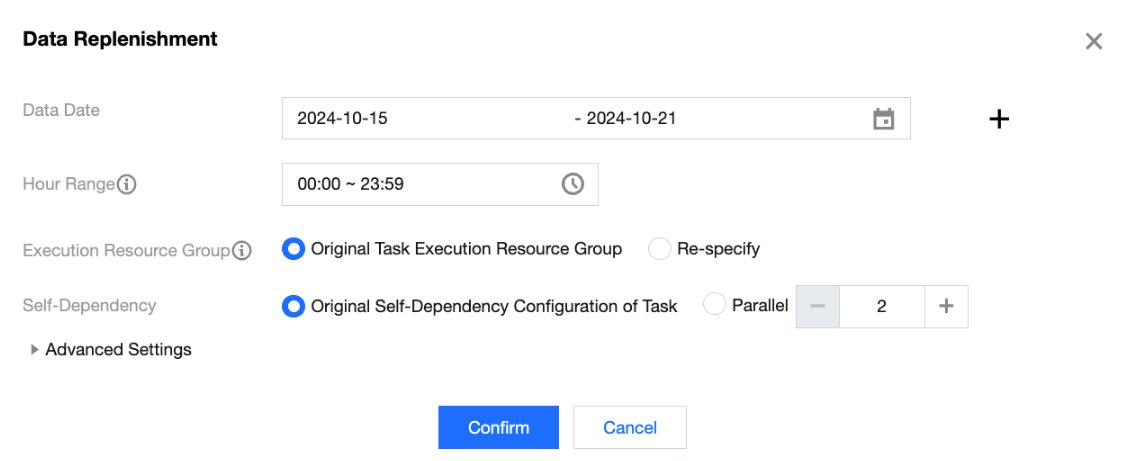
Data Replenishment
Bulk data completion for the task, valid only for tasks "Scheduling In Progress"
Data Date: Users can define the data date. The selectable range is today and any day before today.
Hour Range: Effective only for hourly tasks and periodic tasks with a period less than an hour. Used in conjunction with the data date to generate supplemental instances.
Execution Resource Group: Specify the resource group for running supplemental instances. This does not affect the configuration of execution resources for periodic tasks.
Self-Dependency: Default self-dependency configuration of the original task. Users can define it with a minimum parallelism of 2 (default value is 2, maximum value is 10). When set, it will override the original self-dependency of the task.
Advanced settings:
Replenishment Instance Generation Period: You can re-specify the generation cycle of the supplemental task instances; currently, only daily instances can be converted into instances generated on the 1st of every month.
Custom Parameters:
Default task parameters can be re-specified by the user to facilitate the execution of new logic in supplemental instances. The new parameters will override the previous task parameter values.
Custom parameters should be input in key-value format.
Alarm Subscription
View the associated task rules and recent alarm conditions under the task.
Start
Schedule the task of the start node, valid only for tasks "Paused" and "Stopped"
Pause
Pause the scheduling task of the node, valid only for tasks "Scheduling In Progress". After pausing, new instances will not be generated. Existing instances will continue to run
Stop
Terminate all "Pending Execution" and "Running" instances of the node task, and no new instances will be generated
Delete
Delete this task and all instances under it together, valid only for tasks "Stopped"
Setting Alarms
Set the alarm information for the task, supports batch operations.
Modify Owner
Modify the person in charge of the task, supports batch operations.