Implementing LiveActivity
Download
フォーカスモード
フォントサイズ
Integration Considerations
iOS 16.1 and later are supported.
Remote Start (push-to-start) requires iOS 17.2 or later; iOS 17.1 and earlier only support Remote Update and Remote End operations.
Live Activity on Dynamic Island can be displayed for up to eight hours, and on the Lock Screen for up to twelve hours.
To enable remote operations, users must configure a p8 certificate.
Supported devices include iPhone 14 Pro, iPhone 14 Pro Max, and newer models.
Implementation Steps
Step 1. Add support configuration for Live Activities
Add the key-value: Supports Live Activities = YES in the Info.plist of the main program.
Step 2. Create a WidgetExtension
If there is already one in the project, skip this step.
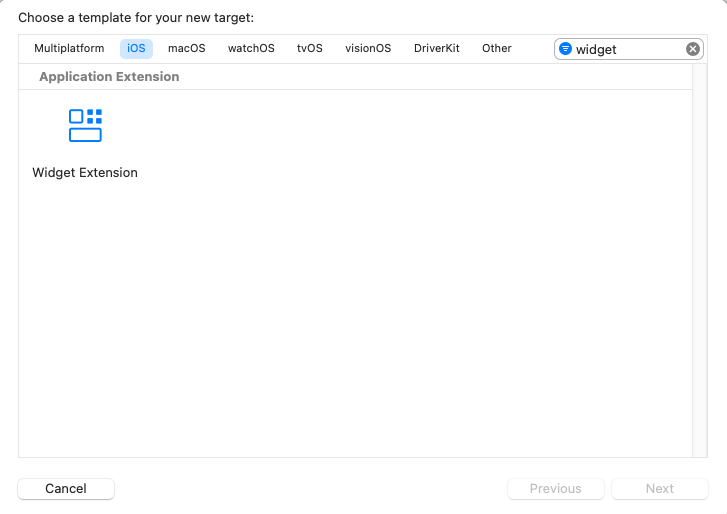
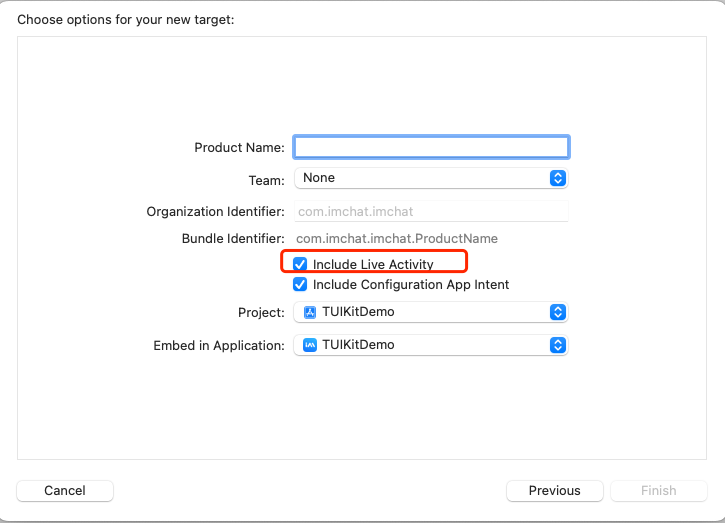
Step 3. Code implementation
1. Implement Activity Attributes
The following implementation needs to implement the corresponding data model according to your own business. Among them, the data in ContentState can be dynamically updated. It is recommended to define activityID as the unique identifier of LiveActivity.
import Foundationimport ActivityKitstruct LiveActivityAttributes: ActivityAttributes {public struct ContentState: Codable, Hashable {// Dynamic stateful properties about your activity go here!var text: Stringvar pauseTime: Date?var endTime: Date?}// Fixed non-changing properties about your activity go here!// custom activityID when creating a LiveActivityvar activityID: String}
2. Create UI
Please write the specific UI according to your needs. It contains the definitions of Lock Screen UI and Dynamic Island UI.
import ActivityKitimport WidgetKitimport SwiftUIstruct LiveActivityLiveActivity: Widget {var body: some WidgetConfiguration {ActivityConfiguration(for: LiveActivityAttributes.self) { context in// Lock screen/banner UI goes hereVStack {Text("Hello \\(context.state.text)")}.activityBackgroundTint(Color.cyan).activitySystemActionForegroundColor(Color.black)} dynamicIsland: { context inDynamicIsland {// Expanded UI goes here. Compose the expanded UI through// various regions, like leading/trailing/center/bottomDynamicIslandExpandedRegion(.leading) {Text("Leading \\(context.attributes.activityID)\\(context.state.text)")}DynamicIslandExpandedRegion(.trailing) {Text("Trailing \\(context.state.text)")}DynamicIslandExpandedRegion(.center) {Text("Center \\(context.state.text)")}DynamicIslandExpandedRegion(.bottom) {Text("Bottom \\(context.state.text)")// more content}} compactLeading: {Text("CL \\(context.state.text)")} compactTrailing: {Text("CT \\(context.state.text)")} minimal: {Text("CB \\(context.state.text)")}.widgetURL(URL(string: "https://www.tencentcloud.com/document/product/269/100621?from_cn_redirect=1")).keylineTint(Color.red)}}}
The layout definition of Dynamic Island UI is as follows:
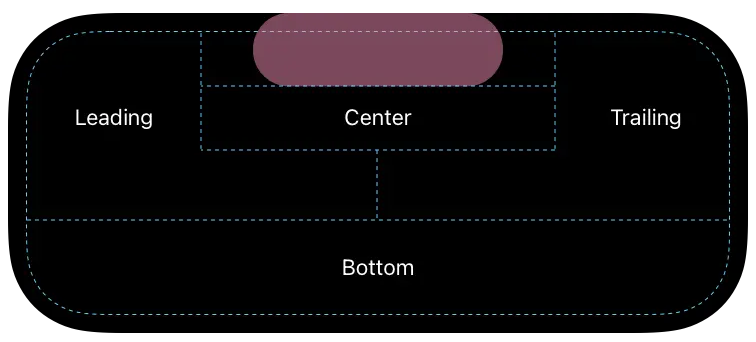
3. Start, Update and Stop Logic
// startlet activity = try Activity.request(attributes: adventure,content: .init(state: initialState, staleDate: nil),pushType: .token)// updateawait activity.update(ActivityContent<AdventureAttributes.ContentState>(state: contentState,staleDate: Date.now + 15,relevanceScore: alert ? 100 : 50),alertConfiguration: alertConfig)// endawait activity.end(ActivityContent(state: finalContent, staleDate: nil), dismissalPolicy: dismissalPolicy)
4. Remote Reporting Configuration and Update Operation
Listen for token updates and report
Task {for await pushToken in activity.pushTokenUpdates {let pushTokenString = pushToken.hexadecimalStringLogger().debug("New push token: \\(pushTokenString)")try await self.setLiveActivity(activityID:activity.attributes.activityID, pushToken: pushToken)}}func setLiveActivity(activityID: String, pushToken: Data) async throws {var _apnsConfig = ImSDK_Plus.V2TIMLiveActivityConfig()_apnsConfig.businessID = xxxx_apnsConfig.token = pushToken_apnsConfig.activityID = activityIDos_log("%@", type: .debug, "setLiveActivity activityID: \\(activityID)\\ntoken:\\(pushToken.hexadecimalString)")ImSDK_Plus.V2TIMManager.sharedInstance().setLiveActivity(_apnsConfig, succ: {print("setLiveActivity succ")}, fail: {code, desc inprint("setLiveActivity fail, \\(code), \\(desc)")})}
Submit the cleaning of LiveActivity
func clearActivity(activityID: String) async throws {os_log("clearActivity ID: \\(activityID)")ImSDK_Plus.V2TIMManager.sharedInstance().setLiveActivity(nil, succ: {print("clearActivity succ")}, fail: {code, desc inprint("clearActivity fail, \\(code), \\(desc)")})}
Update and disable iOS real-time activity on the server side
Note:
1. Push restrictions for LiveActivity. The P8 certificate, p8 certificate, must be configured.
2. If the recipient does not report the corresponding activityID, it will automatically downgrade to a normal notification push.
Field description of the JSON Object corresponding to ApnsInfo.LiveActivity
Field Name | Type | Option | Field description |
Event | String | Required | Push event type for Live Activity: fill in start to start, update to update, and end to end. For an introduction to Live Activity in APNs, refer to the APNs documentation. |
AttributesType | String | Optional | Required when Event is "start". The name of the Live Activity attributes type, which must exactly match the name of the attributes type struct defined on the client. |
Attributes | JSON Object | Optional | Required when Event is "start". A custom key:value object representing the static attributes declared in the Live Activity attributes type, used to initialize the Live Activity. Must match the values of the client SDK. |
LaId | String | Optional | Required when Event is "update" or "end". The Live Activity identifier, corresponding to the client activityID, with a length not exceeding 64 bytes. |
ContentState | JSON Object | Required | Required when Event is "start", "update", or "end". A custom key:value object representing the dynamic attributes declared in the Live Activity attributes type. Must match the values of the client SDK. |
DismissalDate | Integer | Optional | When Event is "end", the Unix time at which the Live Activity ends its display on the lock screen. Defaults to the current time, dismissing the lock screen activity immediately. |
Request sample:
Omitted or unlisted parameters in the example, refer to the documentation: One-to-One chat, Send One-to-One Messages to Multiple Users, OfflinePushInfo.
{// other parameters..."OfflinePushInfo": {"Title": "Offline Push Title","Desc": "Offline push content","Ext": "{\\"entity\\":{\\"k1\\":\\"v1\\",\\"k2\\":\\"v2\\"}}", // passthrough field, push uses string in json format"ApnsInfo": {"LiveActivity": {"LaId": "timpush","Event": "update", // Update LiveActivity push"ContentState": {"k1": "v1","k2": "v2",...}}},"AndroidInfo": {... // For details, see AndroidInfo field description}}}
{// other parameters..."OfflinePushInfo": {"Title": "Offline Push Title","Desc": "Offline push content","Ext": "{\\"entity\\":{\\"k1\\":\\"v1\\",\\"k2\\":\\"v2\\"}}", // passthrough field, push uses string in json format"ApnsInfo": {"LiveActivity": {"LaId": "timpush","Event": "end", // End LiveActivity push"ContentState": {"k1": "v1","k2": "v2",...},"DismissalDate": 1739502750}},"AndroidInfo": {... // For details, see AndroidInfo field description}}}
5. Remote Start (Push-to-Start) Configuration
Remote start (push-to-start) enables the server to launch a new LiveActivity even when the app is closed or terminated. This process uses a unique token mechanism that operates independently from remote update or end actions.
Note:
1. Remote start is supported on iOS 17.2 or later. Devices running iOS 17.1 or earlier can only perform remote update or end operations.
2. The push-to-start token is associated with the ActivityAttributes type (attributesType). It is not linked to a specific activityID; each activity type has its own token.
3. The app can be remotely started while not running, as long as
ActivityConfiguration(for: XXXAttributes.self) is implemented for the desired type in the WidgetExtension.Listening for Push-to-Start Token Updates and Reporting
To listen for push-to-start token updates, use the
pushToStartTokenUpdates async sequence, similar to handling update tokens. Report the token via V2TIMLiveActivityConfig. The key difference is: when reporting, specify attributesType (the activity type name); there is no need to provide activityID.// ActivityAttributes type for remote start listeningstruct LiveActivityAttributes: ActivityAttributes {public struct ContentState: Codable, Hashable {var k1: String?var k2: String?}var activityID: Stringvar k1: String?var k2: String?}// Remote start requires iOS 17.2 or aboveif #available(iOS 17.2, *) {Task {for await tokenData in Activity<LiveActivityAttributes>.pushToStartTokenUpdates {Logger().debug("New push-to-start token: \\(tokenData.hexadecimalString)")try await self.setStartLiveActivity(attributesType: "LiveActivityAttributes", pushToken: tokenData)}}}@available(iOS 17.2, *)func setStartLiveActivity(attributesType: String, pushToken: Data) async throws {let config = ImSDK_Plus.V2TIMLiveActivityConfig()config.businessID = xxxx // Replace with the P8 certificate ID uploaded in the Chat consoleconfig.token = pushToken// Remote start scenario: set attributesType (must exactly match the ActivityAttributes class name on the client), activityID is not requiredconfig.attributesType = attributesTypeImSDK_Plus.V2TIMManager.sharedInstance().setLiveActivity(config, succ: {print("setStartLiveActivity succ")}, fail: { code, desc inprint("setStartLiveActivity fail, \\(code), \\(desc)")})}
Note:
When testing or supporting multiple ActivityAttributes types, listen to each type’s
pushToStartTokenUpdates separately and report the corresponding attributesType for each.Remotely Starting iOS Live Activities via the Server
Note:
P8 certificate configuration is required. The
attributes-type field must exactly match the ActivityAttributes class name on the client. If the system cannot find a matching type, the request will be discarded. The
attributes and content-state fields must be decodable by their corresponding client-side ActivityAttributes and ContentState types. Missing any required (non-optional) fields will cause the entire start operation to fail. The start event must include an alert.APNs Start Request Example:
{// other parameters..."OfflinePushInfo": {"Title": "Offline Push Title","Desc": "Offline push content","Ext": "{\\"entity\\":{\\"k1\\":\\"v1\\",\\"k2\\":\\"v2\\"}}", // passthrough field, push uses string in json format"ApnsInfo": {"LiveActivity": {"Event": "start", // start LiveActivity"AttributesType": "AdventureAttrs","Attributes":{"k1": "v1","k2": "k2",...},"ContentState": {"k1": "v1","k2": "v2",...}}},"AndroidInfo": {... // For details, see AndroidInfo field description}}
フィードバック