Adjusting the Database Proxy Configuration
Unduh
Mode fokus
Ukuran font
After database proxy activation, you can adjust the database proxy configuration, including its specifications, AZs, and number of nodes, in the console. This document describes how to adjust the database proxy configuration.
Prerequisites
Must-Knows
If the selected database proxy and the primary instance are not in the same AZ, write performance may degrade when connections are made through the database proxy.
If the calculated number of required proxy nodes exceeds the purchase limit, choose proxy nodes with higher specifications.
Configuration adjustment is an asynchronous operation. All proxy nodes must have the same specifications, and the total number of proxy nodes cannot exceed 4.
Operation Steps
1. Log in to the TencentDB for PostgreSQL console.
2. Locate the target instance in the instance list, click the Instance ID, and go to the instance management page.
3. On the instance management page, select the Database Proxy tab.
4. On the Overview page of the Database Proxy tab, click Adjust Configuration next to Number of Proxy Nodes under Basic Info.
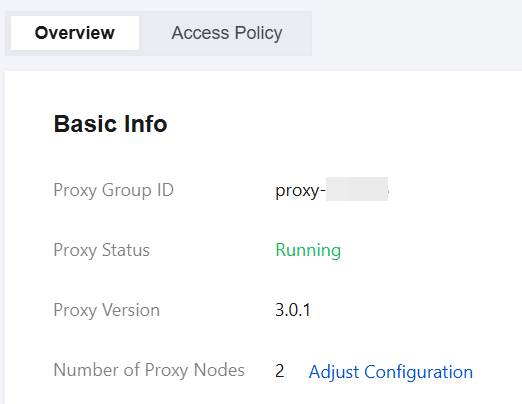
5. In the dialog box that appears, modify the database proxy configuration as needed, including the proxy specifications, AZs, and the number of nodes, and click Confirm.
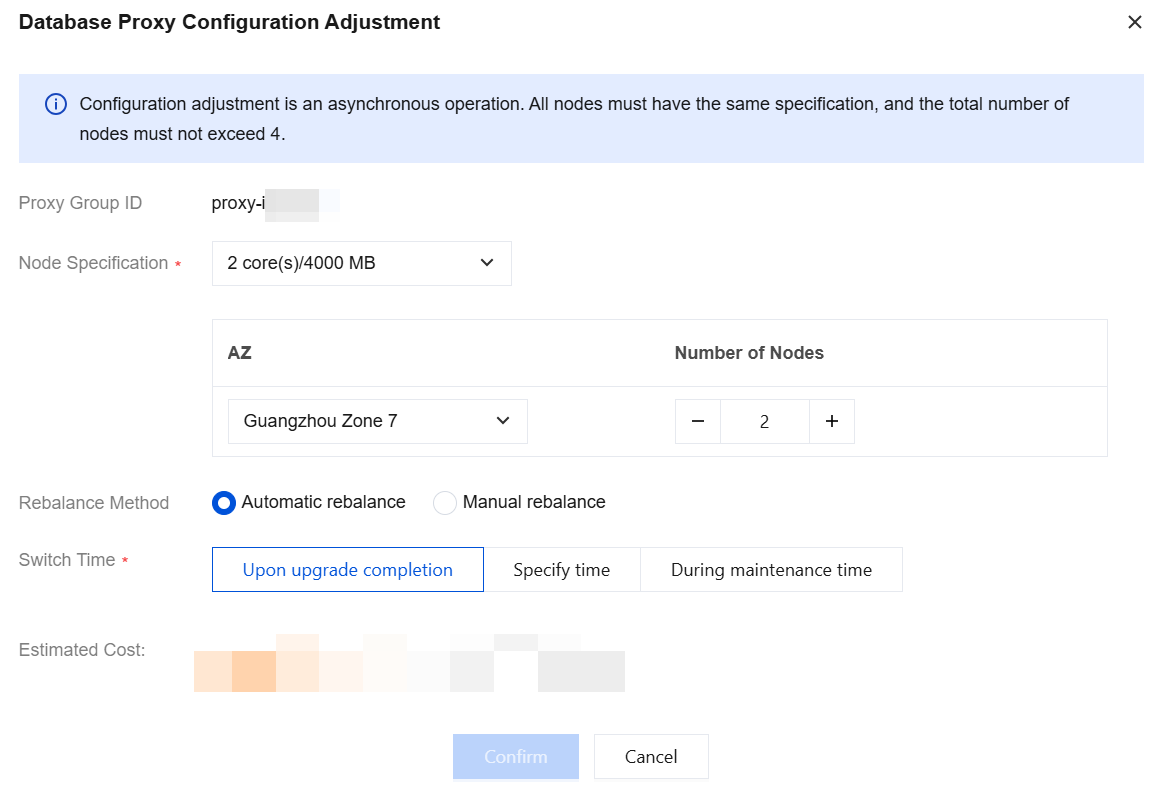
Parameter | Description |
Node Specification | Modify the proxy node specification. Both upgrades and downgrades are supported. Options include: 2-core/4000MB, 4-core/8000MB, 8-core/16000MB. |
AZ and Number of Nodes | Modify the AZ or number of nodes. For specific available resources, refer to the actual configuration page. The number of proxy nodes is 1/16 of the sum of the CPU cores of the primary instance and read-only instances (rounded up). For example, if the primary instance has 8 CPU cores and the read-only instance has 16 CPU cores, the recommended number of proxy nodes = (8+16)/16 ≈ 2, with a maximum of 4. |
Rebalance Method | Select a rebalancing method. Supported options: Automatic rebalance: After configuration adjustments are completed and the switchover time arrives, the system automatically rebalances the load. Manual rebalance: After configuration adjustments are completed, manually perform Reconfigure Load Balancing under Connection Address in Overview on the Database Proxy page. |
Switch Time | Set Switch Time: Upon upgrade completion: After configuration adjustments are completed, the system automatically switches to the new configuration. Specify time: The user specifies a switchover time range, with a minimum interval of 30 minutes. During maintenance time: After configuration adjustments are completed, the system performs the switchover within your specified maintenance window. If you selected switchover within the maintenance window but need to switch earlier due to business requirements, you can manually perform the switchover on the database proxy page after configuration adjustments are completed. |
6. When the proxy status changes to Running under Basic Info on the database proxy page, the configuration adjustment is complete.
Bantuan dan Dukungan
Apakah halaman ini membantu?
Anda juga dapat Menghubungi Penjualan atau Mengirimkan Tiket untuk meminta bantuan.
masukan