Enabling Database Proxy
下载
聚焦模式
字号
This document describes how to activate the database proxy for an instance in the TencentDB for PostgreSQL console.
Prerequisites
The instance status is Running.
The instance database version must meet the following requirements:
PostgreSQL 12: v12.22_r1.41 or later.
PostgreSQL 13: v13.22_r1.36 or later.
PostgreSQL 14: v14.23_r1.45 or later.
PostgreSQL 15: v15.18_r1.31 or later.
PostgreSQL 16: v16.14_r1.26 or later.
PostgreSQL 17: v17.10_r1.19 or later.
PostgreSQL 18: v18.4_r1.10 or later.
Must-Knows
If the instance's kernel minor version is too low and does not meet the kernel version requirements in the prerequisites, database proxy activation is not supported. Upgrade the kernel minor version as described in Upgrading the Kernel Minor Version before activating the database proxy.
Supported Region
Regions that support database proxy activation: Guangzhou, Shenzhen, Shenzhen Finance, Shanghai, Shanghai Finance, Nanjing, Beijing, Beijing Finance, Tianjin, Chengdu, Chongqing, Hong Kong (China), Singapore, Bangkok, Jakarta, Seoul, Frankfurt, Silicon Valley, Virginia, Sao Paulo, Tokyo, and Riyadh.
Operation Steps
1. Log in to the TencentDB for PostgreSQL console.
2. Locate the target instance in the instance list, click the Instance ID, and go to the instance management page.
3. On the instance management page, select the Database Proxy tab and click Enable Now.
4. Complete the following configurations in the pop-up dialog box and click OK.
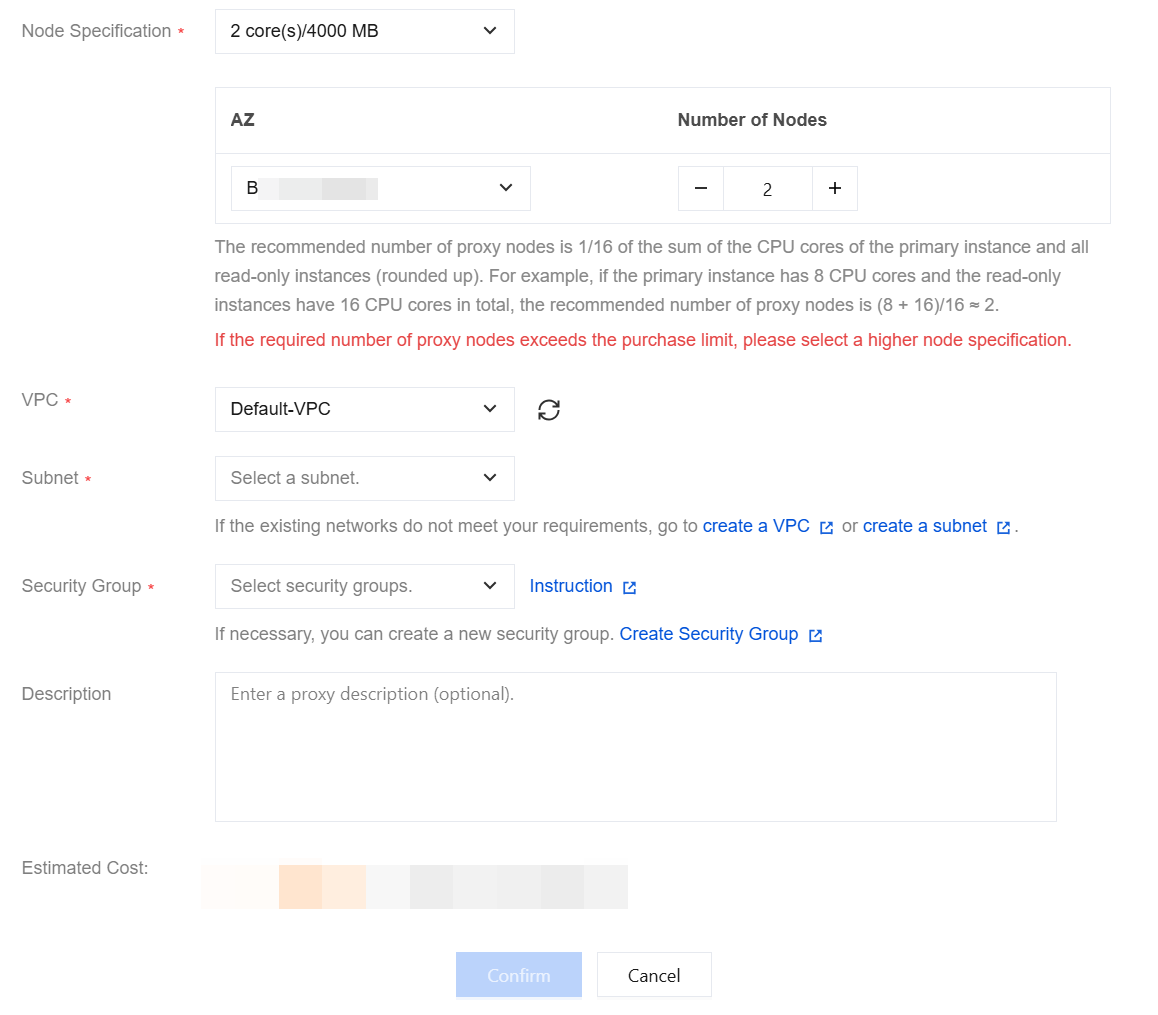
Parameter | Description |
Node Specification | Supported node specifications: 2-core/4000MB, 4-core/8000MB, 8-core/16000MB. |
AZ and Number of Nodes | Select the AZ for the database proxy. The available resources are subject to what is displayed on the actual configuration page. Select the number of nodes. The recommended method for calculating the number of proxy nodes is as follows: The recommended number of proxy nodes is 1/16 of the total CPU cores of the primary instance and read-only instances, rounded up. For example, if the primary instance has 8 CPU cores and the read-only instance has 16 CPU cores, the recommended number of proxy nodes = (8 + 16)/16 ≈ 2. Note: If the calculated number of required proxy nodes exceeds the purchase limit, choose proxy nodes with higher specifications. |
VPC | Select the network for the database proxy. Only VPC is supported. To create a VPC, click Create VPC. |
Subnet | |
Security Group | Select an existing security group or create a new one. To create a security group, click Create Security Group. Note: To access the database proxy, configure a security policy to allow traffic through the private network access port. For details, see Managing Security Groups. |
Description | Enter a description for the proxy (optional). |
5. After successful activation, you can view the basic information, proxy nodes, and connection addresses of the database proxy on the Database Proxy page.
Note:
If the connection counts across proxy nodes are unbalanced, click ReConfigure Load Balancing to redistribute connections. This reallocates existing connections to backend nodes based on their weights. The process may cause brief connection jitter, so perform it during off-peak hours and ensure that your business has a reconnection mechanism.
文档反馈