Enabling and Disabling the Connection Pool Feature
Unduh
Mode fokus
Ukuran font
This document provides instructions on enabling and disabling the connection pool feature.
Prerequisites
Enabling the Connection Pool Feature
1. Log in to the TencentDB for PostgreSQL console.
2. Locate the target instance in the instance list, click the Instance ID, and go to the instance management page.
3. On the instance management page, select the Database Proxy tab.
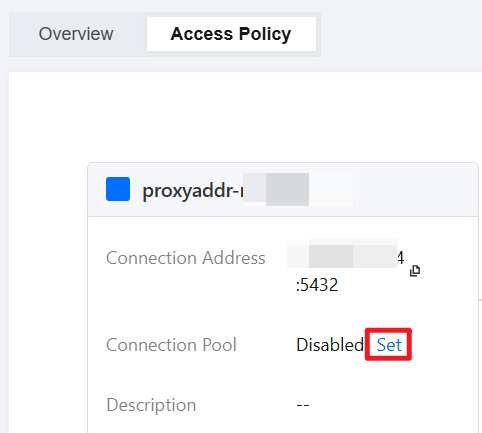
4. Select the Access Policy tab and click Set next to Connection Pool.
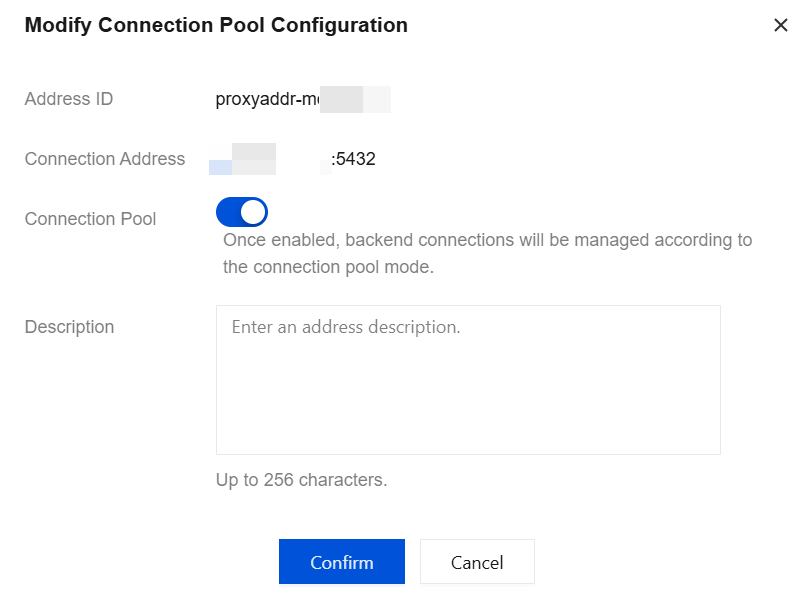
5. In the pop-up dialog box, enable the connection pool feature, enter a description (optional), and click Confirm.
Disabling the Connection Pool Feature
1. Log in to the TencentDB for PostgreSQL console.
2. Locate the target instance in the instance list, click the Instance ID, and go to the instance management page.
3. On the instance management page, select the Database Proxy tab.
4. Select the Access Policy tab and click Set next to Connection Pool.
5. In the pop-up dialog box, disable the connection pool feature and click Confirm.
Bantuan dan Dukungan
Apakah halaman ini membantu?
Anda juga dapat Menghubungi Penjualan atau Mengirimkan Tiket untuk meminta bantuan.
masukan