Enabling and Disabling the CDC Feature
Unduh
Mode fokus
Ukuran font
Change data capture (CDC) is a native SQL Server feature that tracks data changes (insertion, update, and deletion). Currently, the TencentDB for SQL Server console has supported enabling and disabling the feature, but only at the database level. To enable table-level CDC, you can connect to the instance through SSMS and execute related commands after enabling database-level CDC in the console.
This document introduces operation practices for enabling and disabling the database-level and table-level CDC feature.
Enabling or Disabling the Database-Level CDC Feature
1. Log in to the TencentDB for SQL Server console and click Instance ID or Manage in the Operation column in the instance list to enter the instance management page.
2. On the instance management page, select the Database Management tab, locate the row where the target database is located, and select Others > Enable/Disable CDC in the Operation column.

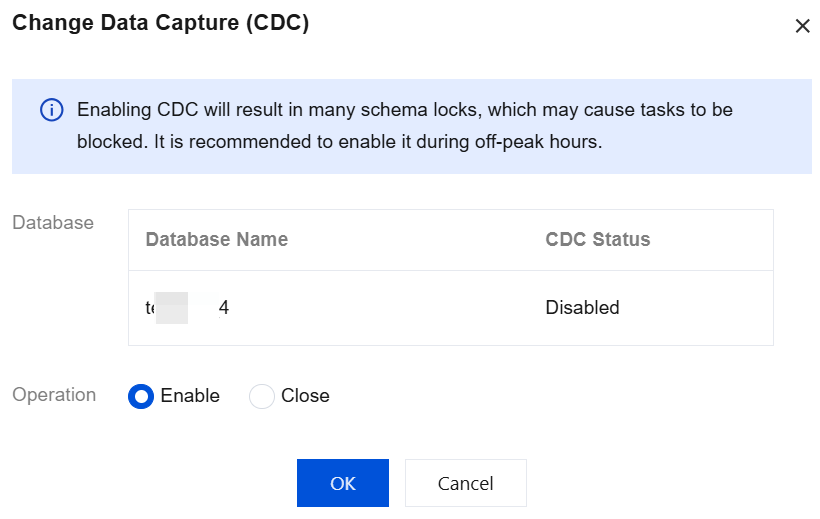
3. In the pop-up dialog box, select enable or close and then click OK.
Enabling or Disabling the Table-Level CDC Feature
Note:
After the table-level CDC is enabled, it may generate a large volume of data occupying space.
During the operation of the table-level CDC, using Data Definition Language (DDL) to add or delete fields may lead to CDC exceptions.
CDC and publish-subscribe use the same logreader process, which may conflict.
Step 1: Enabling the Database-Level CDC Feature
Step 2: Connecting to the SQL Server Instance Through SSMS
For detailed operations, see the connection methods in Connecting to TencentDB for SQL Server Instance from Windows CVM Instance or Connecting to TencentDB for SQL Server Instance from Local System.
Step 3: Enabling or Disabling the Table-Level CDC Feature Through Commands
Note:
When the following command is used, replace the variables with actual information:
[databasename]: Replace it with your target database name, for example, [MyDB].
N'table_name': Replace it with the table name for which CDC will be enabled or disabled, for example, N'Orders'.
N'dbo_table_name': Replace it with the actual table name, for example, N'dbo_Orders'.
Example: Enabling CDC for the Table
use [databasename]goEXEC sys.sp_cdc_enable_table@source_schema = N'dbo',@source_name = N'table_name',@role_name = null,@filegroup_name = N'Primary',@supports_net_changes = 1
Example: Disabling CDC for the Table
use [databasename]goEXECUTE sys.sp_cdc_disable_table@source_schema = N'dbo',@source_name = N'table_name',@capture_instance = N'dbo_table_name';
Bantuan dan Dukungan
Apakah halaman ini membantu?
Anda juga dapat Menghubungi Penjualan atau Mengirimkan Tiket untuk meminta bantuan.
masukan