Catatan Rilis
Account List
Mode fokus
Ukuran font
This document describes the fields in the account list.
Database account
After creating an SQL Server instance, you can create different database accounts under the instance and assign different accounts for database management according to business needs.
Viewing the account list
1. Log in to the TencentDB for SQL Server console.
2. In the instance list, click Manage in the Operation column of the target instance to enter the Instance Details page.
3. Click Account Management to enter the corresponding tab.

Tools
Tool | Description |
Search box | Click  |
Refresh | You can click  |
Fields in the account list
Parameter | Description |
Account Name | The names of the accounts created for the instance. |
Account Type | The types of accounts created for the instance. The supported account types vary by instance architecture as follows: Two-node and multi-node Privileged Account: A type of admin account, which has owner privileges for all databases by default. Standard Account: A type of non-admin account, which supports specifying readwrite, read-only, and owner privileges for a specific database. Designated Account: A designated account can only view and own the specified database. A designated account can be authorized to multiple databases, but a database can be authorized to only one designated account. Single-node Admin Account: A type of admin account, which has the highest-level sysadmin permission and the owner permissions of all databases. After it is enabled, the product SLA will no longer be guaranteed.Privileged Account: A type of admin account, which has owner privileges for all databases by default. Standard Account: A type of non-admin account, which supports specifying readwrite, read-only, and owner privileges for a specific database. Designated Account: A designated account can only view and own the specified database. A designated account can be authorized to multiple databases, but a database can be authorized to only one designated account. |
Status | The status of the account. |
Account Creation Time | The time when the account was created, which can be sorted in ascending or descending order. |
Account Update Time | The time when the account was last updated, which can be sorted in ascending or descending order. |
Password Update Time | The time when the account password was last reset, which can be sorted in ascending or descending order. |
Database | The databases that the account is authorized to access. |
Remarks | The remarks of the account. |
Operation | Removing the administrator: Privileged accounts and admin accounts are administrator accounts. If you need to delete an account, you should remove the administrator first. Setting database permissions: Read-write, read-only, or owner permissions of a specified database can be set for standard accounts and designated accounts. Reset Password: Reset the password of the account. Delete Account: Delete the account. Setting table permissions: Table-level permissions can be set for standard accounts and privileged accounts |
Note:
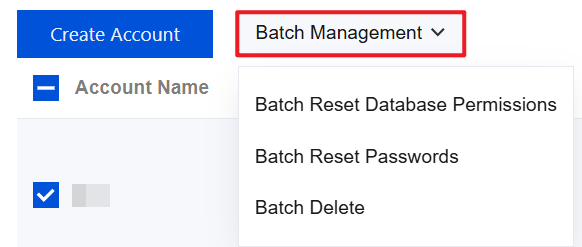
You can select multiple accounts and click Batch Management above the account list to reset database permissions, reset passwords, and delete accounts in batches.
Relevant operations
Related APIs
API | Description |
This API is designed for the creation of instance accounts. | |
This API is utilized to retrieve the list of instance accounts. | |
This API is used to modify instance account permissions. | |
This API is designed to update account remarks. | |
This API is designed to reset the account password for an instance. | |
This API is designed to remove instance accounts. | |
This API is used to query the database name associated with the account. | |
This API is used to query information on the databases and permissions associated with the account. |
Bantuan dan Dukungan
Apakah halaman ini membantu?
Anda juga dapat Menghubungi Penjualan atau Mengirimkan Tiket untuk meminta bantuan.
masukan