Feature Description
The hotspot update feature is an optimization capability designed for high-concurrency scenarios, primarily addressing the performance bottleneck issues that arise from multiple requests simultaneously updating the same database record (referred to as a "hotspot row") in business cases such as flash sales and limited-time sales.
When a hotspot update protection task is created, the system automatically detects whether there are single-row hotspot updates. If they are identified, the system logically groups the transactions with hotspot row update conflicts into multiple groups. Within the same group, transactions can execute other statements in parallel in addition to updating the hotspot row. This approach reduces the concurrency performance degradation risks due to excessive row locks, thereby improving database performance in high-concurrency scenarios. Hotspot update protection tasks can be created, viewed, disabled, and deleted through the DBbrain console. The core working principle of the feature can be simply put as the following process:
1. Automatic detection: The system monitors the update operations on the database in real time and automatically identifies the specific data rows that are updated frequently.
2. Request queuing: Once a hotspot row is identified, the system places subsequent concurrent update requests for that row into a waiting queue.
3. Transaction waiting and wakeup: After logical grouping, transactions within the group will only require serialization when hotspot update statements are executed; other statements can be executed in parallel.
Supported Versions
MySQL 5.7 20250330 or later versions support hotspot update optimization based on the primary key and unique key.
MySQL 8.0 20241001 or later versions support hotspot update optimization based on the primary key.
Applicable Scenarios
The feature is mainly used for business scenarios such as flash sales and limited-time sales, solving the database performance bottleneck issues caused by a large number of users simultaneously updating the same data (such as inventory).
In scenarios where the execution time of transactions is inherently long or where there are both long and short transactions, using this feature can enhance execution performance.
Feature Strengths
It does not need business transformation.
It offers broader SQL compatibility, supporting multiple SELECT FOR UPDATE, UPDATE, or INSERT SQL statements within a single transaction.
Previously, transactions that needed to update hotspot rows could only be started after the previous transaction was committed. Now, these transactions can be executed immediately after the previous transaction is updated, which significantly shortens the lock waiting time for transactions.
Performance Data
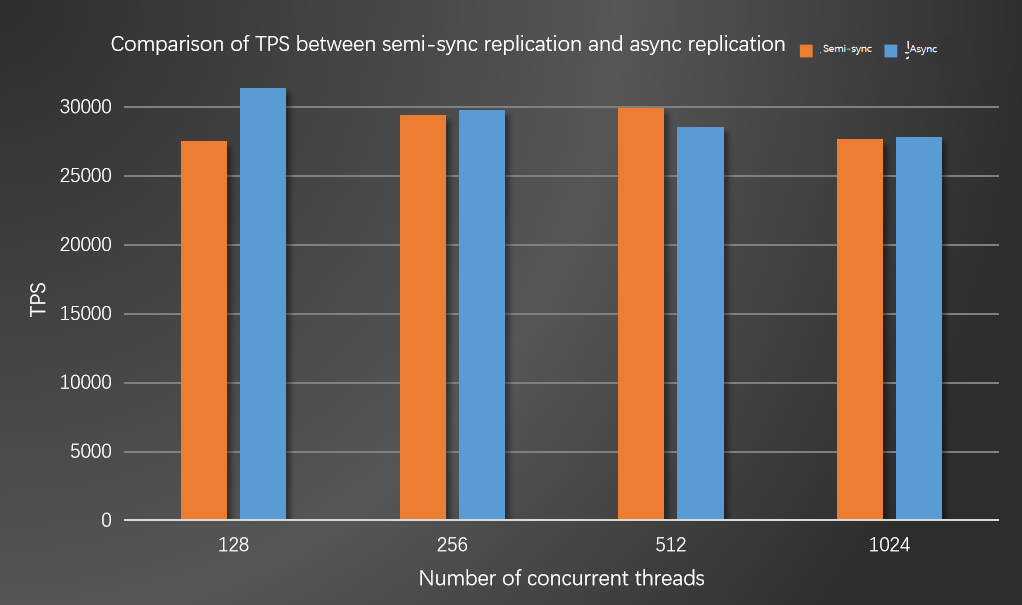
Instance specification configuration: MySQL 8.0 exclusive - 32 cores, 256,000 MB of memory, and 200 GB of storage space.
After the hotspot update feature is enabled, the TPS of TencentDB for MySQL can stabilize at around 30,000, meeting actual business requirements.
Feature Usage Must-Knows
The applicable transaction mode is as follows. "a" cannot be an indexed key; otherwise, it does not take effect.
BEGIN;
xxx
UPDATE table_name SET a=? WHERE id/pk=?;
yyy
COMMIT;
The method of using unique key hotspot updates is to add the Hint to the SQL: /*+ TXSQL_UK_HOT_UPDATE */. The example is as follows.
UPDATE table_name SET a=? WHERE uk=?;
When the hotspot update feature is used, set the value of the thread_handling parameter to one-thread-per-connection.
Use Limits of the Feature
Load Limit
A transaction cannot perform multiple UPDATE operations on the same hotspot record.
After the hotspot UPDATE operation is completed in the transaction, subsequent statements should not conflict with each other. Although they may not form a hotspot, they may cause a hang issue.
Multiple hotspots cannot be updated within the same transaction.
Hotspot rows cannot be deleted during hotspot update load.
Parameter Limits
The thread pool mode is not supported currently.
The Binlog should be enabled, and the binlog_order_commits parameter should be set to ON. If the Binlog is disabled, the innodb_hot_update_detect parameter cannot be enabled. If the innodb_hot_update_detect parameter is enabled and there are still hotspot updates in the load, Binlog cannot be disabled at that time.
To disable the parameter innodb_hot_update_detect, you should wait for the current hotspot update in the current load to be completed.
SELECT FOR UPDATE Limits
Both SELECT FOR UPDATE and UPDATE should perform a single update based on the primary key index, with consistent update conditions.
SELECT FOR UPDATE should be executed before UPDATE.
Unique Key Limits
The transaction mode of SELECT UK FOR UPDATE followed by UPDATE UK is not supported.
In the same transaction, updating a hotspot row first using the primary key and then using the unique key is not allowed. If Transaction 1 uses the primary key and Transaction 2 uses the unique key to update the same row, this hybrid update method is supported.
Feature Usage
TencentDB for MySQL provides the following two methods to enable the hotspot update feature.
Method 1: Enabling the Feature Through the DBbrain Console
Method 2: Enabling the Feature Through Parameters
The hotspot update feature is enabled by setting the value of the parameter innodb_hot_update_detect to ON.
Relevant Parameter Description
|
innodb_hot_update_detect | yes | string | ON | ON/OFF | Whether to enable the hotspot update feature. ON: indicates enabled. OFF: indicates disabled. |