tencent cloud

Cloud Load Balancer

Memulai
Memulai CLB
Memulai CLB IPv6
Men-deploy Nginx di CentOS
Men-deploy Java Web di CentOS
Panduan Pengoperasian
Instance CLB
Pendengar CLB
Server Asli
Pemeriksaan Kesehatan
Pengelolaan Sertifikat
Pengelolaan Log
Pemantauan dan Peringatan
Cloud Access Management
CLB Klasik
Tutorial Praktis
Konfigurasi Penerusan HTTPS
Menerapkan HA di Beberapa AZ
Algoritme dan Konfigurasi Bobot
Mengonfigurasi Perlindungan WAF untuk nama domain pendengar CLB
Panduan OPS
Solusi untuk Waktu Tunggu Klien yang Terlalu Lama
Uji Performa Layanan HTTPS Penyeimbang Beban
Pertanyaan Umum Seputar Pengujian Tekanan
Izin Pengoperasian Sertifikat CLB
DokumentasiCloud Load Balancer

Configuring Deletion Protection

Mode fokus
Ukuran font
Terakhir diperbarui: 2024-10-09 17:09:48
This feature prevents an instance from being deleted and released by mistake.

Restrictions

When a CLB instance is terminated due to overdue payment, the instance will be released automatically even if deletion protection is enabled.

Directions

1. Log in to the CLB console and select your region in the top left corner of the Instance management page.
2. In the instance list, click the ID of the target instance.
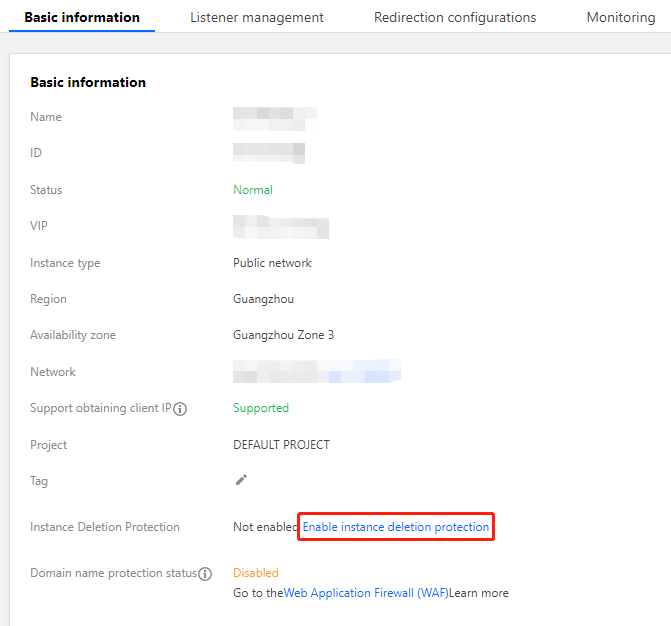
3. On the page that appears, click Enable Deletion Protection on the Basic configuration tab.

4. In the pop-up window, click OK.
Note:
After enabling deletion protection for an instance, you cannot delete the instance in the console or by calling an API. To delete the instance, go to the instance details page and click Disable Deletion Protection on the Basic configuration tab.

References
Bantuan dan Dukungan

Apakah halaman ini membantu?

masukan