tencent cloud

DokumentasiBastion Host

Operation logs

Download
Mode fokus
Ukuran font
Terakhir diperbarui: 2025-04-18 10:58:55

Overview

The operation logs primarily record user activities, including operations, maintenance, and configuration behaviors on the BH. These logs help administrators understand the usage of the BH, identify potential security issues, and perform troubleshooting and accountability tracing in case of anomalies.


Directions

Viewing Operation Logs

1. Log in to the BH console.
2. In the left sidebar, choose Self-Audit > Operation logs.
3. On the Operation Logs page, detailed records include the operation time, username/name, source IP, specific operation, and operation result.


Querying Operation Logs

On the Operation Logs page, you can click Time to switch and view operation records for different time periods.

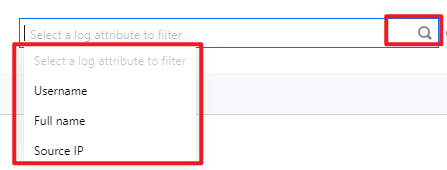
In the search box, filter logs by attributes such as username, name, or source IP. Click

to quickly query operation logs.

On the Operation logs page, search for specific operation logs using Operation and Result.


Bantuan dan Dukungan

Apakah halaman ini membantu?

masukan