Lite Topic Messaging
Unduh
Mode fokus
Ukuran font
Scenarios
Lite Topic is an advanced message type provided by Message Queue for RocketMQ. Building on compatibility with the existing topic model, Lite Topic implements capabilities such as secondary data isolation, exclusive subscription per client, and automatic lifecycle management. It supports a scale of millions of topics per single instance, making it an ideal choice for scenarios like AI-native applications, multi-agent collaboration, and session-level task isolation.
Typical Scenarios
Scenario 1: Multi-Agent Asynchronous Collaboration
Business Pain Points
The primary Agent invokes sub-Agents via synchronous HTTP/RPC calls. Slow downstream processing blocks upstream operations, and the longer the task chain, the more fragile it becomes: if an Agent experiences jitter, the entire task chain is interrupted; if an Agent fails, the entire task is invalidated.
Lite Topic Solution
The primary Agent dispatches subtasks to the dedicated Lite Topic for each type of sub-Agent. Sub-Agents asynchronously consume these tasks and write the results back to a unified event stream topic. The event stream is inherently ordered + replayable. Even if the Supervisor process restarts, it can resume from the checkpoint and continue processing without losing task context. To add a new type of sub-Agent, you only need to subscribe to a new Lite Topic, without modifying the primary control code.
Typical Customer Scenarios
AI Programming Assistant: Context Search → Task Planning → Code Generation → Sandbox Testing → Review
Industry Research Agent: Information Search → Upstream/Downstream Analysis → Content Integration → PPT Generation
Marketing Content Factory: Copy Generation → Image Generation → Review → Multi-platform Distribution
Scenario 2: User Session-Level Isolation + LLM Streaming Disconnection Recovery
Business Pain Points
AI assistant products face two dimensions of significant challenges after launch:
Horizontally: With millions of users concurrently accessing the system, Company A's sessions must not be slowed down by Company B's high-volume batch requests.
Vertically: A single long conversation/report generation can take tens of minutes. During this period, network jitter and gateway upgrades are almost inevitable. If a traditional SSE/WebSocket connection is interrupted, the user either loses content or must regenerate it from the beginning, resulting in a double loss of user experience and computational resources.
Lite Topic Solution
A dedicated Lite Topic is dynamically created for each user session and is terminated after use. The LLM inference node sequentially writes tokens to it. The SSE gateway exclusively consumes these tokens and pushes them to the frontend browser.
Horizontally: Sessions are hard-isolated at the infrastructure layer via Lite Topic, ensuring they are not affected by neighboring tenants.
Vertically: After a reconnection, the browser carries the local offset. The new gateway then precisely resumes pushing tokens from the breakpoint. The user perceives a "resume watching after network recovery" experience, and no previously generated tokens are wasted.
Typical Customer Scenarios
Enterprise AI Assistant: Meeting Minutes / Long-form Writing / Data Insight Reports
AI Customer Service / Intelligent Q&A: Multi-turn Long Conversation with Streaming Output
Multi-tenant SaaS: Independent Channels for Millions of Concurrent Online Sessions
Scenario 3: RAG Knowledge Base Incremental Synchronization
Business Pain Points
In enterprise RAG systems, incremental updates across massive tenants and massive knowledge bases represent the most challenging aspect for the data foundation:
The "delete-then-add" document events are reordered by HTTP pushes, causing "phantom data" to appear in the vector database.
The shared queue is blocked by batch updates from slow tenants, which in turn compromises the real-time SLA of fast tenants.
Metadata from long-tail cold tenants persistently consumes resources and is difficult to clean up automatically.
Lite Topic Solution
A Lite Topic is automatically created for each knowledge base of each tenant. Document change events are appended and written in the order of occurrence. The Embedding Worker exclusively consumes these events and updates the vector database sequentially.
Order Preservation: The sequence of deleting v1 and then adding v2 is guaranteed at the protocol layer, preventing the occurrence of "phantom data".
Isolation: Tenants are hard-isolated at the Broker layer, ensuring that slow tenants do not affect fast tenants.
Zero Ops: Automatic TTL reclamation for long-tail cold tenants, and zero Ops for metadata across millions of knowledge bases.
Typical Customer Scenarios
Enterprise RAG Knowledge Base: Real-time synchronization of corporate wikis / collaborative documents / self-developed CMS to the vector database.
The Data Foundation for AI Search / Intelligent Q&A
Private Knowledge Base Management for Multi-tenant SaaS
Scenario 4: Asynchronous Long-Running Tool Invocation for MCP Server
Business Pain Points
Under the MCP protocol, Tool execution can be a heavy operation, such as image generation, video rendering, in-depth research, or large-table aggregation queries, which takes tens of seconds to several minutes. Agent synchronous waiting will be suspended for a long time, resulting in low resource utilization, fragile links, and frequent timeouts.
Lite Topic Solution
The MCP Server internally creates a dedicated Lite Topic for each long-running task. The Worker executes asynchronously and sequentially writes progress notifications → intermediate products → final results. The MCP Server consumes these in order and returns them to the Agent via the MCP protocol's progress notification. During the wait, the Agent releases its thread and can continue processing other tasks.
Typical Customer Scenarios
Multimodal Generation Tools: Text-to-Image / Text-to-Video / Text-to-3D
Data Analysis Tools: BI Large-Table Aggregation Queries, Deep Research
Engineering Tools: Code Sandbox Construction, Automated Testing, Large File Processing
Feature Strengths
Comparison Item | Lite Topic (Lightweight Message) | Regular Topic |
Message Model | Two-level model: Topic + Lite Topic. Secondary Lite Topics are automatically created by default, and a single instance can scale to millions. | Single-layer Topic. Must be created in advance (unless the auto-creation switch is enabled). A single instance supports thousands of Topics. |
Lifecycle Management | Fully automated management. Automatically created and deleted based on TTL, and automatically cleaned up if no new messages are written within the TTL period. | Manual management is required. Only some advanced editions support the setting of message retention time at the Topic level. |
Ordering | Each Lite Topic has a dedicated underlying queue, making message production, consumption, and storage inherently ordered. | Multiple queues by default. Ordering is guaranteed through the Message Group + partition-based sequential consumption mechanism. |
Managing Subscription | Relaxes Group restrictions. Different consumers within the same Group can subscribe to different Lite Topics, supporting dynamic subscription addition and removal. | Consumers within the same Group must maintain consistent subscription relationships. Dynamic subscription capability is not supported. |
Consumption Mode | Supports two modes: Shared consumption and Exclusive consumption, suitable for session persistence scenarios. | Only the Shared consumption mode is supported. Consumers within a Consumer Group consume messages in a balanced manner. |
Observability | Supports message tracing, provides independent metrics at the Lite Topic level, and allows monitoring to be aggregated by Topic. | Supports basic metrics such as message tracing, backlog, and production/consumption rates. |
Technical Implementation Principles
Conceptual Model
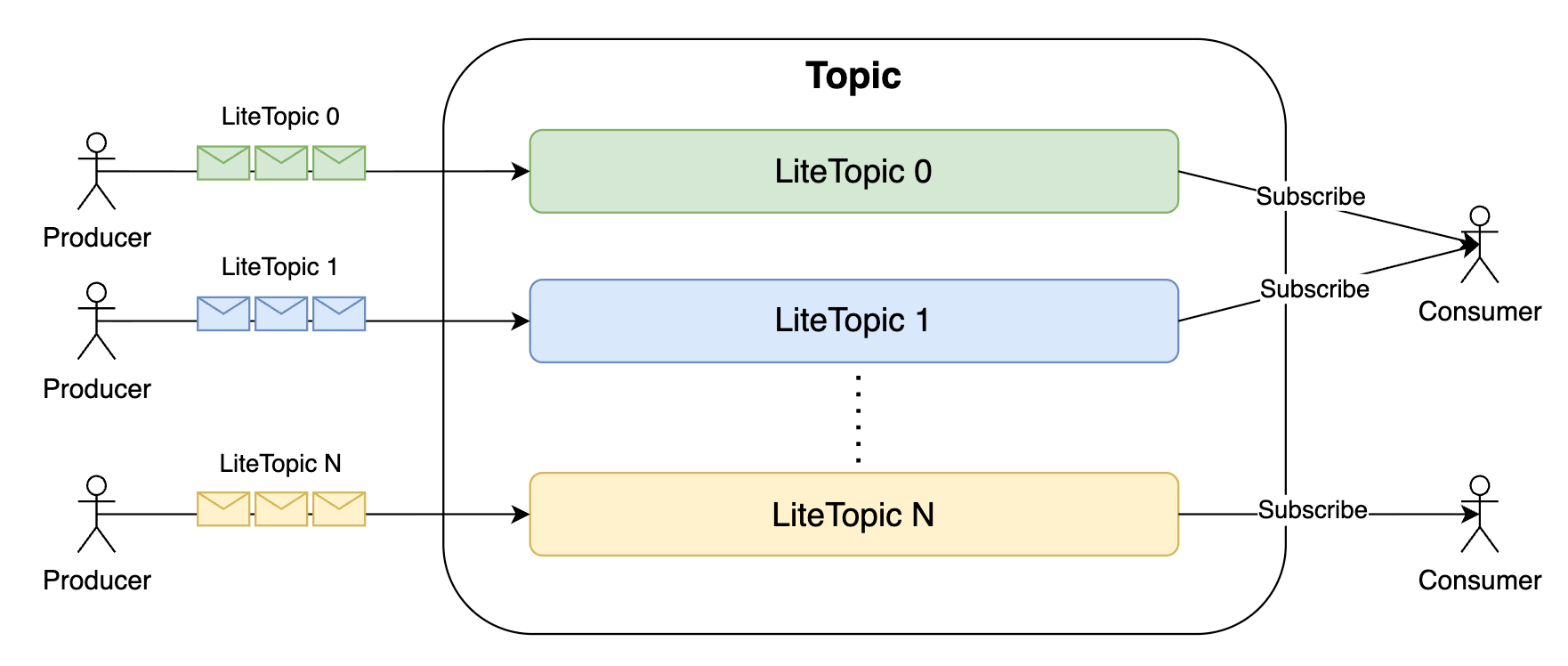
Lite Topic in RocketMQ has a logical hierarchical relationship with Topic (ParentTopic): each Lite Topic belongs to a Topic, and a Topic can be associated with multiple Lite Topics. Lite Topic serves as the actual message storage carrier, while Topic assumes the roles of route registration and business isolation.
Lifecycle
The entire lifecycle of a Lite Topic requires no attention from the business side and supports fully automated management:
Created on Send: When a client sends a message, the Broker checks whether the Lite Topic already exists. If it does not exist, the Lite Topic is automatically created.
Automatically Deleted After Expiration: A TTL is set when a Topic is created, and all associated Lite Topics share this TTL. If the write time of the most recent message in a Lite Topic exceeds the TTL, that Lite Topic is considered expired and enters an asynchronous background cleanup process (deleting consumer offsets, consumption indexes, and related subscription relationships in memory).
Message Storage
The consumption index construction system of Lite Topic directly reuses the LMQ (Light Message Queue) capability of RocketMQ. All messages sent to a Lite Topic are appended to the same physical queue in the storage layer, ensuring global ordering. When a Broker node restarts or experiences a single-machine failure, write traffic automatically switches to other available nodes within the cluster, prioritizing service availability. At the kernel storage level, Lite Topic has no structural differences from traditional Topics, significantly reducing maintenance and Ops costs.
Subscription and Distribution
Client-Dimension Subscription Management
Unlike the traditional model that maintains subscription relationships based on Consumer Groups, Lite Topic manages subscription relationships by pushing them down to the client dimension (ClientId). Because it no longer heavily relies on the internal consistency state of Consumer Groups, the subscription model is inherently lighter. It can maintain low subscription state management overhead even at a scale of millions of Lite Topics.
Event-Driven Merge Pull
After a new message is written to a Lite Topic and its index is built, the Broker immediately distributes a ready event to the relevant subscribers. Each subscriber maintains an independent ready event set, which records the ready events for all Lite Topics it subscribes to. When a client initiates a POP request, the Broker directly reads ready messages from the ready event set. A single request can merge and pull messages from multiple Lite Topics, avoiding a large number of invalid queries against the storage layer.
Exclusive Consumption Mode
Traditional RocketMQ uses the Shared consumption mode, where all clients under a Consumer Group evenly consume messages in a Topic. To better adapt to the session persistence scenario of Lite Topic, RocketMQ provides a new Exclusive consumption mode: messages sent to a Lite Topic are exclusively consumed by only one client under the Consumer Group. After the Exclusive consumption mode is enabled, the Broker by default selects the most recently connected client as the exclusive consumer for the Lite Topic and notifies the old client to unsubscribe.
Operation Guide
Step 1: Log In to the Console and Go to the RocketMQ Cluster.
1. Log in to the TDMQ for RocketMQ console on Tencent Cloud.
2. In the left sidebar, select Topic. Select the region and cluster and click Create to go to the Create Topic page.
3. In the New Topic dialog, fill in the following information:
Parameter | Required | Description |
Topic Name | Yes | Enter the topic name, which cannot be modified after creation. The name must be 3 to 100 characters in length and can contain only letters, digits, percent signs (%), hyphens (-), and underscores (_). |
Type | Yes | Select the "Lightweight Message" type, and this topic will serve as the parent topic for Lite Topics. When a business application sends messages to it, the Broker automatically creates a secondary Lite Topic based on the Lite Topic name specified by the client, eliminating the need for manual creation in the console. |
Tag | No | Tags are used to categorize and manage topic resources. You can also grant sub-accounts read/write permissions for specific resource types through authorization by tag. For details, see Configuring Resource Tags and Granting Tag-Level Permissions to Sub-accounts. |
Automatic deletion of Lite Topic | No | After the automatic deletion switch is turned on, if no new messages are written to a Lite Topic within the expiration period, the server automatically deletes that Lite Topic, and the unconsumed messages also expire. |
Expiration time of Lite Topic | No | Range: 30 minutes to 12 hours |
Message Retention Period | Yes | Retention time for persisted messages, after which messages are deleted regardless of whether they are consumed. Only 5.x clusters of Pro Edition and Platinum Edition support adjusting the message retention time at the Topic level, and 5.x clusters of Trial Edition and Basic Edition and 4.x clusters support adjustment at the cluster level. |
Topic Description | No | Enter the topic description, with a string of up to 128 characters. |
Note:
Currently, only 5.x clusters support Lite Topic. If your current 5.x cluster does not have the entry to create a Lite Topic, submit a ticket to contact Tencent Cloud. The service team will upgrade your cluster to the latest version.
To produce and consume messages using Lite Topic, the client must use the 5.x gRPC SDK.
4. Click Submit to complete the creation.
Step 2: Create a Consumer Group for Consuming Lite Topics
1. Log in to the TDMQ for RocketMQ console on Tencent Cloud.
2. In the left sidebar, select Group. Select the region and cluster and click Create to go to the Create Group page.
3. In the New Group dialog, fill in the following information:
Parameter | Description |
Current Cluster | Cluster to which a group belongs, which cannot be modified. |
Group Name | Name of a group, which cannot be modified after creation. The name should comply with naming rules: The name must be 3 to 100 characters in length and can contain only letters, digits, percent signs (%), hyphens (-), and underscores (_). |
Tag | Tags are used to categorize and manage group resources. You can also grant sub-accounts read/write permissions for specific resource types through authorization by tag. For details, see Configuring Resource Tags and Granting Tag-Level Permissions to Sub-accounts. |
Consumption Mode | Select Lite Topic Consumption. In the lightweight message consumption scenario, the role of a Group differs from that in other message types. Therefore, when a Group is created, a Group that consumes Lite Topics must be distinguished from a regular Group. |
Subscribed Topic | Select the Topic that a Group subscribes to. To facilitate subscription relationship management, only one Topic (the Topic at the upper layer of a Lite Topic) can be defined. |
Delivery Sequence | Message consumption within a Lite Topic is strictly ordered. Sequential delivery is displayed by default. |
Enable Consumption | After it is disabled, all consumption operations under a group are suspended. Re-enabling it can resume consumption. It can be used for system Ops, consumer group flow control, and fault isolation, achieving cluster-level protection and smooth operations. |
Retry Policy | Sequential delivery for Lite Topics supports only "fixed interval", which means messages are retried at the configured interval. |
Fixed Retry Interval | The default retry interval for messages within a Lite Topic is 1 second, preventing a large backlog of subsequent messages caused by an excessively long interval when retries actually occur. |
Group Description | Enter the group description, with up to 128 characters. |
Note:
The Exclusive consumption mode is one of the core capabilities of Lite Topic. After it is enabled, for the same Lite Topic, the Broker allows only the most recently connected client under the Group to exclusively consume messages. The old client is automatically unsubscribed, making this mode ideal for scenarios such as Agent session persistence.
Step 3: View the Automatically Created Lite Topic List
After a client sends a message, the server automatically creates a Lite Topic. Go to the Topic details page and switch to the Lite Topic tab to view all Lite Topics that were automatically created by producer writes. The list displays recently active Lite Topics by default. If there are many Lite Topics, you can search for a specific one by its name in the search box. The list shows the following information for each Lite Topic:
Lite Topic Name (Automatically created when specified by the producer client)
Heaped Messages
Number of Consumers
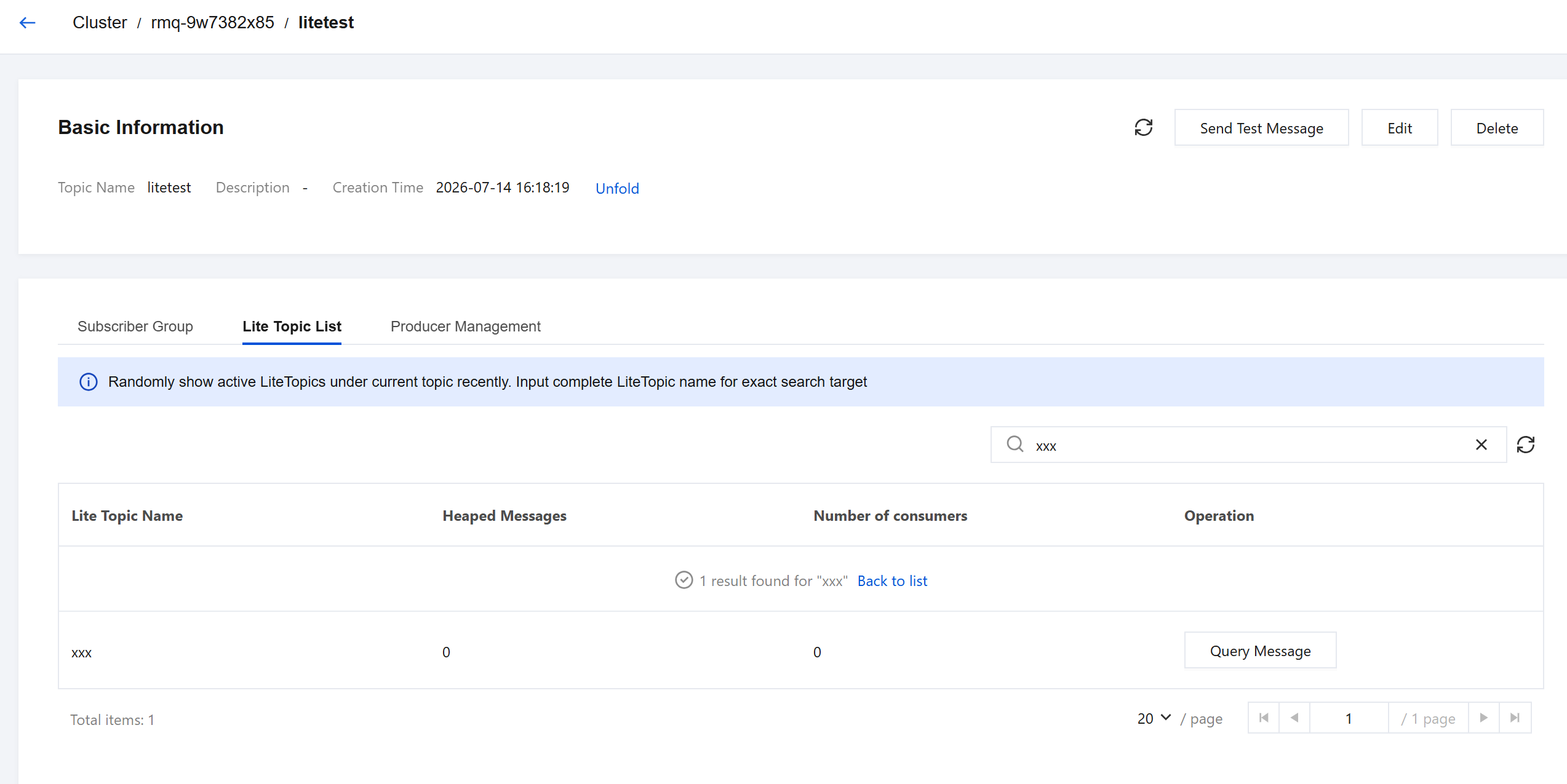
Other message-related features, such as message query, message tracing display, and subscription relationship viewing, are consistent with those of other Topics.
Sample Code
Note:
Only the 5.x gRPC SDK supports Lite messages, and it must be upgraded to a newer version: Java SDK v5.1.0 or later, Go SDK v5.1.4 or later. You can check the Open Source SDK Release Notes to query the minimum supported versions for more programming languages.
Sending Lite Messages
final String topic = "{Topic_Name}"; // The name of the Lite Topic you created in the consolefinal String accessKey = "{Access_Key}"; // The AccessKey of the role you created in the consolefinal String secretKey = "{Secret_Key}"; // The SecretKey of the role you created in the consolefinal String endpoints = "{EndPoints}"; // The cluster access point displayed in the consolefinal SessionCredentialsProvider sessionCredentialsProvider = new StaticSessionCredentialsProvider(accessKey, secretKey);final ClientConfiguration clientConfiguration = ClientConfiguration.newBuilder().setEndpoints(endpoints).setCredentialProvider(sessionCredentialsProvider).enableSsl(false).build();final Producer producer = provider.newProducerBuilder().setClientConfiguration(clientConfiguration).setTopics(topic).setMaxAttempts(3).build();final byte[] body = "This is a lite message of TDMQ RocketMQ".getBytes(StandardCharsets.UTF_8);final Message message = provider.newMessageBuilder().setTopic(topic).setLiteTopic("{Lite_Topic_Name}") // Automatically created upon the first send.setBody(body).build();try {final SendReceipt sendReceipt = producer.send(message);log.info("Sent lite message successfully, messageId {}", sendReceipt.getMessageId());} catch (Throwable t) {log.error("Failed to send lite message {}, please try again", message, t);}// Close the Producer before your business process exits or after you stop sending messages.producer.close();
Consuming Lite Messages
final String topic = "{Topic_Name}"; // The name of the Lite Topic you created in the consolefinal String consumerGroup = "{Consumer_Group_Name}"; // The name of the consumer group you created in the console. Note: It must be bound to the correct Lite Topic.final String accessKey = "{Access_Key}"; // The AccessKey of the role you created in the consolefinal String secretKey = "{Secret_Key}"; // The SecretKey of the role you created in the consolefinal String endpoints = "{EndPoints}"; // The cluster access point displayed in the consolefinal SessionCredentialsProvider sessionCredentialsProvider = new StaticSessionCredentialsProvider(accessKey, secretKey);final ClientConfiguration clientConfiguration = ClientConfiguration.newBuilder().setEndpoints(endpoints).setCredentialProvider(sessionCredentialsProvider).enableSsl(false).build();final LitePushConsumer litePushConsumer = provider.newLitePushConsumerBuilder().setClientConfiguration(clientConfiguration).setConsumerGroup(consumerGroup).bindTopic(topic).setMessageListener(messageView -> {// Business consumption codelog.info("Consumed messageId {}", messageView.getMessageId());return ConsumeResult.SUCCESS;}).build();try {litePushConsumer.subscribeLite("{Lite_Topic_Name}");// You can subscribe to more Lite Topics.} catch (Throwable t) {log.error("Failed to subscribe lite topics, please try again", t);}// Close the Consumer before your business process exits.litePushConsumer.close();
Bantuan dan Dukungan
Apakah halaman ini membantu?
Anda juga dapat Menghubungi Penjualan atau Mengirimkan Tiket untuk meminta bantuan.
masukan