How Do I Check in a Browser Whether an SSL Certificate Has Taken Effect?
Unduh
Mode fokus
Ukuran font
Terakhir diperbarui: 2024-03-06 18:03:03
How do I check in a browser whether an SSL certificate has taken effect?
After an SSL certificate is successfully installed and your domain name is resolved to a server IP address, perform the following steps to check whether the SSL certificate has taken effect:
1. Open a browser (Chrome is used as an example), and enter the domain name address bound to the SSL certificate in the https format in the address box.
2. Press Enter to access the domain name address. Check whether the following conditions are met:
You can successfully access the website using the domain name address.
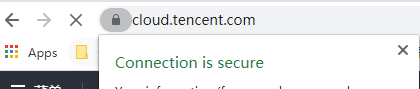
A security lock icon is displayed on the left of the address in the browser address box, which indicates that your SSL certificate has taken effect as shown in the following figure.