tencent cloud

Tencent Real-Time Communication

Release Notes and Announcements
Release Notes
Recent Product Announcement
TRTC Live (TUILiveKit) Product Launch Announcement
TRTC Conference Official Editions Launched
The commercial version of Conference is coming soon
Terms and Conditions Applicable to $9.9 Starter Package
Rules for the "First Subscription $100 Discount" Promotion
Announcement on the Start of Beta Testing for Multi-person Audio and Video Conference
TRTC Call Official Editions Launched
License Required for Video Playback in New Version of LiteAV SDK
TRTC to Offer Monthly Packages
Product Introduction
Overview
Concepts
Features
Strengths
Use Cases
Performance Statistics
Tencent RTC Quickplay: Experience Ultimate Real-Time Audio and Video Interaction!
Purchase Guide
Billing Overview
Free Minutes
Monthly subscription
Pay-as-you-go
TRTC Overdue and Suspension Policy
FAQs
Refund Instructions
User Tutorial
Free Demo
Call
Overview
Activate the Service
Run Demo
Integration
Offline Call Push
Conversational Chat
On-Cloud Recording
AI Noise Reduction
UI Customization
Calls integration to Chat
Additional Features
No UI Integration
Server APIs
Client APIs
Solution
ErrorCode
Release Notes
FAQs
Conference
Overview(TUIRoomKit)
Activate the Service (TUIRoomKit)
Run Demo(TUIRoomKit)
Integration(TUIRoomKit)
Screen Sharing (TUIRoomKit)
Schedule a meeting (TUIRoomKit)
In-meeting Call (TUIRoomKit)
UI Customization(TUIRoomKit)
Virtual Background (TUIRoomKit)
Conference Control (TUIRoomKit)
Cloud Recording (TUIRoomKit)
AI Noise Reduction (TUIRoomKit)
In-Conference Chat (TUIRoomKit)
Robot Streaming (TUIRoomKit)
Enhanced Features (TUIRoomKit)
Client APIs (TUIRoomKit)
Server APIs (TUIRoomKit)
FAQs (TUIRoomKit)
Error Code (TUIRoomKit)
SDK Update Log (TUIRoomKit)
Live
Billing of Video Live Component
Overview
Activating the Service (TUILiveKit)
Run Demo
No UI Integration
UI Customization
Live Broadcast Monitoring
Video Live Streaming
Voice Chat Room
Advanced Features
Client APIs
Server APIs
Error Codes
Release Notes
FAQs
RTC Engine
Activate Service
SDK Download
API Examples
Usage Guidelines
API Reference Manual
Advanced Features
AI Integration
Overview
Configure MCP Server
Install Skills
Integration Guide
FAQ
RTC RESTFUL API
History
Introduction
API Category
Room Management APIs
Stream mixing and relay APIs
On-cloud recording APIs
Data Monitoring APIs
Pull stream Relay Related interface
Web Record APIs
AI Service APIs
Cloud Slicing APIs
Cloud Moderation APIs
Making API Requests
Call Quality Monitoring APIs
Usage Statistics APIs
Data Types
Appendix
Error Codes
Console Guide
Application Management
Package Management
Usage Statistics
Monitoring Dashboard
Development Assistance
Solution
Real-Time Chorus
FAQs
Migration Guide
Billing
Features
UserSig
Firewall Restrictions
How to Downsize Installation Package
Android and iOS
Web
Flutter
Electron
TRTCCalling for Web
Audio and Video Quality
Others
Legacy Documentation
RTC RoomEngine SDK(Old)
Integrating TUIRoom (Web)
Integrating TUIRoom (Android)
Integrating TUIRoom (iOS)
Integrating TUIRoom (Flutter)
Integrating TUIRoom (Electron)
TUIRoom APIs
On-Cloud Recording and Playback (Old)
RTC Analytics Monthly Packages (Previous Version)
Protocols and Policies
Compliance
Security White Paper
Notes on Information Security
Service Level Agreement
Apple Privacy Policy: PrivacyInfo.xcprivacy
TRTC Policy
Privacy Policy
Data Processing And Security Agreement
Glossary

Room List (Flutter)

PDF
Focus Mode
Font Size
Last updated: 2026-01-15 22:07:51

Feature Overview

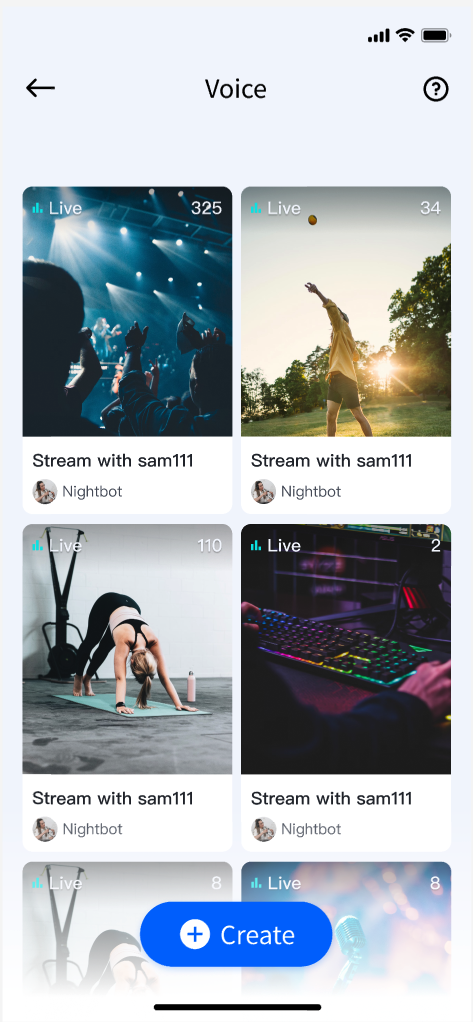
This document provides a detailed introduction to the Voice Chat Room List Page feature within TUILiveKit. Use this guide to seamlessly integrate a fully functional Live Stream List page into your project. The page includes pull-to-refresh, infinite scrolling (load more), and tap-to-join live stream room capabilities.


Quick Integration

Step 1: Integrate the Component

Refer to Preparations guide to add TUILiveKit to your project.

Step 2: Add the Live Stream List Page

Determine where in your app you want users to access the Live Stream List page. Based on your app’s navigation and UI structure, choose one of the following integration methods to either launch the Live Stream List page directly or embed it within your Widget tree:
Direct Navigation
Embed in Widget Tree
import 'package:tencent_live_uikit/tencent_live_uikit.dart';

// Navigate to the live stream list page
Navigator.push(context, MaterialPageRoute(
builder: (BuildContext context) {
return LiveListWidget();
}));
// --- Select one way to integrate based on your Widget tree structure ---

// [Option 1] As the only child Widget (single subtree)
// Suitable for containers such as Container, Padding that normally only contain one child Widget
Container(
child: LiveListWidget() // Integrate the live list here
)

// [Option 2] As one of multiple child Widgets (multi-subtree)
// Suitable for layouts such as Column, Row, Stack that can contain multiple child Widgets
Stack(
children: [
YourOtherWidget(), // Your other child Widget
LiveListWidget(), // Integrate the live list here
YourOtherWidget(), // Your other child Widget
])
After integration, the page displays a vertically scrollable list of live stream rooms.

Next Steps

You’ve now integrated the Live Stream List feature. To further enhance your live streaming experience, consider adding host streaming and audience viewing features. See the table below for details:
Feature
Description
Integration Guide
Host Streaming
Implements the complete process for a host to start a voice chat room live, including pre-live setup and in-session interactions.
Audience Viewing
Enables audience participation after joining the host’s voice chat room, including joining the mic, sending and receiving bullet comments, and more.

FAQs

Why is the Live Stream List empty after integration?

If the Live Stream List page appears blank, make sure you have completed the login step. For testing, use two devices: start a stream on one device as the host, and use the Live Stream List page on another device to fetch and display currently active live rooms.

Help and Support

Was this page helpful?

Help us improve! Rate your documentation experience in 5 mins.

Feedback