tencent cloud

Tencent Real-Time Communication

Release Notes and Announcements
Release Notes
Recent Product Announcement
TRTC Live (TUILiveKit) Product Launch Announcement
TRTC Conference Official Editions Launched
The commercial version of Conference is coming soon
Terms and Conditions Applicable to $9.9 Starter Package
Rules for the "First Subscription $100 Discount" Promotion
Announcement on the Start of Beta Testing for Multi-person Audio and Video Conference
TRTC Call Official Editions Launched
License Required for Video Playback in New Version of LiteAV SDK
TRTC to Offer Monthly Packages
Product Introduction
Overview
Concepts
Features
Strengths
Use Cases
Performance Statistics
Tencent RTC Quickplay: Experience Ultimate Real-Time Audio and Video Interaction!
Purchase Guide
Billing Overview
Free Minutes
Monthly subscription
Pay-as-you-go
TRTC Overdue and Suspension Policy
FAQs
Refund Instructions
User Tutorial
Free Demo
Call
Overview
Activate the Service
Run Demo
Integration
Offline Call Push
Conversational Chat
On-Cloud Recording
AI Noise Reduction
UI Customization
Calls integration to Chat
Additional Features
No UI Integration
Server APIs
Client APIs
Solution
ErrorCode
Release Notes
FAQs
Conference
Overview(TUIRoomKit)
Activate the Service (TUIRoomKit)
Run Demo(TUIRoomKit)
Integration(TUIRoomKit)
Screen Sharing (TUIRoomKit)
Schedule a meeting (TUIRoomKit)
In-meeting Call (TUIRoomKit)
UI Customization(TUIRoomKit)
Virtual Background (TUIRoomKit)
Conference Control (TUIRoomKit)
Cloud Recording (TUIRoomKit)
AI Noise Reduction (TUIRoomKit)
In-Conference Chat (TUIRoomKit)
Robot Streaming (TUIRoomKit)
Enhanced Features (TUIRoomKit)
Client APIs (TUIRoomKit)
Server APIs (TUIRoomKit)
FAQs (TUIRoomKit)
Error Code (TUIRoomKit)
SDK Update Log (TUIRoomKit)
Live
Billing of Video Live Component
Overview
Activating the Service (TUILiveKit)
Run Demo
No UI Integration
UI Customization
Live Broadcast Monitoring
Video Live Streaming
Voice Chat Room
Advanced Features
Client APIs
Server APIs
Error Codes
Release Notes
FAQs
RTC Engine
Activate Service
SDK Download
API Examples
Usage Guidelines
API Reference Manual
Advanced Features
AI Integration
Overview
Configure MCP Server
Install Skills
Integration Guide
FAQ
RTC RESTFUL API
History
Introduction
API Category
Room Management APIs
Stream mixing and relay APIs
On-cloud recording APIs
Data Monitoring APIs
Pull stream Relay Related interface
Web Record APIs
AI Service APIs
Cloud Slicing APIs
Cloud Moderation APIs
Making API Requests
Call Quality Monitoring APIs
Usage Statistics APIs
Data Types
Appendix
Error Codes
Console Guide
Application Management
Package Management
Usage Statistics
Monitoring Dashboard
Development Assistance
Solution
Real-Time Chorus
FAQs
Migration Guide
Billing
Features
UserSig
Firewall Restrictions
How to Downsize Installation Package
Android and iOS
Web
Flutter
Electron
TRTCCalling for Web
Audio and Video Quality
Others
Legacy Documentation
RTC RoomEngine SDK(Old)
Integrating TUIRoom (Web)
Integrating TUIRoom (Android)
Integrating TUIRoom (iOS)
Integrating TUIRoom (Flutter)
Integrating TUIRoom (Electron)
TUIRoom APIs
On-Cloud Recording and Playback (Old)
RTC Analytics Monthly Packages (Previous Version)
Protocols and Policies
Compliance
Security White Paper
Notes on Information Security
Service Level Agreement
Apple Privacy Policy: PrivacyInfo.xcprivacy
TRTC Policy
Privacy Policy
Data Processing And Security Agreement
Glossary

Web&Electron

PDF
Focus Mode
Font Size
Last updated: 2024-07-03 17:14:46
In video conferences, participants can send messages in real-time in the chat area, share opinions and ideas, and create a relaxed and pleasant communication environment by exchanging emoticons and animations. To maintain the order of the meeting, the host or administrator can set to prohibit participants from sending messages in the chat, ensuring the focus and efficiency of the conference content. By flexibly using these features, video conferences can provide efficient and convenient communication experiences for various scenarios.

Feature Introduction

Text Interaction

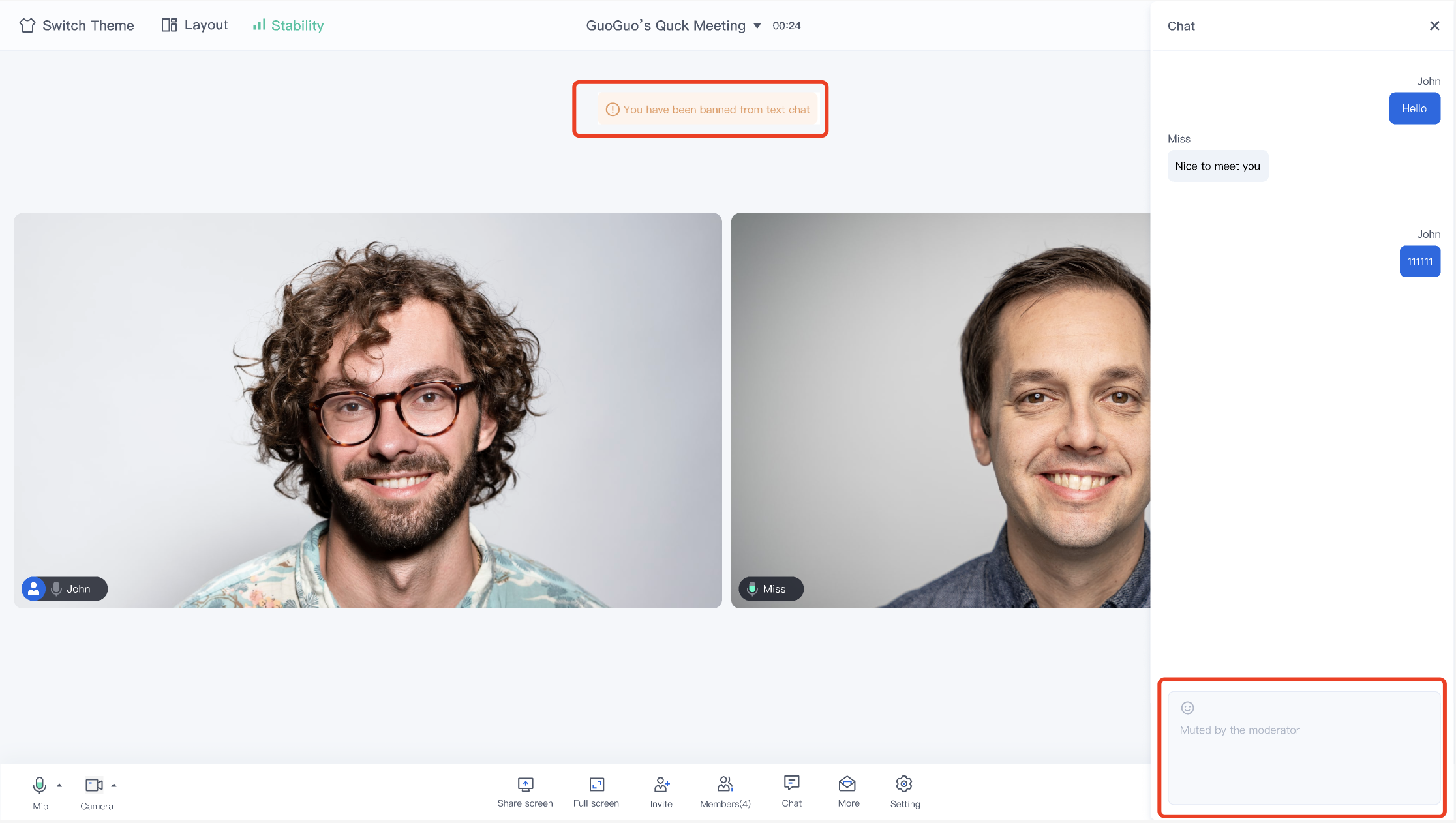
At the bottom menu bar of the conference interface, you can find an option called Chat. Click on it to expand the chat box located on the right side of the screen. In the chat box, participants can communicate with other participants by sending custom text messages. This design facilitates real-time communication between participants without affecting the speaker.


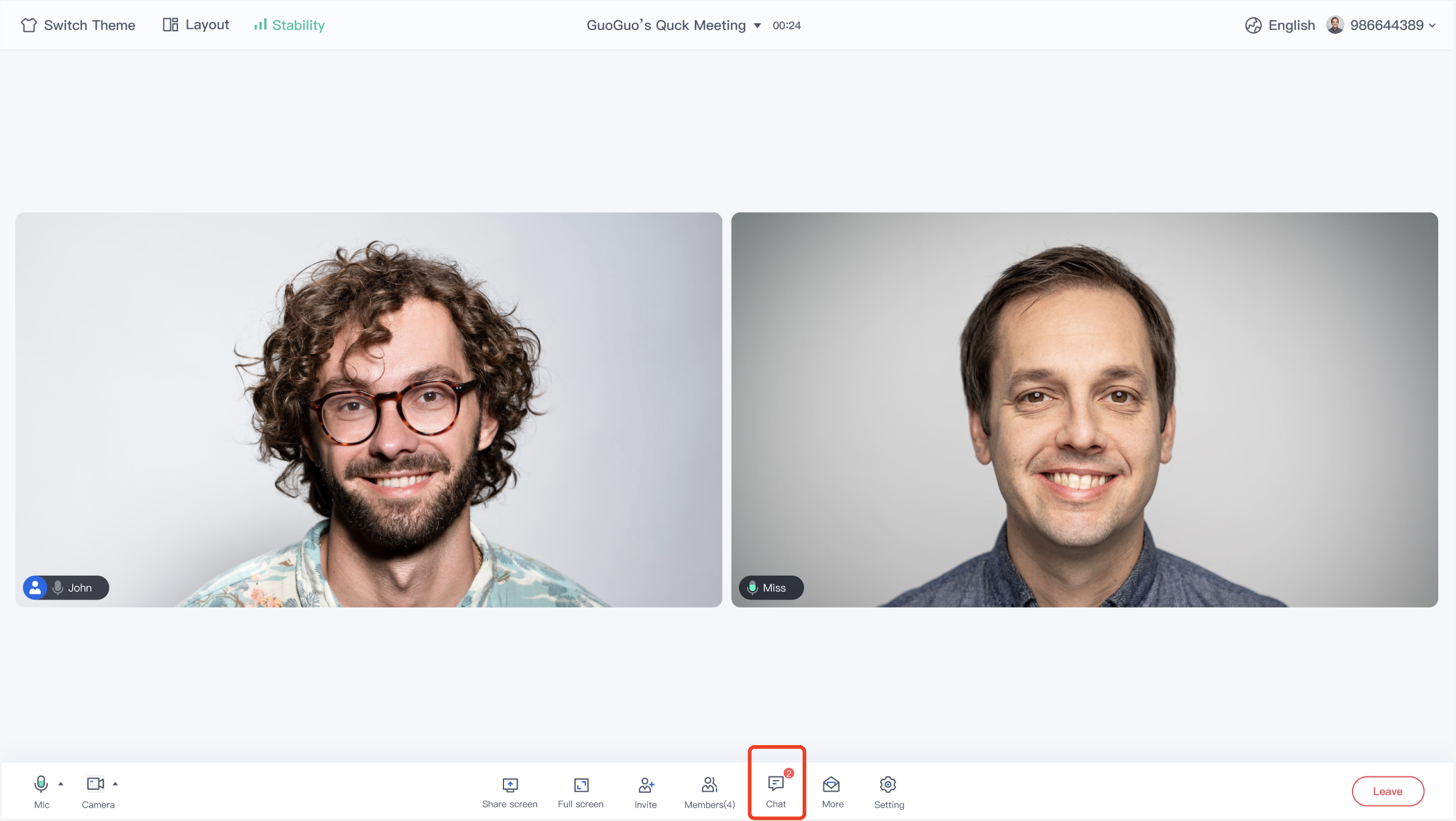
When a new chat message is sent, a red bubble prompt will appear in the upper right corner of the Chat on the bottom toolbar, reminding you of unread messages. This way, you can always keep track of real-time dynamics in the conference and ensure that you don't miss any important information.


Emoticon Interaction

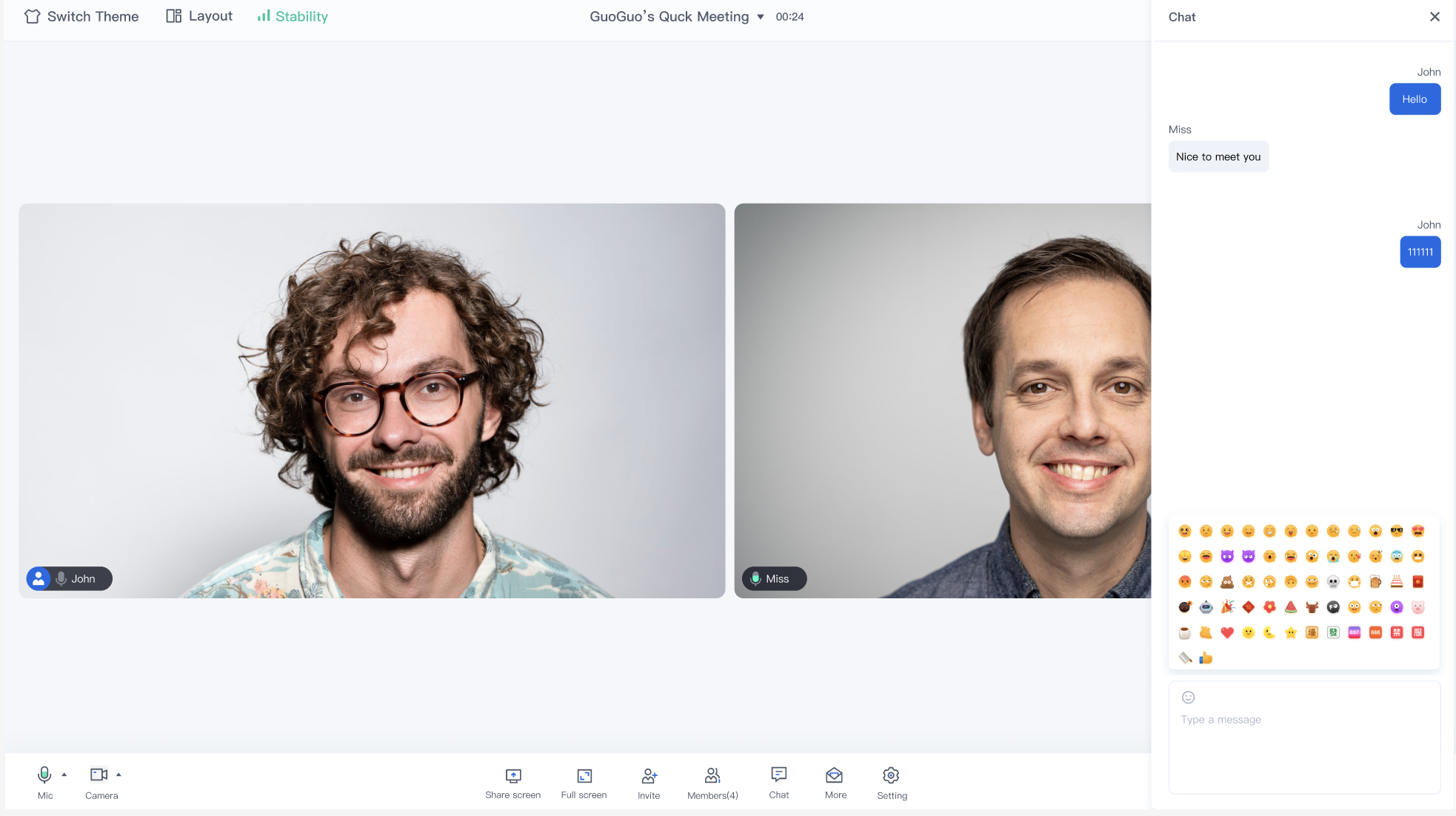
Click the emoticon icon in the chat interface's message editing bar to display the emoticon list. Click the corresponding emoticon to send it and give a thumbs-up to the speaker's brilliant speech.


Note:
To respect the emoji design copyright, the Conference project does not include large emoji element slices. Before the official commercial launch, please replace them with your own designed emoji or other emoji packs that you own the copyright to. The default Little Yellow Face Emoji Pack copyright belongs to Tencent Cloud and can be licensed for a fee. If you wish to obtain a license, you can Submit a ticket to contact us.

Manage In-conference Chat Permissions

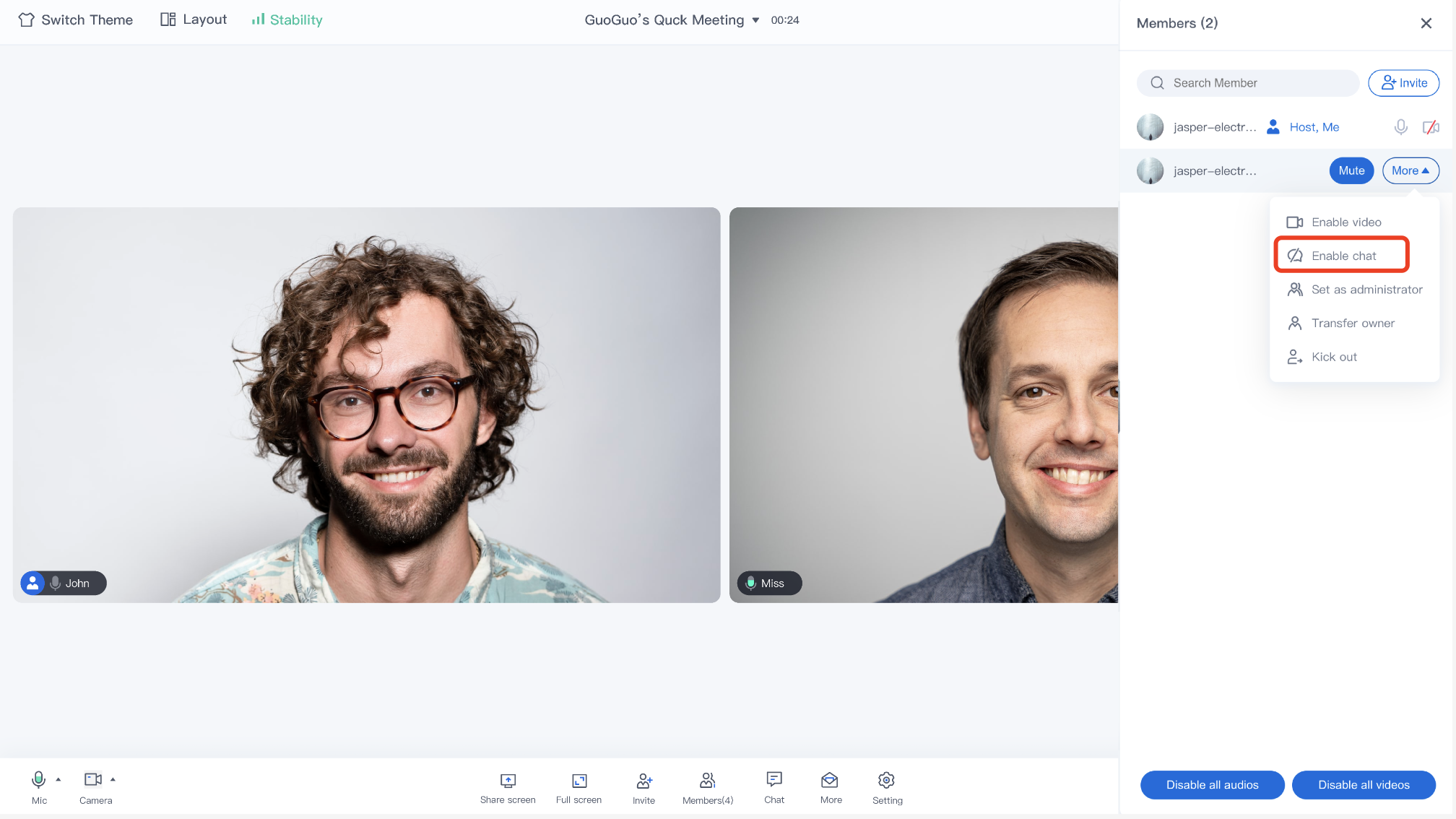
The host/administrator can set the chat permissions of a member in member management.


Ordinary members who are prohibited from speaking will not be able to edit or send text or emoticons.


Feature Access

Currently, the TUIRoomKit for Web and Electron has integrated chat capabilities during the meeting. You can click Github to download the TUIRoomKit code, and refer to the README.md documentation in the code repository to run the TUIRoomKit Web sample project.
Note:
TUIRoomKit Web&Electron currently only supports text message chat. If you need to send image message chat and other extended content, you can implement it by getting the tim instance. For the web-side tim capabilities, please check: IM API Documentation.

Help and Support

Was this page helpful?

Help us improve! Rate your documentation experience in 5 mins.

Feedback