tencent cloud

Tencent Real-Time Communication

Release Notes and Announcements
Release Notes
Recent Product Announcement
TRTC Live (TUILiveKit) Product Launch Announcement
TRTC Conference Official Editions Launched
The commercial version of Conference is coming soon
Terms and Conditions Applicable to $9.9 Starter Package
Rules for the "First Subscription $100 Discount" Promotion
Announcement on the Start of Beta Testing for Multi-person Audio and Video Conference
TRTC Call Official Editions Launched
License Required for Video Playback in New Version of LiteAV SDK
TRTC to Offer Monthly Packages
Product Introduction
Overview
Concepts
Features
Strengths
Use Cases
Performance Statistics
Tencent RTC Quickplay: Experience Ultimate Real-Time Audio and Video Interaction!
Purchase Guide
Billing Overview
Free Minutes
Monthly subscription
Pay-as-you-go
TRTC Overdue and Suspension Policy
FAQs
Refund Instructions
User Tutorial
Free Demo
Call
Overview
Activate the Service
Run Demo
Integration
Offline Call Push
Conversational Chat
On-Cloud Recording
AI Noise Reduction
UI Customization
Calls integration to Chat
Additional Features
No UI Integration
Server APIs
Client APIs
Solution
ErrorCode
Release Notes
FAQs
Conference
Overview(TUIRoomKit)
Activate the Service (TUIRoomKit)
Run Demo(TUIRoomKit)
Integration(TUIRoomKit)
Screen Sharing (TUIRoomKit)
Schedule a meeting (TUIRoomKit)
In-meeting Call (TUIRoomKit)
UI Customization(TUIRoomKit)
Virtual Background (TUIRoomKit)
Conference Control (TUIRoomKit)
Cloud Recording (TUIRoomKit)
AI Noise Reduction (TUIRoomKit)
In-Conference Chat (TUIRoomKit)
Robot Streaming (TUIRoomKit)
Enhanced Features (TUIRoomKit)
Client APIs (TUIRoomKit)
Server APIs (TUIRoomKit)
FAQs (TUIRoomKit)
Error Code (TUIRoomKit)
SDK Update Log (TUIRoomKit)
Live
Billing of Video Live Component
Overview
Activating the Service (TUILiveKit)
Run Demo
No UI Integration
UI Customization
Live Broadcast Monitoring
Video Live Streaming
Voice Chat Room
Advanced Features
Client APIs
Server APIs
Error Codes
Release Notes
FAQs
RTC Engine
Activate Service
SDK Download
API Examples
Usage Guidelines
API Reference Manual
Advanced Features
AI Integration
Overview
Configure MCP Server
Install Skills
Integration Guide
FAQ
RTC RESTFUL API
History
Introduction
API Category
Room Management APIs
Stream mixing and relay APIs
On-cloud recording APIs
Data Monitoring APIs
Pull stream Relay Related interface
Web Record APIs
AI Service APIs
Cloud Slicing APIs
Cloud Moderation APIs
Making API Requests
Call Quality Monitoring APIs
Usage Statistics APIs
Data Types
Appendix
Error Codes
Console Guide
Application Management
Package Management
Usage Statistics
Monitoring Dashboard
Development Assistance
Solution
Real-Time Chorus
FAQs
Migration Guide
Billing
Features
UserSig
Firewall Restrictions
How to Downsize Installation Package
Android and iOS
Web
Flutter
Electron
TRTCCalling for Web
Audio and Video Quality
Others
Legacy Documentation
RTC RoomEngine SDK(Old)
Integrating TUIRoom (Web)
Integrating TUIRoom (Android)
Integrating TUIRoom (iOS)
Integrating TUIRoom (Flutter)
Integrating TUIRoom (Electron)
TUIRoom APIs
On-Cloud Recording and Playback (Old)
RTC Analytics Monthly Packages (Previous Version)
Protocols and Policies
Compliance
Security White Paper
Notes on Information Security
Service Level Agreement
Apple Privacy Policy: PrivacyInfo.xcprivacy
TRTC Policy
Privacy Policy
Data Processing And Security Agreement
Glossary

iOS

PDF
Focus Mode
Font Size
Last updated: 2025-04-17 16:28:40

The error message "The package you purchased does not support this ability"?

If you encounter the above error message, it is because the audio and video call capability package of your current application has expired or has not been activated. You can refer to the service activation guide to claim or activate the audio and video call capability, and then continue to use the TUICallKit component.

How to modify TUICallKit source code?

To import the component using CocoaPods, follow these steps:
1. Create a TUICallKit folder in the same directory as your project's Podfile.
2. Click to enter Github/TUICallKit , select Clone/Download code, and then copy the TUICallKit_Swift folder and TUICallKit_Swift.podspec file in the iOS directory to the TUICallKit folder you created in Step 1.
3. Add the following dependencies to your Podfile.
# :path => "Directed TUICallKit-Swift.podspec's phase path"
pod 'TUICallKit_Swift', :path => "TUICallKit/TUICallKit_Swift.podspec"
4. Execute the pod install command to complete the import.
Note:
The TUICallKit_Swiftfolder and TUICallKit_Swift.podspec file must be in the same directory.
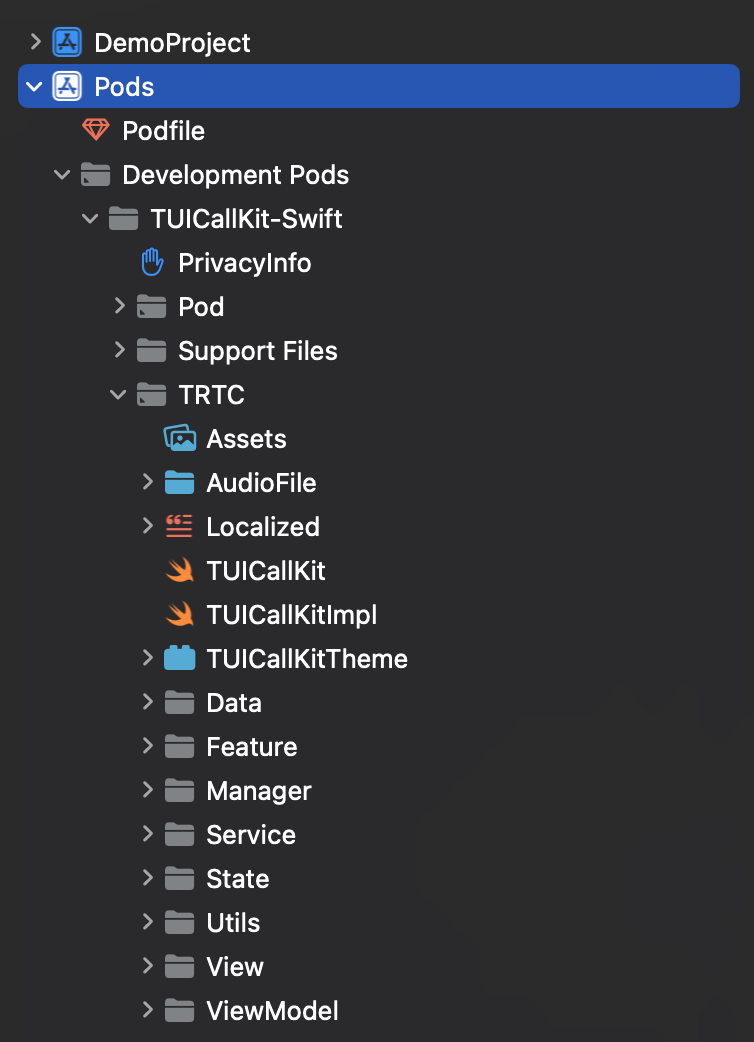
After integrating the TUICallKit_Swift component, the effect is as follows:


Note:
After integrating the TUICallKit_Swift component, it supports hierarchical folder display, making it easier for you to read and modify the source code.

Xcode 15 compiler error?

1、Sandbox: rsync is displayed.


You can set User Script Sandboxing to NO in Build Settings:


2、If SDK does not contain, compile error screenshot.


Add the following code to the Podfile:
# target 'xxxx' do
# ...
# pod 'TUICallKit_Swift'
# end

post_install do |installer|
installer.pods_project.targets.each do |target|
target.build_configurations.each do |config|
config.build_settings['IPHONEOS_DEPLOYMENT_TARGET'] = '13.0'
end
end
end

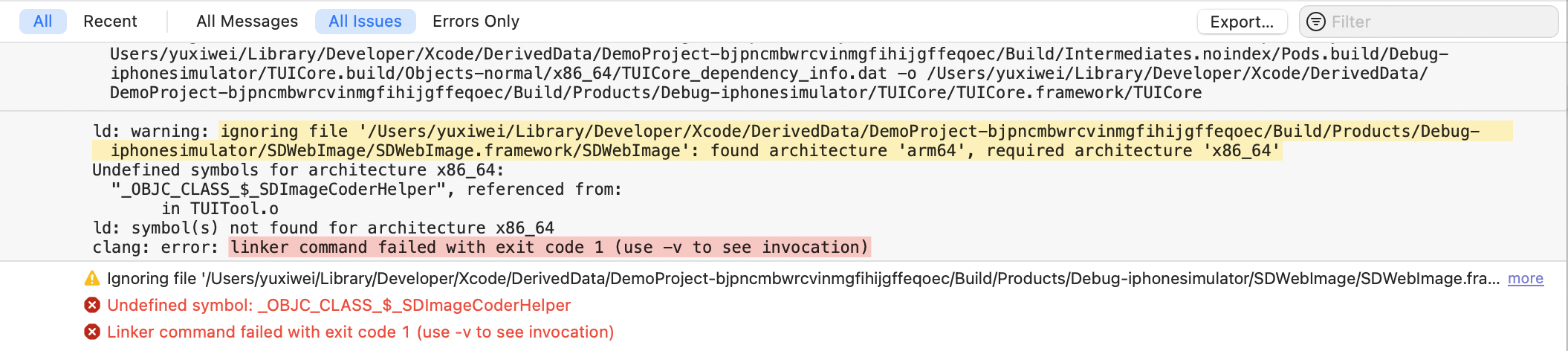
3、If you run the simulator on an M-series computer, Linker command failed with exit code 1 (use-v to see invocation) may appear.


Add the following code to the Podfile:
# target 'xxxx' do
# ...
# pod 'TUICallKit_Swift'
# end

post_install do |installer|
installer.pods_project.targets.each do |target|
target.build_configurations.each do |config|
config.build_settings['EXCLUDED_ARCHS[sdk=iphonesimulator*]'] = "arm64"
end
end
end

Is there a conflict between TUICallKit and the integrated audio and video library?

Tencent Cloud's audio and video libraries cannot be integrated at the same time, and there may be symbol conflicts. You can handle it according to the following scenarios.
1. If you are using the TXLiteAVSDK_TRTC library, there will be no symbol conflicts. You can directly add dependencies in the Podfile file.
pod 'TUICallKit_Swift'
2. If you are using the TXLiteAVSDK_Professional library, there will be symbol conflicts. You can add dependencies in the Podfile file.
pod 'TUICallKit_Swift/Professional'
3. If you are using the TXLiteAVSDK_Enterprise library, there will be symbol conflicts. It is recommended to upgrade to TXLiteAVSDK_Professional and then useTUICallKit_Swift/Professional

Does TUICallKit support background operation?

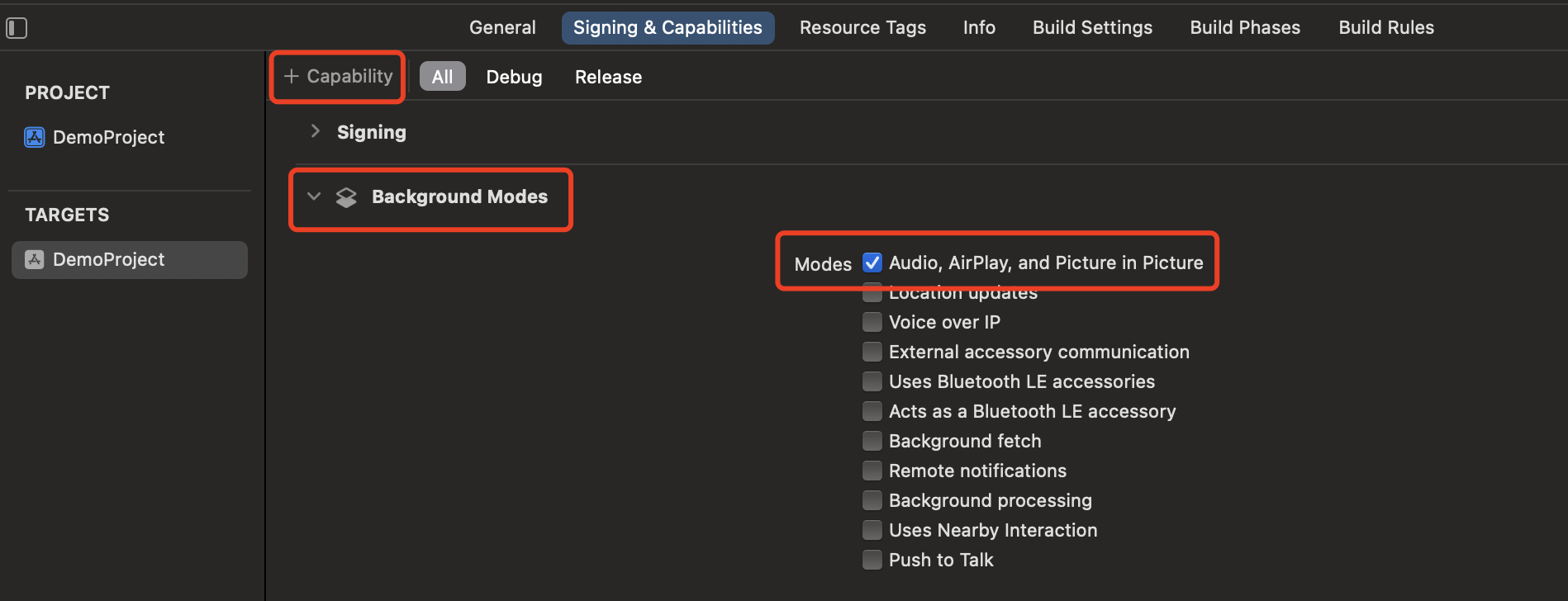
Yes, if you need to continue running related functions in the background, you can select the current project, and in the Background Modes section under Capabilities, check Audio, AirPlay, and Picture in Picture, as shown in the following image:


How to view TRTC logs?

TRTC logs are compressed and encrypted by default, with the extension .xlog. Whether the log is encrypted can be controlled by setLogCompressEnabled. The file name containing C(compressed) is encrypted and compressed, and the file name containing R(raw) is plaintext.
iOS:Sandbox's Documents/log
Note:
To view the .xlog file, you need to download the decryption tool and run it directly in the Python 2.7 environment with the xlog file in the same directory using python decode_mars_log_file.py.
To view the .clog file (new log format after version 9.6), you need to download the decryption tool and run it directly in the Python 2.7 environment with the clog file in the same directory using python decompress_clog.py.

Help and Support

Was this page helpful?

Help us improve! Rate your documentation experience in 5 mins.

Feedback