购买方式
下载
聚焦模式
字号
本文档将为您介绍如何完成腾讯云 Web 应用防火墙(Web Application Firewall,WAF)实例套餐的购买与扩展。
购买 WAF 实例
1. 进入 Web 应用防火墙购买页,根据实际需求选择实例类型、地区和套餐等基础配置。
2. 根据实际需求,选择 WAF 的增值配置:
说明:
3. 根据实际需求,选择 WAF 的扩展配置:
扩展配置名称 | 扩展配置说明 |
域名扩展包 | 一个域名包包含10个域名防护(含1个主域名和9个该主域名下的子域名防护)。每次最多可购买500个扩展包。 |
业务扩展包 | 如果接入业务的请求或带宽峰值超过了套餐版本默认规格值,可通过购买业务扩展包或开启弹性计费补充。每个业务扩展包支持扩展1000QPS 业务峰值,以及25Mbps 带宽峰值。 注意: |
混合云节点 | 配置范围1-1000个,每增加一个节点,默认增加本地集群5000QPS 的业务防护,以及本地集群扩展10个域名包。 注意: 仅云原生型 WAF 企业版及以上套餐实例支持购买混合云节点。购买时默认赠送 1 个混合云节点。如需使用混合云管理功能,需 提交工单 申请购买额外混合云节点,当混合云节点数 > 2 时,控制台会自动开启混合云管理功能。 |
弹性计费 | 若存在短期业务活动或突发异常峰值流量导致业务 QPS 或者带宽峰值上涨,建议您开启弹性业务 QPS 和带宽计费。开启后,支持对超出的 QPS 或带宽后付费,避免实例因超用进入沙箱或带宽限流,影响正常业务。 注意: |
独享 IP | 可为特定域名分配独享 IP 资源,从而满足其对业务稳定性、网络性能及资源独占的定制化需求。独享 IP 不承诺固定 VIP,每次开启或关闭操作均可能导致 VIP 地址变化。 注意: |
自动续费 | 勾选后,账户余额足够时,到期后按月自动续费。 |
实例名称 | 为 WAF 实例自定义一个名称。名称长度不超过60个字符,需由字母、数字、下划线(_)、连字符(-)或点号(.)组成。留空则系统自动生成。 |
安全日志服务包 | 安全日志服务包提供1TB 存储容量,支持最长180天的访问日志查询与下载。若日志量超出1TB,则仅保障1TB 容量内的服务。单击前往开通或前往升级进入开通或升级页面完成配置。 |
日志投递 | 启用配置目标投递后,支持给予域名开启访问日志投递能力。单击前往开通进入开通页面完成配置。 说明: |
说明:
4. 根据实际需求,选择 WAF 所需时长。
5. 配置完成后,单击立即购买,支付费用后,即可完成实例套餐购买。
扩展 WAF 实例
增值页面
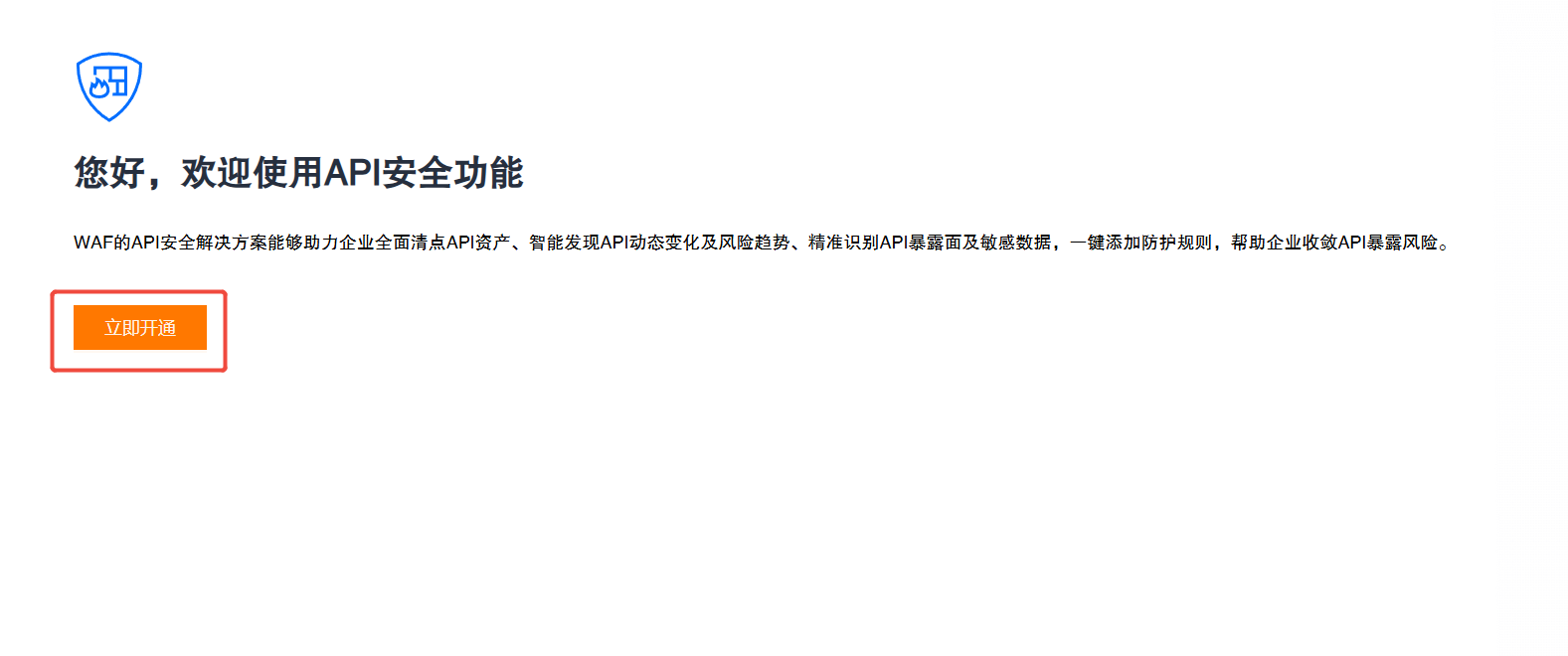
以 API 安全为例,若您未在购买 WAF 实例时选择 API 安全,可按需购买此增值配置,BOT 流量管理等增值配置购买方式同理:
1. 登录 Web 应用防火墙控制台,在左侧导航栏中,选择 API 安全。
2. 在 API 安全页面,单击立即开通。
3. 根据需求,选择相应的防护配置。
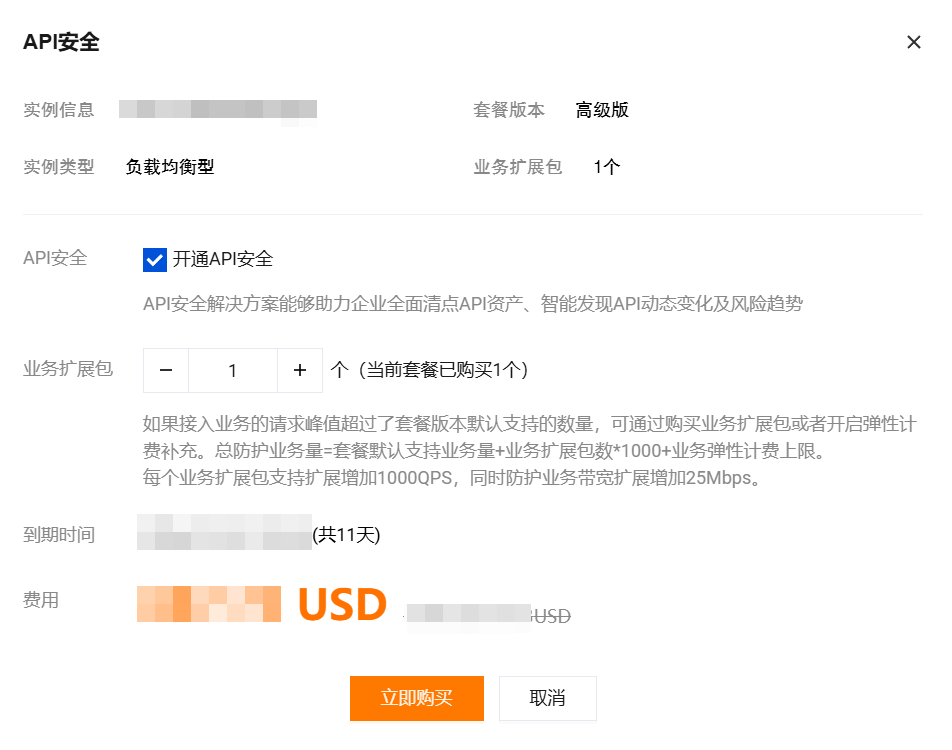
说明:
4. 配置完成后,单击立即购买,支付费用后,即可完成增值配置购买。
实例页面
1. 登录 Web 应用防火墙控制台,在左侧导航栏中,选择接入管理 > 实例管理。
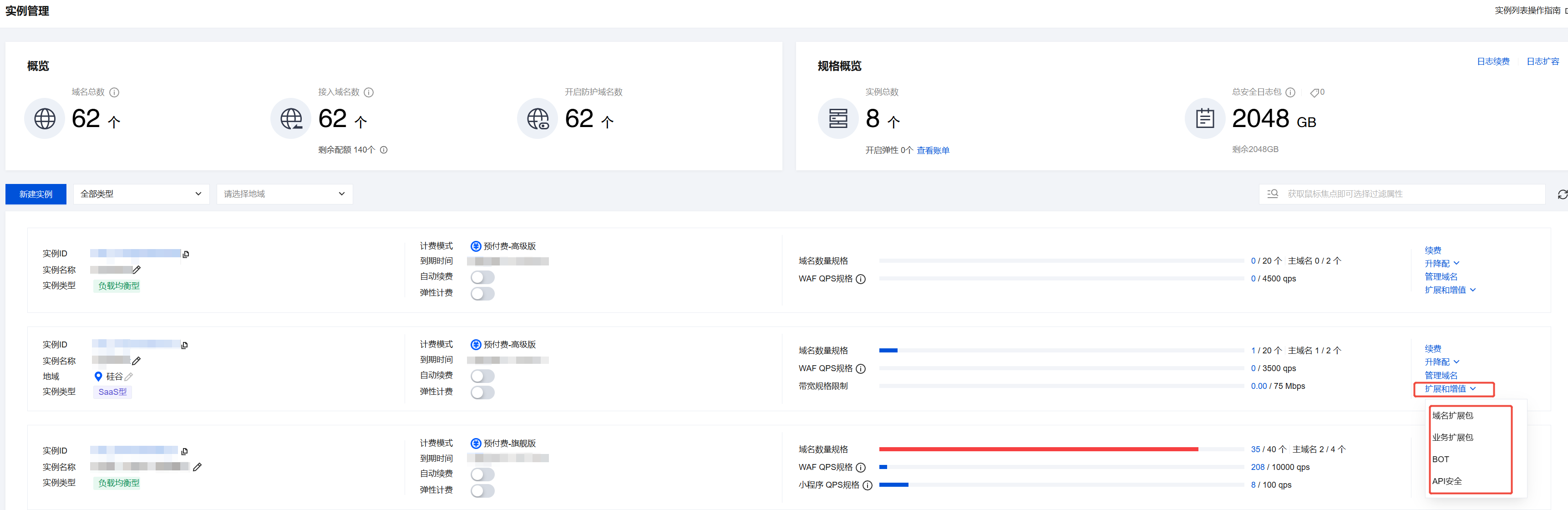
3. 单击需要进行扩展或增值的配置,进入购买页面进行配置。
4. 配置完成后,单击立即购买,支付费用后,即可完成增值配置或扩展配置购买。
后续步骤
文档反馈