A log topic is the basic unit for log data collection, storage, search, and analysis on the CLS platform. The massive amounts of logs collected are managed by log topic. For example, you can configure log collection rules and storage time, search for and analyze logs, and download, consume, and ship logs by log topic.
A log topic usually corresponds to an application/service. It is recommended to collect logs of the same application/service from different servers to the same log topic. For example, a payment service (payService) is deployed on dozens of machines and has two types of logs: access logs (access_log) and error logs (error_log). You can create two log topics, payService_access_log_topic and payService_error_log_topic, to collect the two types of logs on the machines respectively. You can use these two log topics to centrally search for and analyze all logs on the machines.
Log topics and applications/services are not strictly in one-to-one mapping relationships. If the log structures of two services are similar, and the logs of the two services need to be analyzed in a centralized manner, you can report the logs of the two services to the same log topic.
Metric topic
A metric topic is the basic unit for metric data collection, storage, search, and analysis on the CLS platform. Collected metric data is managed by metric topic, including retention period configuration, search and analysis, and other operations.
A metric topic is compatible with the Prometheus metrics data model and query API, functioning as a Prometheus instance. Metrics from different applications/services can be stored in a single metric topic, provided their metric names do not conflict and the upload rate does not exceed the specification limits of 25,000 QPS and 250 MB/s. In practice, metrics from production, testing, and development environments of a business system are typically stored in separate metric topics.
Logset
A logset (Logset) is a grouping of log topics and metric topics. A logset can contain multiple log topics and metric topics. A logset itself does not store any log data, but just makes it easier for users to manage topics.
A logset usually corresponds to a project/business in a company. You are advised to add the log topics of multiple applications/businesses of a project/business to the same logset. For example, if a company's e-commerce project contains multiple services (payService, userService, stockService, etc.), you can create a logset named e_commerce_logset and add the log topics of these services to this logset. In this way, when the company has multiple projects, the project personnel only need to view the log topics in the logset corresponding to the project, without interference from the log topics of other projects.
Note:
When creating a new topic, you can specify its associated logset. Once saved, this assignment cannot be changed.
Example
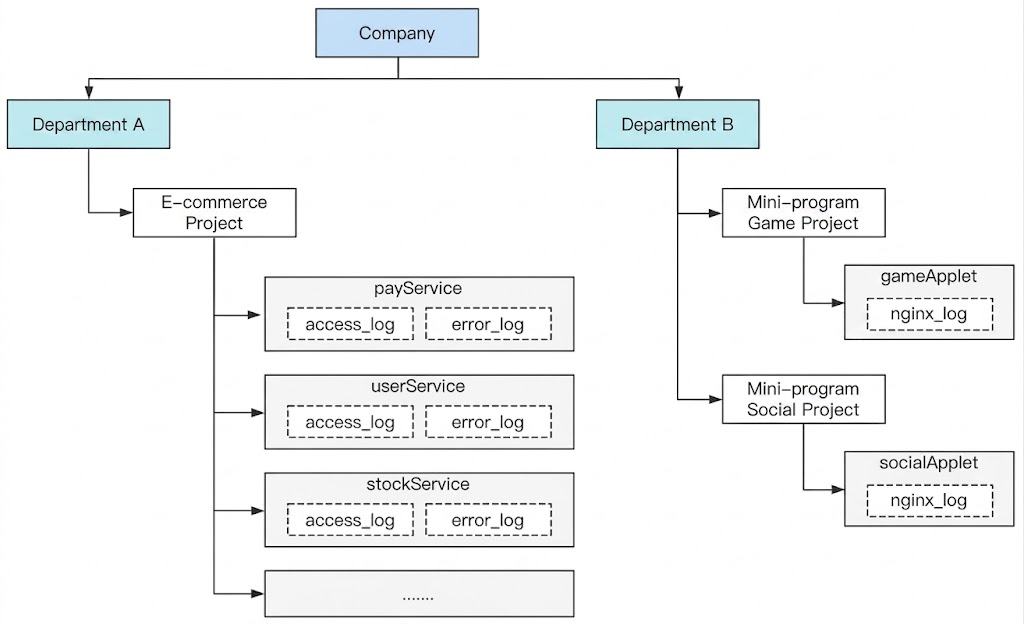
As shown in the figure above, the company has two departments:
Department A has an e-commerce project that adopts the microservice architecture, and each service has two types of logs: access logs (access_log) and error logs (error_log).
Department B has two projects: Mini Program game project and Mini Program social project. The two projects adopt a simple technical architecture and each has one type of logs: nginx access logs (nginx_log).
To use CLS to monitor the logs of the applications of the company, you can create the following logsets and log topics:
Logset
Log Topic
Tag
e_commerce_logset
payService_access_log_topic
Department: Department A
e_commerce_logset
payService_error_log_topic
Department: Department A
e_commerce_logset
userService_access_log_topic
Department: Department A
e_commerce_logset
userService_error_log_topic
Department: Department A
e_commerce_logset
stockService_access_log_topic
Department: Department A
e_commerce_logset
stockService_error_log_topic
Department: Department A
e_commerce_logset
......
Department: Department A
gameApplet_logset
gameApplet_nginx_log_topic
Department: Department B
socialApplet_logset
socialApplet_nginx_log_topic
Department: Department B
The Tags are used to distinguish the departments to which logsets and log topics belong. Combined with permission policies, they can control personnel in each department to view only the data of their own department.
For Department A, the e_commerce_logset logset covers the log topics of all services under its e-commerce business. If other projects are added later, simply create a new logset.
For Department B, although the current technical architecture is relatively simple with only two types of logs in total, two logsets have been created, each containing only one log topic, for the following purposes:
Support for subsequent architecture expansion: If the service scale increases and the technical architecture changes to the microservice architecture, you can continue to use the current logset and add log topics to the current logset. In this way, projects do not affect each other.
Flexible response to project adjustment: If the entire department is used as a logset, and a project needs to be changed to an independent department or moved to another department, log adjustment will be difficult because the logset of a log topic cannot be changed directly, and you may need to collect logs again. If each project corresponds to a logset, this situation does not exist, and you only need to adjust the tags corresponding to the logset and log topic for department adjustment.