tencent cloud

Cloud Streaming Services

신규 사용자 가이드
제품 소개
제품 개요
하위 제품 소개
기본 개념
제품 기능
응용 시나리오
제품 장점
사용 제한
구매 가이드
가격 리스트
기본 서비스
부가 서비스
선불 패키지
구매 프로세스
과금 변경
환불 정책
청구서 조회
연장 안내
연체시 서비스 중지 설명
과금 FAQ
LVB
개요
응용 시나리오
시작하기
SDK 연결 안내
LEB(초저지연 라이브 방송)
개요
LEB와 LVB의 차이점
응용 시나리오
시작하기
SDK 통합
콘솔 가이드
콘솔 소개
개요
Domain Management
스트리밍
리소스 패키지 관리
기능 설정
릴레이
사용량 과금
CAM 액세스 제어
기능 사례
Push and Playback
기능
Live Streaming Security
해외 라이브 방송
콜백 이벤트 정보 알림
자주 사용하는 3rd party 툴 가이드
SDK 사례
0. SDK 통합 가이드
2. 재생
3. 고급 기능
API문서
History
Introduction
API Category
Making API Requests
Live Pad APIs
Live Stream Mix APIs
Time Shifting APIs
Monitoring Data Query APIs
Billing Data Query APIs
Live Transcoding APIs
Delayed Playback Management APIs
Domain Name Management APIs
Watermark Management APIs
Certificate Management APIs
Stream Pulling APIs
Recording Management APIs
Live Callback APIs
Screencapturing and Porn Detection APIs
Authentication Management APIs
Live Stream Management APIs
Data Types
Error Codes
유지보수 가이드
비디오 랙 최적화(V2)
푸시 스트리밍 실패 문제 해결
재생 실패 문제 해결
라이브 방송 딜레이 문제 해결
풀 스트림 비디오 품질 저하 문제 해결
라이브 방송에 COS bucket 권한을 부여하여 화면 캡처 저장
장애 처리
라이브 방송 혼합 스트림 오류: InvalidParameter.OtherError
FAQs
라이브 방송 기본 관련
푸시 및 재생
라이브 방송 과금
라이브 방송 해외 관련
라이브 레코딩
클라우드 혼합 스트리밍 관련
도메인 설정 관련
Apple ATS 적용 관련
SLA
CSS Service Level Agreement
CSS 정책
개인 정보 보호 정책
데이터 처리 및 보안 계약
문서Cloud Streaming Services

Live FLV Encryption

포커스 모드
폰트 크기
마지막 업데이트 시간: 2023-10-07 17:25:41
Most private live streaming or live streaming that requires content security does not require hardware-level security and complex certificate distribution and verification processes. Moreover, in domestic live streaming, the FLV live streaming method is also popular. A secure live streaming solution for FLV is needed.

Use case: When using the FLV protocol for playback, it is desired to encrypt the stream content so that hackers cannot capture it through the network, and even if the stream is dumped locally, it cannot be played.
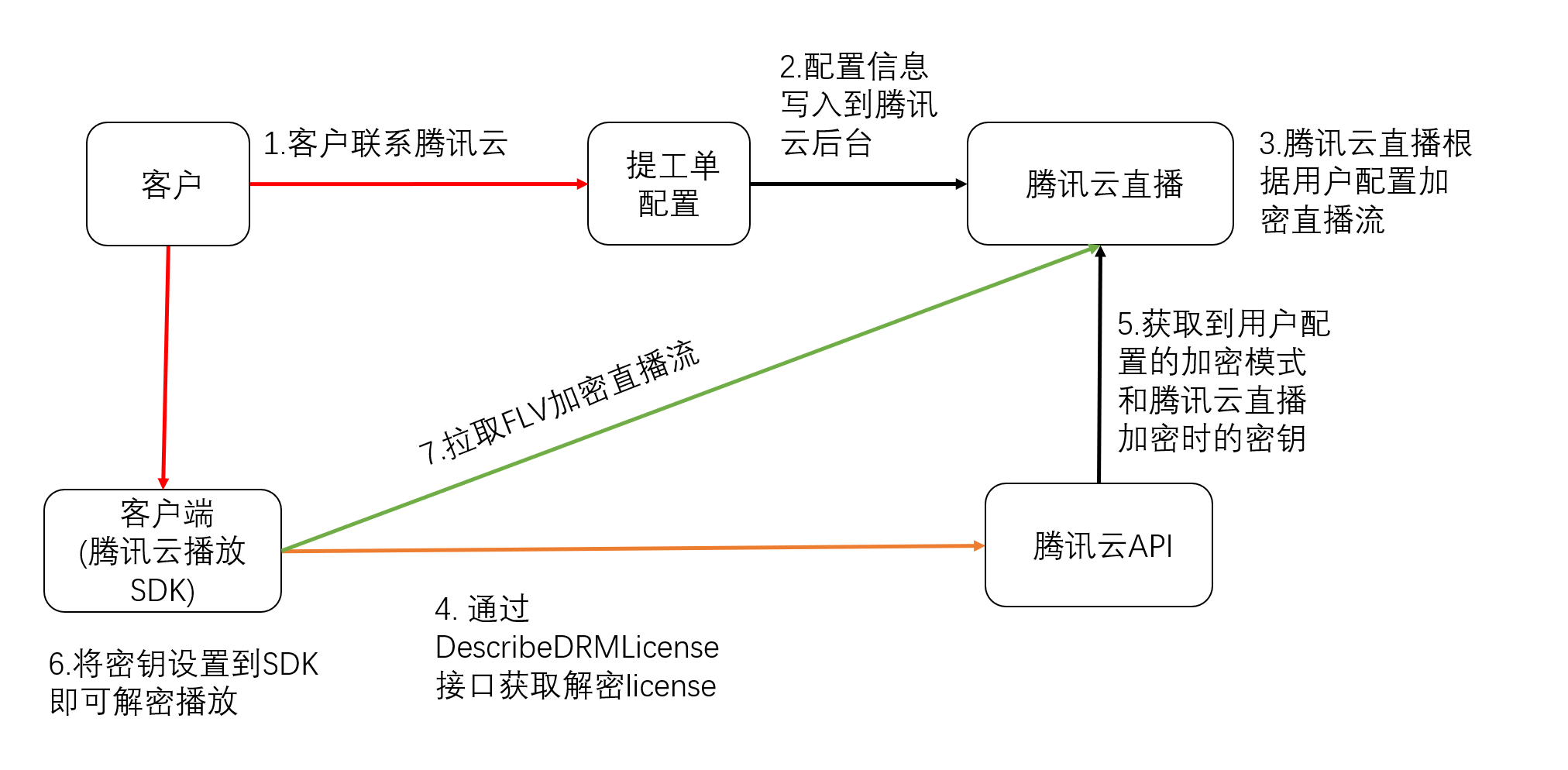
Implementation plan: Tencent Cloud CSS has developed its own stream encryption solution. Customers can request FLV encryption by submitting a ticket, specifying the encryption mode (video encryption, audio and video encryption), and Tencent Cloud will encrypt the live stream according to the specified module. When decrypting and playing, customers can obtain the TXEncryptionToken key field through the Tencent Cloud API interface DescribeDRMLicense request, add it to the playback URL parameters, and provide it to the playback SDK for decryption and playback.
The self-developed encryption and decryption process is as follows:


Implementation Method: For the specific implementation process, please contact Tencent Cloud sales or submit a ticket to contact Tencent Cloud CSS.
Advantages of the solution: The entire process is controllable, with product and tool support for keys and encryption/decryption. Tencent Cloud provides Player SDK, which is easy to integrate and has a mature solution.
Existing issues: The need to integrate the SDK, only supports custom-developed players. Web and browsers cannot play.

This solution provides two access methods for iOS and Android. Click here to download the SDK.

iOS Integration

/**
Create a Player Instance.
*/
V2TXLivePlayer *player = [[V2TXLivePlayer alloc] init];


/**
 * Set the video rendering View for the player. This control is responsible for displaying the video content.
 *
 * @param view Player Rendering View
 * @return Return Value {@link V2TXLiveCode}
 *         - V2TXLIVE_OK:Success
 */
[player setRenderView:view];


/**
 * Set the player callback.
 *
 * By setting the callback, you can listen to some callback events of the V2TXLivePlayer player,
 * This includes player status, playback volume callback, audio and video first frame callback, statistical data, warnings, and error information, etc.
 * @param observer The target object for the player's callback. For more information, please check {@link V2TXLivePlayerObserver}
 */
[player setObserver:self];


/**
* For key requests, please refer to License acquisition.
 * Set the Key
*
* @note The URL in the JSON must be the same as the URL in startLivePlay. The SDK performs a second validation through the URL to avoid incorrect decryption caused by a mismatch between the key and the URL.
*/
NSString *url = @"http://5000.liveplay.myqcloud.com/live/flvtest100_1000.flv?request_type=STDFLV&TXEncryptionToken=ZW5jTW9kZT01JmVuY0tleT0yNmFjZWIxMjViNDczMWNjODRkZTAxZWEyNDA3ZDVmZCZlbmNJVj1iZmEwYmI0NDRhN2NhNDUyMDRjMmNhNzZhYWQyMWFjNA==
";


/**
 * Start playing the audio and video stream.
 *
 * @param url The playback address of the audio and video stream, supporting RTMP, HTTP-FLV, TRTC,HLS。
 * @return Return Value {@link V2TXLiveCode}
 *         - V2TXLIVE_OK: Operation successful, start connecting and playing
 *         - V2TXLIVE_ERROR_INVALID_PARAMETER: Operation failed, the URL is not valid
 *         - V2TXLIVE_ERROR_REFUSED: RTC does not support pushing and pulling the same StreamId on the same device at the same time.
[player startLivePlay:url];

Android Integration

/**
 * Create a Player Instance.
*/
V2TXLivePlayer player = new V2TXLivePlayer();


/**
 * Set the video rendering View for the player. This control is responsible for displaying the video content.
 *
 * @param view Player rendering View
 * @return Return value {@link V2TXLiveCode}
 *         - V2TXLIVE_OK:Success
 */
player.setRenderView(view);


/**
 * Set the player callback. 
 *
 * By setting the callback, you can listen to some callback events of the V2TXLivePlayer player,
 * including player status, playback volume callback, audio and video first frame callback, statistical data, warnings, and error information, etc.
 *
 * @param observer the callback target object of the player,For more information, please refer to {@link V2TXLivePlayerObserver}
 */
player.setObserver(this);


/**
* For key request, please refer to License acquisition
 * Set the key
*
* @note The URL in the JSON must be the same as the URL in startLivePlay. The SDK performs a secondary verification through the URL to avoid the situation where the key and URL do not match, causing incorrect decryption.
*/
String url = "http://5000.liveplay.myqcloud.com/live/flvtest100_1000.flv?request_type=STDFLV&TXEncryptionToken=ZW5jTW9kZT01JmVuY0tleT0yNmFjZWIxMjViNDczMWNjODRkZTAxZWEyNDA3ZDVmZCZlbmNJVj1iZmEwYmI0NDRhN2NhNDUyMDRjMmNhNzZhYWQyMWFjNA==
";


/**
 * Start playing the audio and video stream. 
 *
 * @param url @param url The playback address of the audio and video stream, supporting RTMP, HTTP-FLV, TRTC, and HLS.
 * @return Return value {@link V2TXLiveCode}
 *         - V2TXLIVE_OK: Operation succeeded, start connecting and playing
 *         - V2TXLIVE_ERROR_INVALID_PARAMETER: Operation failed, the URL is not valid
 *         - V2TXLIVE_ERROR_REFUSED: RTC does not support pushing and pulling the same StreamId on the same device at the same time.。
 */
player.startLivePlay(url);


License Acquisition

Set the API interface name as DescribeDRMLicense.
Interface request domain: drm.tencentcloudapi.com.
Developers need to specify the DRM type value NORMALAES, and the Track type value SD for encryption, ContentType value LiveVideo, and ContentId as the user's stream id.
Example:
Test environment request:
POST / HTTP/1.1
Host: drm.tencentcloudapi.com
Content-Type: application/json
X-TC-Action: DescribeDRMLicense
<Public Request Parameters>

{
"DrmType":"NORMALAES",
"ContentId":"flvtest100",
"Tracks":[
"SD"
],
"ContentType":"LIVEVIDEO"
}

Request Result:
{
"Response": {
"ContentId": "flvtest100",
"TXEncryptionToken": "ZW5jTW9kZT01JmVuY0tleT0yNmFjZWIxMjViNDczMWNjODRkZTAxZWEyNDA3ZDVmZCZlbmNJVj1iZmEwYmI0NDRhN2NhNDUyMDRjMmNhNzZhYWQyMWFjNA==",
"RequestId": "47f336fd-b05a-4192-b1f4-8f9d4c5f76f1"
}
}


도움말 및 지원

문제 해결에 도움이 되었나요?

피드백