tencent cloud

Cloud Streaming Services

Release Notes and Announcements
Announcements
User Guide
Product Introduction
Overview
CSS Products
Concepts
Features
Use Cases
Strengths
Use Limits
Purchase Guide
Billing Overview
Basic Service Fee
Value-Added Service Fee
Prepaid plan
Purchase Process
Changing Billing Modes
Refund Policy
Viewing Bills
Renewal
Processing for Overdue Payments
Billing FAQs
Live Video Broadcasting (LVB)
Overview
Use Cases
Getting Started
SDK Integration
Live Event Broadcasting (LEB)
Overview
LEB Versus LVB
Use Cases
Getting Started
SDK Integration
Live Video Caster
Overview
Application Scenarios
Feature Area Introduction
Managing Live Video Caster
General Cloud Director
Configuring Program Lists and Automated Broadcasting
Console Guide
Console Overview
Overview
Domain Management
Stream Management
Package Management
AI Features
Feature Configuration
Relay
Billing Usage Statistics
Monitoring
Toolkit
OOTB live
CAM-Based Access Control
Feature Guide
Push and Playback
Features
Practices in Typical Scenarios
Cloud Native Recording
Live Streaming Security
Global CSS Service
Callback Notifications
User Guides for Common Third-Party Tools
SDK Guide
0. SDK Integration Guide
1. Stream Push
2. Playback
3. Advanced Features
API Documentation
History
Introduction
API Category
Making API Requests
Live Pad APIs
Live Stream Mix APIs
Time Shifting APIs
Monitoring Data Query APIs
Billing Data Query APIs
Live Transcoding APIs
Delayed Playback Management APIs
Domain Name Management APIs
Watermark Management APIs
Certificate Management APIs
Stream Pulling APIs
Recording Management APIs
Live Callback APIs
Screencapturing and Porn Detection APIs
Authentication Management APIs
Live Stream Management APIs
Data Types
Error Codes
Ops Guide
Video Stuttering
Troubleshooting Push Failure
Troubleshooting Playback Failure
CLS Assists in Live Stream Troubleshooting
Troubleshooting High Latency
Troubleshooting Poor Quality of Pulled Video
Authorizing CSS to Store Screenshots in a COS Bucket
Troubleshooting
Live Stream Mixing Error `InvalidParameter.OtherError`
About Pushing
Generating Push URLs
PC Push
Playing Method
Web Player
Live Streaming Quiz
FAQs
Service Region
Live Streaming Basics
Push and Playback
CSS Billing
Global CSS Service
Live Recording
On-Cloud Stream Mix
Domain Configuration
Related to Live Video Caster
Compatibility with Apple ATS
Difference Between Stream Interruption and Stream Suspension
SLA
CSS Service Level Agreement
CSS Policy
Privacy Policy
Data Processing And Security Agreement
Glossary

Overview

PDF
Focus Mode
Font Size
Last updated: 2025-11-12 15:39:29
This document describes how to import advanced live streaming features into your program.

AV1 Video Playback

AV1 is an open-source and royalty-free video compression format. Compared with its predecessor H.265 (HEVC) encoding, it can further reduce the bitrate by over 30% while maintaining the same level of image quality. This means that it can deliver a higher image quality at the same bandwidth. Currently, CSS supports AV1 encoding. However, to play back AV1 videos, your player must support decoding the AV1 format. You can implement AV1 decoding in your own player as follows:

Container format and distribution protocol

Tencent Cloud has implemented a proprietary extension to AV1 in FLV in T-FFmpeg. To modify your player, you can extend the code based on the patch files of T-FFmpeg. For more information, see tencentyun/AV1.

Decoding

Hardware decoding
Software decoding
On PC, almost all new models of AMD, Intel, and Nvidia GPUs support AV1 hardware decoding. Device models supporting AV1 hardware decoding are as listed below:
Type
Brand
Processor
Mobile phone
Realme X7 Pro
Dimensity 1000+
OPPO Reno5 Pro
Dimensity 1000+
HONOR V40
Dimensity 1000+
Redmi K30 Ultra
Dimensity 1000+
Vivo iQOO Z1
Dimensity 1000+
Redmi Note 10 Pro
Dimensity 1000+
Vivo S9
Dimensity 1100
Realme Q3 Pro
Dimensity 1100
Vivo S10
Dimensity 1100
Vivo S12
Dimensity 1100
Vivo S12 Pro
Dimensity 1200
OPPO Reno6 Pro
Dimensity 1200
OPPO Reno7 Pro
Dimensity 1200
Redmi K40 Pro
Dimensity 1200
Realme GT NEO
Dimensity 1200
HONOR X20
Dimensity 1200
OnePlus Nord 2
Dimensity 1200
Realme GT NEO 2
Dimensity 1200
OPPO K9 Pro
Dimensity 1200
OPPO Find X5 Pro Dimensity Edition
Dimensity 9000
Redmi K50
Dimensity 9000
Galaxy S21 (Exynos Edition)
Exynos 2100
Galaxy S22 (Exynos Edition)
Exynos 2200
TV
Samsung Q950TS QLED 8K TV
-
av1d (Tencent Cloud's optimized AV1 decoder, which outperforms dav1d and can provide closed-source libraries. You can integrate it as instructed in av1d Integration Guide. T-FFmpeg provides FFmpeg patches to be integrated and av1d libraries.)
dav1d
libgav1
Android 10.0 integrates an AV1 decoder.
The Chrome family supports AV1 decoding.

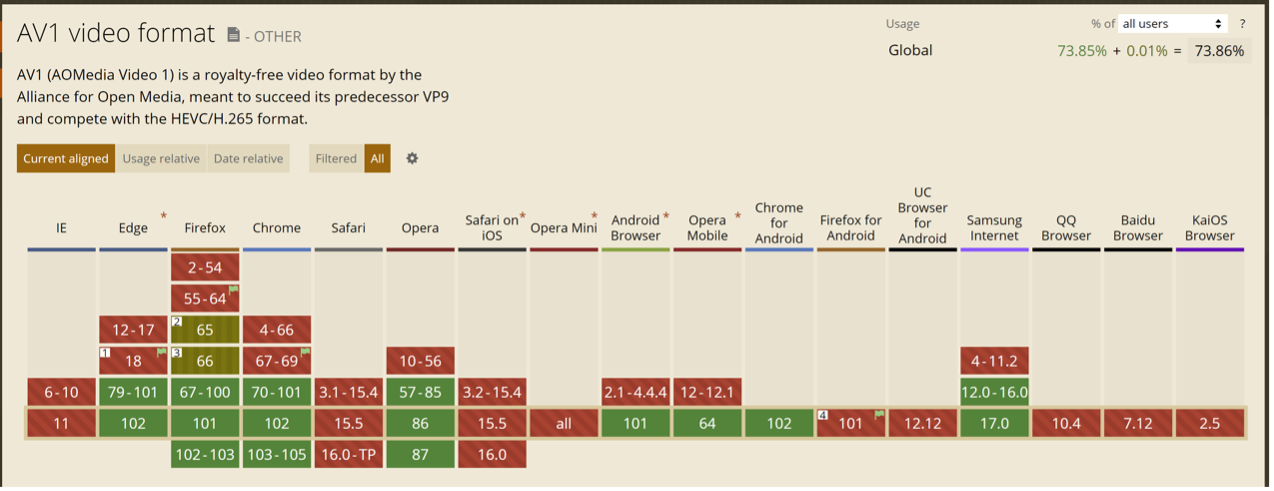
Support by browsers

The Chrome family supports AV1 decoding while browsers on iOS don't.


Note:
The above information was collected from this website in July 2022. To view the latest information, please visit the website.

TMIO SDK

The TMIO SDK customizes, encapsulates, and optimizes streaming media protocols such as SRT and QUIC. It safeguards upstreaming and implements low-latency transfer with a high packet loss prevention rate, multi-linkage transfer optimization, and the retransmission timeout (RTO) mechanism. It promises wide application in scenarios that require a high data source stability and long-range transfer.

Feature description

The TMIO SDK is suitable for long-range transfer and the radio and TV industry.
The TMIO SDK supports mainstream platforms, including Android, iOS, Windows, macOS, and Linux.

Integration method

You can integrate the SDK as instructed in Integration Steps.

libLebConnection SDK

The libLebConnection SDK provides upgraded transfer capabilities based on the native WebRTC. It allows you to connect your existing player to LEB with just a few simple modifications. Based on LVB-compatible stream push and cloud-based media processing capabilities, it can implement live streaming at a low latency even under high concurrency, so as to help you smoothly migrate from standard LVB streaming to low-latency LEB streaming. For large rooms in modern real-time communication (RTC) scenarios, it can also help you quickly implement relayed live streaming at low costs and low latency.

Feature description

The libLebConnection SDK can pull audio/video streams at a low latency even under poor network conditions.
It can play back H.264. H.265, and AV1 videos with B frames and output them as raw video frame data such as Annex B and OBU files for H.264/H.265 and AV1 input videos respectively.
It can play back AAC and Opus audios and output them as raw audio frame data.
It supports Android, iOS, Windows, Linux, and macOS.

Integration method

You can integrate the libLebConnection SDK as instructed in Integrating libLebConnection SDK into a Player.

Beauty filters and special effects

To integrate beauty filters and special effects and import beauty filters, image filters, and stickers during live streaming, you can integrate the Tencent Effect SDK.

Integration into an application

Download the Tencent Effect SDK here and integrate it as instructed in the iOS and Android integration guides.

More

Using the Tencent Effect SDK will incur fees. For billing details, see Pricing Overview.

Help and Support

Was this page helpful?

Help us improve! Rate your documentation experience in 5 mins.

Feedback