You: Any person or organization that uses CSS and owns a Tencent Cloud account.
User: The end users of a CSS customer, mostly audience members.
Aspects of Live Content Protection
Aspect
Description
Hotlink protection
Without hotlink protection, anyone can use your playback URL. Many playback URLs use similar formats, for example, Protocol:\\\\Playback domain\\AppName\\Stream ID. If others figure out your URL format, they may splice playback URLs to play all your streams. This exposes your content, and you have to pay for the traffic consumed by unauthorized playback.
Playback access control
In some scenarios, only users that meet certain conditions should be allowed to view live content, for example, subscribers, logged-in users, or users who have purchased your product.
Playback restrictions for copyrighted content
For copyrighted content, for example, content produced by a film studio or TV network, playback must be limited to safe and trusted environments.
Confidentiality
Only specific viewers should be allowed to view confidential content.
The list above describes some of the different aspects that need to be considered when protecting your live content. The next part of this document introduces CSS’ content protection solutions, starting from the simplest to the most sophisticated. CSS ensures content security using two main methods. One is restricting the use and distribution of playback URLs, and the other is content encryption. The former is relatively easy to implement, but the latter depends on the player and may have requirements for hardware and the operating system as well.
Below are some commonly used content protection solutions for live streaming and their implementation methods.
Referer authentication
Use case: You can use this solution if you do not have high requirements for content security and only want to limit playback to some degree.
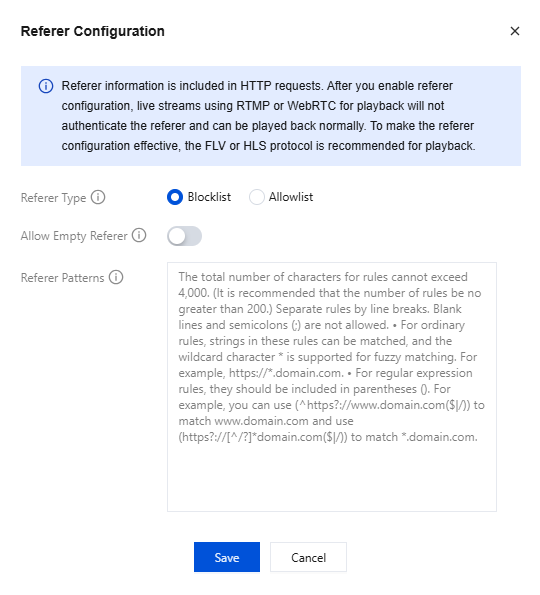
Implementation: Log in to the CSS console and select Domain Management on the left sidebar. Click your playback domain, select the Access Control tab, toggle on Referer, and enter the required information in the pop-up window.
Pros: Easy to implement (can be configured in the console)
Cons: The referer field in a playback request URL can be modified and forged. Others will be able to circumvent your restrictions if they know your referer settings.
IP blocklist/allowlist
Use case: You can use this solution if you want to allow access for or block specific public IP addresses.
Implementation: Log in to the CSS console and select Domain Management on the left sidebar. Click your playback domain and select the Access Control tab. In the IP allowlist/blocklist area, toggle on Status, and enter the IP addresses you want to allow or block in the pop-up window.
Pros: Easy to implement (can be configured in the console); others cannot forge their IP addresses and therefore cannot circumvent the restrictions.
Cons: The public IP addresses of the viewers you want to allow or block are not easy to obtain and are subject to changes.
Key authentication
Use case: You can use this solution if you want to prevent hotlinking.
Implementation: Log in to the CSS console and select Domain Management on the left sidebar. Click your playback domain and select the Access Control tab. In the Key Authentication area, toggle on Playback Authentication, and enter the key information in the pop-up window. After configuration, a playback request URL will include txTime and txSecret, and Tencent Cloud will use the key to decrypt txTime and authenticate the request. For more information, see Hotlink Protection URL Calculation.
Pros: Easy to implement (you only need to enable key authentication in the console and generate txTime and txSecret as instructed in the above document)
Cons: Before a playback URL expires, anyone who has the URL can play your content. This makes hotlinking possible. The longer the validity period, the more likely your content will be hotlinked. However, if you set a short validity period, the playback URL may have already expired by the time viewers get it. Also, if playback is interrupted due to network fluctuations or other reasons, to resume playback, viewers may need to obtain a new playback URL. The recommended validity period for a playback URL is 24 hours.
Key + Remote authentication
To prevent hotlinking caused by viewers playing your live streams from unauthorized channels, you can perform additional authentication using a custom token on top of key authentication.
Use case: You can use this solution if you want to limit playback to viewers that meet certain conditions, for example, subscribers or logged-in users.
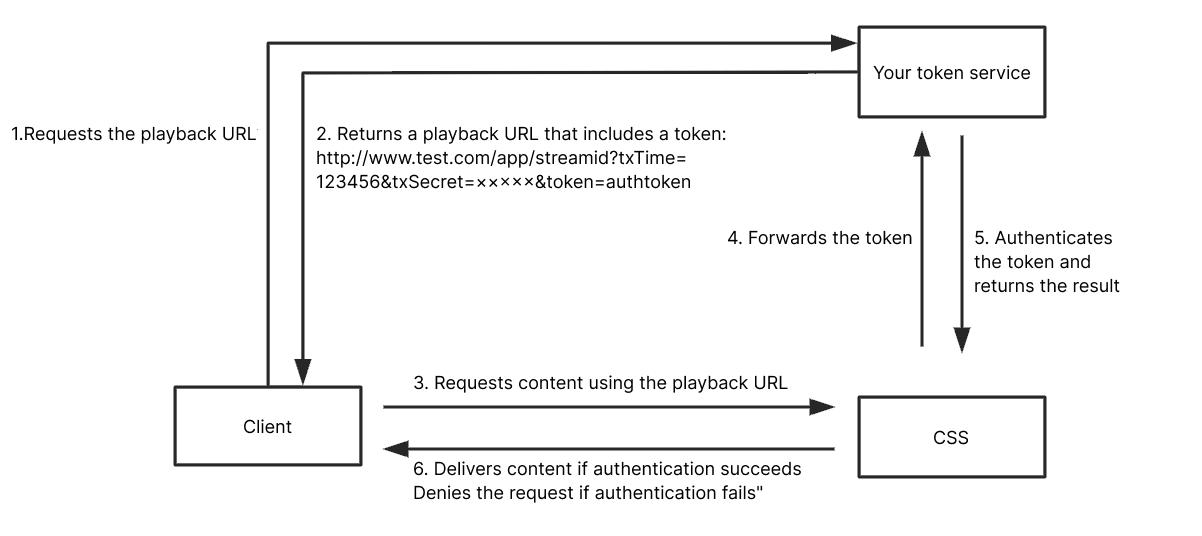
How it works: After authenticating txSecret, Tencent Cloud will call a server API to forward the playback request to your token service. Your token service will authenticate the token in the request and return the result to Tencent Cloud. This allows you to determine whether to allow a playback request.
1.1 A request is sent to your server (token service) for the playback URL.
1.2 Your server will validate the request and send the playback URL. The URL will include Tencent Cloud’s txSecret and your token. We recommend you set a short validity period for txSecret, for example, five minutes.
1.3 Viewers will use the playback URL to request live content from CSS.
1.4 CSS will authenticate txSecret and forward the request, which includes the token, to your token service.
1.5 Your token service will authenticate the token in the request and return the result. The status code 200 indicates the request is allowed. Other codes indicate the request is denied.
1.6 CSS determines whether to deliver content to a client based on the result.
Implementation: Enable key authentication and remote authentication. For detailed directions, please contact sales or submit a ticket.
Pros: You can determine what kind of users can view your content.
Cons: You need to develop your own token distribution service. What’s more, because live streams are not encrypted, viewers with access to your content can record the streams or forward them in real time. Hackers can also steal your content.
Referer authentication/UA blacklist/whitelist combined with IP allowlist/blocklist and Remote authentication
To prevent piracy caused by bypassing authentication through forged Referer/UA content, a more secure anti-hotlinking mechanism can be provided by combining IP allowlist/blocklist and remote authentication methods on top of Referer/UA authentication.
Applicable scenarios:Suitable for live streaming platforms with a large and active user base, such as large live streaming platforms and online education platforms.
Implementation plan:
With Referer blacklists and whitelists already enabled, Operation Analysis can be used to further analyze whether there are client IPs with abnormal traffic, and IP allowlists/blocklists can be configured for these abnormal client IPs.
Implement Remote Authentication by developing a business authorization server to enforce request rate limiting for client IPs based on specific business scenarios.
If the business has an account system, a user ID and a user ID verification token (to prevent fake user IDs) can be added to the playback address, and more complex frequency limiting can be implemented in combination with the user ID.
Pros:Multi-layered protection can complement each other; even if one layer of protection is breached, the other layers can still provide protection.
Cons:Customers need to develop their own business authentication services.
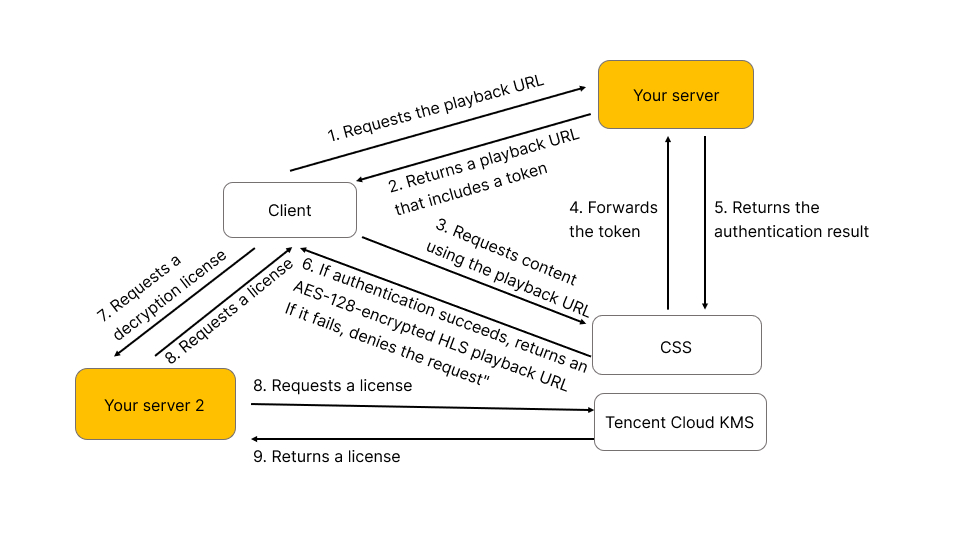
In addition to key and remote token authentication, you can also encrypt HLS TS segments using the AES-128 algorithm.
Use case: You can use this solution if you use the HLS protocol for playback and want to prevent hackers from stealing your content to protect the copyright of your content or keep your content confidential or private.
How it works: HLS TS segments are encrypted using the AES-128 method.
Implementation: Enable key authentication and remote authentication. For detailed directions, please contact sales or submit a ticket.
Pros: This solution is easy to implement. The combination of key and remote token authentication offers extra protection. What's more, because AES-128 is a standard encryption method for HLS, any player that supports HLS also supports AES-128. The decryption capability is built into players. There are also well-established key management services for this solution.
Cons: This solution is only applicable to HLS playback.
DRM scheme
You can encrypt your content using DRM solutions recognized in and outside China, such as Apple’s FairPlay DRM, Google’s Widevine DRM, and ChinaDRM. To use these DRM solutions, you need to request a certificate, which is used to manage identity information and the key used to encrypt/decrypt content, as well as set limits for the use of keys.
Use case: You can choose this scheme if the copyright owner specifically requires that their content be encrypted using recognized DRM solutions.
How it works: Currently, CSS only supports Apple’s FairPlay DRM and Google’s Widevine DRM. More solutions will be supported in the future.
Implementation: For detailed directions, please contact sales or submit a ticket.
Pros: The protection level is relatively high because decryption relies on the operating system or hardware. What’s more, the solutions offer flexible access control. For example, you can limit playback to the first 10 minutes of a video.
Cons: The solutions are only applicable to HLS or DASH playback. The implementation process is somewhat complicated. You need to request a certificate and integrate a DRM component into your player. What’s more, the solutions have limited browser support. FairPlay supports only HLS and playback is only possible on iOS and macOS. Widevine may support browsers that are not based on Chromium, such as Firefox, but a CDM module needs to be loaded separately, which compromises playback smoothness. Parts of the implementation process (license requesting and encryption/decryption) are carried out in black box, making it difficult to debug and improve compatibility.
Tencent Cloud’s proprietary encryption scheme
Most live streams with requirements for privacy or content security do not really need hardware-based protection. Nor is the complicated certificate distribution and authentication process necessary. Given this, we offer a content protection solution for FLV playback.
Use case: You can use this solution if your live streams are in FLV format and you want to encrypt them to prevent hackers from stealing your content.
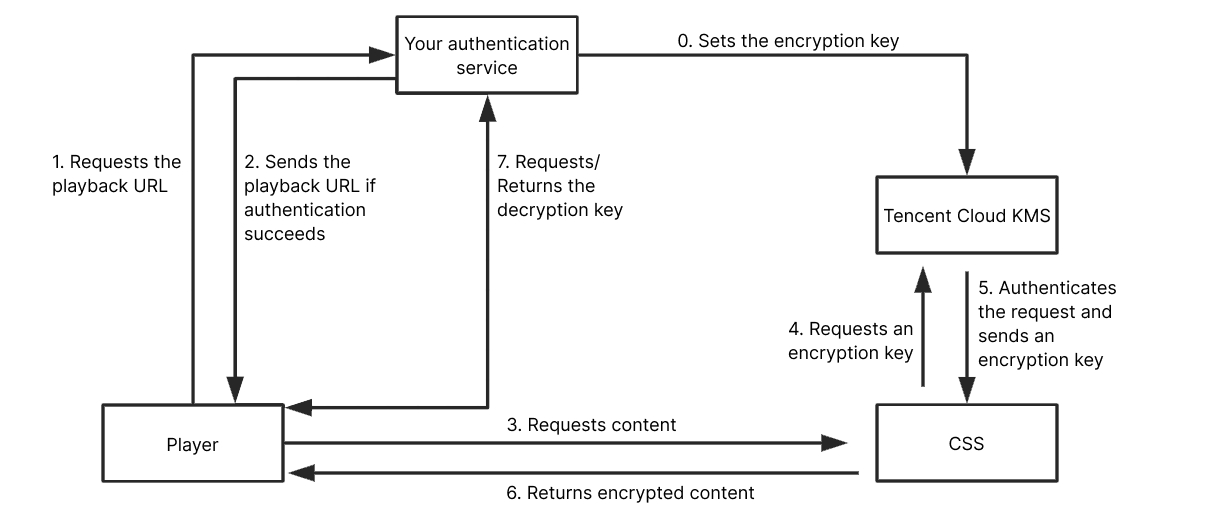
How it works: You set an encryption key. CSS uses the key to encrypt your streams. When a viewer requests to play your streams, you authenticate the request and distribute a decryption key to the client. This process is similar to the AES-128 encryption/decryption process.
The process is as follows:
Implementation: For detailed directions, please contact sales or submit a ticket.
Pros: You have control over the entire process, and there are key management services and encryption/decryption tools to support this solution. Tencent Cloud’s Player SDK is easy to integrate.
Cons: You need to integrate an SDK into your project in order to use this solution. What’s more, this solution does not work for browsers. You need to use your own player.
Comparison
Solution
How It Works
Features
Cons
Implementation
Recommended
Referer authentication
Authenticates the referer field in an HTTP request
Quick and easy to implement.
The referer content can be forged.
Very simple
IP blocklist/allowlist
Allows or blocks specific IP addresses
Quick and easy to implement.
The IP addresses of viewers are difficult to obtain and are subject to changes.
Very simple
Key authentication
Encrypts and authenticates a playback URL
Quick and easy to implement.
A long validity period for `txSecret` may result in hotlinking, while a short validity period means viewers may have to obtain a new playback URL frequently.
Very simple
Key authentication + Remote authentication
Playback URLs are encrypted and both CSS and your server authenticate the URLs.
Easy to implement and relatively strong protection against hotlinking, but you need to develop your own token service.
-
Simple
Referer authentication/UA blacklist/whitelist combined with IP allowlist/blocklist and Remote authentication
It authenticates HTTP requests using Referer/UA and also authenticates the accessing IP address, providing customers with a self-authentication process.
Easy to implement and relatively strong protection against hotlinking,Customer cooperation is required to develop authentication services.
-
Simple
HLS encryption
Encrypts playback URLs as well as live streams
Easy to implement, but you need to develop your own token service.
Only applicable to HLS, not FLV
Simple
DRM scheme
Encrypts live streams (you can also encrypt playback URLs); supports software- and hardware-based protection.
Somewhat complicated. You need to develop your own player and there may be compatibility issues.
Difficult to implement, with compatibility issues (different solutions are required for iOS and Android).
Complicated
Proprietary encryption scheme
Encrypts content as well as playback URLs
Somewhat complicated. You need to develop your own player, but you have control over the entire process.
You need to comply with Tencent Cloud’s communication protocol. This solution cannot be used on browsers.