This document describes how to create alarm policies and associate alarm objects in the Tencent Cloud Observability Platform (TCOP) console.
Overview
You can create alarm policies to trigger alarms and send alarm notifications when the Tencent Cloud service status changes. The created alarm policies can determine whether an alarm needs to be triggered according to the difference between the monitoring metric value and the given threshold at intervals.
You can take appropriate precautionary or remedial measures in a timely manner when the alarm is triggered by changed product status. Therefore, properly created alarm policies can help you improve the robustness and reliability of your applications. For more information on alarms, see Creating Alarm Policy in TCOP.
To send an alarm for a specific status of a product, you need to create an alarm policy at first. An alarm policy is composed of three compulsory components, that is, the name, type and alarm triggering conditions. Each alarm policy is a set of alarm triggering conditions with the logical relationship "OR", that is, as long as one of the conditions is met, an alarm will be triggered. The alarm will be sent to all users associated with the alarm policy. Upon receiving the alarm, the user can view the alarm and take appropriate actions in time.
Note:
Make sure that you have set the default alarm recipient; otherwise, no notifications will be sent based on the default alarm policy of TencentDB.
Directions
Creating an alarm policy
1. Log in to the TCOP console, and choose Alarm Management > Alarm Configuration in the left sidebar.
2. In the alarm policy list, click Create.
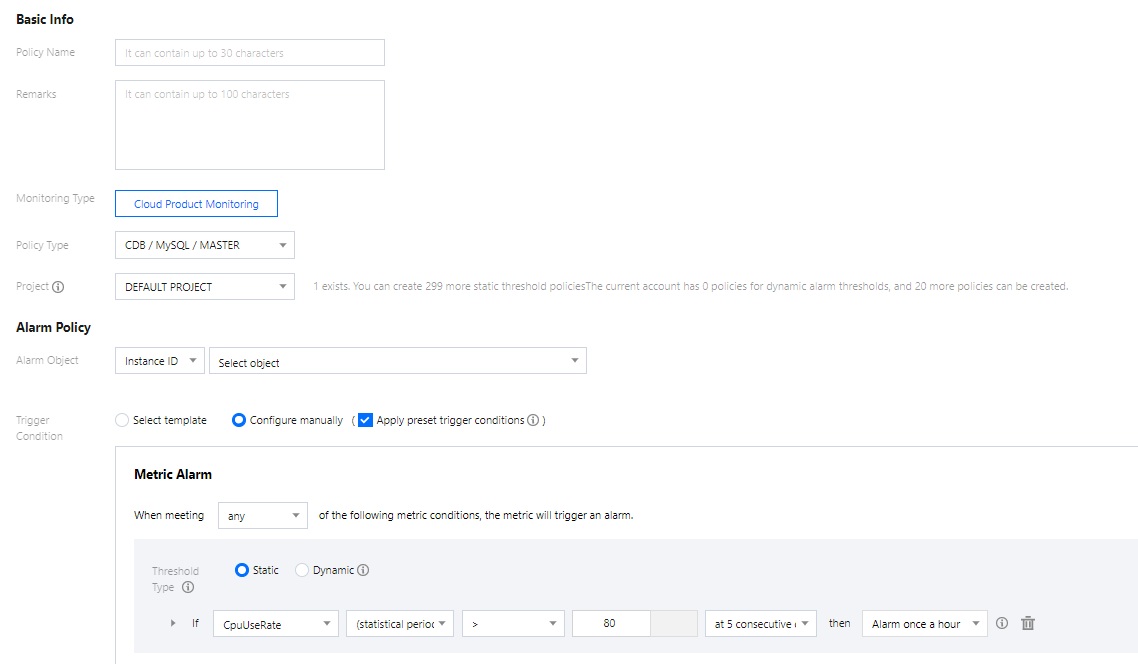
3. On the Create Alarm Policy page, set the policy name, policy type, alarm object, and trigger condition.
Policy Type: It divides into source monitoring and replica monitoring, which are applicable to different types of instances.
Deploy monitoring on the source: When the monitored instance is a source instance which is not a replica of any instance, replication-related monitoring data is invalid for the source, and the IO and SQL threads are disabled. Replication-related monitoring data is valid and the IO and SQL threads can be enabled only when the monitored instance is a disaster recovery or a read-only instance.
Deploy monitoring on the replica: The two-node or three-node source instance and disaster recovery instance come in a source/replica architecture by default. As a result, replication-related monitoring data is valid for the replica only when the monitored instance is a source or disaster recovery instance. Such monitoring data can reflect the replication delay distance and time between the source or disaster recovery instance and its hidden replica nodes. We recommend that you keep an eye out for such monitoring data of the replica. If the source or disaster recovery instance fails, its monitored hidden replica nodes can be promoted to the source instance quickly.
Alarm Object: The instance to be associated with the policy alarm. You can find the desired instance by selecting the region where it is located or searching for its ID.
Trigger Condition: An alarm trigger is a semantic condition composed of metric, comparison, threshold, statistical period, and duration. For example, if the metric is disk utilization, the comparison is >, the threshold is 80%, the statistical period is 5 minutes, and the duration is two statistical periods, then the data on disk utilization of a database will be collected once every five minutes, and an alarm will be triggered if the disk utilization exceeds 80% for two consecutive times.
Configure Alarm Notification: You can select a preset or custom notification template. Each alarm policy can be bound to three notification templates at most. For more information, see Creating Notification Template.
4. After confirming that everything is correct, click Complete.
Associating an alarm object
After the alarm policy is created, you can associate some alarm objects with it. When an alarm object satisfies an alarm trigger condition, an alarm notification will be sent.
1. In the alarm policy list, click the name of an alarm policy to enter the alarm policy management page.
2. Click Add Object in the Alarm Object section.
3. In the pop-up window, select the target alarm object and click OK to associate it with the alarm policy.
FAQs
How can I configure the source-replica delay monitoring?
You can do so by following the steps below based on the actual scenarios.
Scenario 1: Configure source-replica delay monitoring for the source instance
1.1 Log in to the TCOP console select Alarm Policy under Alarm Management module on the left sidebar, and click Create Policy on the Policy Management tab.
1.2 On the Create Alarm Policy page, select Policy Type: Cloud Database > MySQL > Replica Monitoring.
Note:
When configuring source-replica delay monitoring for the source instance, you must select replica monitoring as the policy type, so that the delay information from the replica to the source is monitored.
1.3 Complete the trigger condition settings for the monitoring items "Source-Replica Delay (in MB)" and "Source-Replica Delay (in Seconds)" as well as other configuration items as needed, and click Complete.
1.4 After the setting is completed, the alarm can be triggered when the monitoring items "Source-Replica Delay (in MB)” and "Source-Replica Delay (in Seconds)" meet the trigger conditions.
Scenario 2: Configure source-replica delay monitoring for the read-only and disaster recovery instances
1.1 Log in to the TCOP console select Alarm Policy under Alarm Management module on the left sidebar, and click Create Policy on the Policy Management tab.
1.2 On the Create Alarm Policy page, select Policy Type: Cloud Database > MySQL > Host Monitoring.
Note:
When configuring source-replica delay monitoring for the read-only instance, you must select host monitoring as the policy type, so that the delay information from the read-only instance to the source instance is monitored.
?When configuring source-replica delay monitoring for the disaster recovery instance, you can select host monitoring as the policy type, so that the delay information from the disaster recovery instance to the source instance is monitored. If you select replica monitoring as the policy type, then the delay information from the replica of the disaster recovery instance to the disaster recovery instance is monitored.
1.3 Complete the trigger condition settings for the monitoring items "Source-Replica Delay (in MB)" and "Source-Replica Delay (in Seconds)" as well as other configuration items as needed, and click Complete.
1.4 After the setting is completed, the alarm can be triggered when the monitoring items "Source-Replica Delay (in MB)” and "Source-Replica Delay (in Seconds)" meet the trigger conditions.