tencent cloud

TencentDB for MySQL

Release Notes and Announcements
Release Notes
Product Announcements
User Tutorial
Product Introduction
Overview
Strengths
Use Cases
Database Architecture
Resource Isolation Policy
Economical Instance
Feature List
Database Instance
High Availability (Multi-AZ)
Regions and AZs
Service Regions and Service Providers
Kernel Features
Overview
Kernel Version Release Notes
Functionality Features
Performance Features
Security Features
Stability Features
TXRocks Engine
LibraDB Engine
Checking and Fixing Kernel Issues
Purchase Guide
Billing Overview
Selection Guide
Purchase Methods
Renewal
Payment Overdue
Refund
Pay-as-You-Go to Monthly Subscription
Instance Adjustment Fee
Backup Space Billing
Database Audit Billing Overview
Commercial Billing and Activity Description for Database Proxy
Description of the Database Proxy Billing Cycle
Viewing Bills
Getting Started
Overview
Creating MySQL Instance
Connecting to MySQL Instance
SQL Insight (Database Audit)
Overview
Viewing Audit Instance List
Enabling Audit Service
Viewing Audit Log
Log Shipping
Configuring Post-Event Alarms
Modifying Audit Rule
Modifying Audit Services
Disabling Audit Service
Audit Rule Template
SQL Audit Rule (Legacy)
Viewing Audit Task
Authorizing Sub-User to Use Database Audit
MySQL Cluster Edition
Introduction to TencentDB for MySQL Cluster Edition
Creating TencentDB for MySQL Cluster Edition Instance
Maintenance Management Instance
Viewing Instance Monitoring
Adjusting Instance Configuration
Operations for Other Features
Migrate or upgrade to TencentDB for MySQL Cluster Edition
Operation Guide
Use Limits
Operation Overview
Instance Management and Maintenance
Instance Upgrade
CPU Elastic Expansion
Read-Only/Disaster Recovery Instances
Database Proxy
Database Management Center (DMC)
Account Management
Parameter Configuration
Backup and Rollback
Data Migration
Network and Security
Monitoring and Alarms
Log Center
Read-Only Analysis Engine
Tag
Practical Tutorial
Using TencentDB for MySQL to Upgrade MySQL 5.7 to MySQL 8.0
Methods and Instructions for Upgrading from MySQL 5.6 to MySQL 5.7
Cybersecurity Classified Protection Practice for Database Audit of TencentDB for MySQL
Building All-Scenario High-Availability Architecture
Usage Specifications of TencentDB for MySQL
Configuring Automatic Application Reconnection
Impact of Modifying MySQL Source Instance Parameters
Limits on Automatic Conversion from MyISAM to InnoDB
Creating VPCs for TencentDB for MySQL
Enhancing Business Load Capacity with TencentDB for MySQL
Setting up 2-Region-3-DC Disaster Recovery Architecture
Improving TencentDB for MySQL Performance with Read/Write Separation
Migrating Data from InnoDB to RocksDB with DTS
Building LAMP Stack for Web Application
Building Drupal Website
Calling MySQL APIs in Python
The primary and secondary instances have inconsistent query data
White Paper
Performance White Paper
Security White Paper
Troubleshooting
Connections
Performance
Instance Data Sync Delay
Failure to Enable Case Insensitivity
Failure to Obtain slow_query_log_file via a Command
API Documentation
History
Introduction
API Category
Instance APIs
Making API Requests
Data Import APIs
Database Proxy APIs
Database Audit APIs
Security APIs
Task APIs
Backup APIs
Account APIs
Rollback APIs
Parameter APIs
Database APIs
Monitoring APIs
Log-related API
Data Types
Error Codes
FAQs
Related to Selection
Billing
Backup
Rollback
Connection and Login
Parameter Modifications
Instance Upgrade
Account Permissions
Performance and Memory
Ops
Data Migration
Features
Console Operations
Logs
Event
Database audit
Instance Switch Impact
API 2.0 to 3.0 Switch Guide
Service Agreement
Service Level Agreement
Terms of Service
Reference
Standards and Certifications
Contact Us
Glossary

Enabling Public Network Address

PDF
Focus Mode
Font Size
Last updated: 2026-03-23 17:33:18
TencentDB for MySQL supports enabling the public network connection address. Once enabled, it facilitates daily testing and management, enhancing the convenience of development and use. This document describes the public network addresses and how to manually enable or disable them in the TencentDB for MySQL console.
After enabling the public network addresses, you can use the system-assigned domain name and port to access TencentDB for MySQL instances from the public network. For related operations, see Connecting to Database via Public Network Address.
Note:
Failures of public network access will not be counted in the overall availability calculation of the TencentDB for MySQL service.
Public network access to your TencentDB for MySQL instance poses a risk to its security, hence it is advisable to employ it solely for administrative purposes, testing, or auxiliary database management. The availability of the Service Level Agreement (SLA) cannot be ensured in this context. For business access, please select private network access.
It is recommended that you use public domain names rather than IP addresses for access. Because the adjustment in database instance specifications, the reactivation of public network, and the network upgrade may lead to changes in the public IP addresses. Accessing via public domain names ensures minimal impact on your operations, without the need of application modification.

Explanation of New Public Network Architecture Upgrade

1. New Architecture Release Time

To enhance the security and reliability of databases' public network links, in May 2024, Beijing Time (UTC+8) , TencentDB for MySQL released a new public network architecture, which adopted Cloud Load Balancer (CLB) as its underlying structure.

2. Comparison of New and Old Architectures

Item
Old Public Network Architecture
New Public Network Architecture (CLB)
Architecture differences
The old public network architecture adopts single-point deployment, resulting in slow recovery and a lack of high availability in case of a single point of failure.
The new public network architecture can extend the service capability of an application system through traffic distribution, improving the availability of the application system by eliminating single points of failure.
Whether product integration involved
No.
Yes. After the public network is enabled, the system will automatically create a free, simple CLB instance in the same region in the CLB console to provide public network capabilities.


3. Precautions

Currently, after the public network is enabled for TencentDB for MySQL instances, they adopt the CLB architecture. The system will automatically create a free, simple CLB instance in the same region in the CLB console to provide public network capabilities. Note the policies of the CLB architecture (as shown in the table below). If you have higher performance requirements, you can also directly purchase CLB.
Classification
Number of Concurrent Connections
Number of New Connections
Packet Volume
Inbound Bandwidth
Outbound Bandwidth
CLB
2000
200/s
Unlimited
20 Mbps
20 Mbps

Note:
The CLB instance automatically created upon enabling the public network address can be tried for free.
After disabling the public network address, the corresponding CLB instance on the CLB console will be automatically deleted.
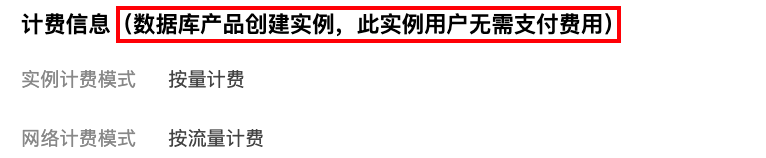
Activating the Public network capabilities for TencentDB for MySQL instances is complimentary. However, the activation process includes a verification of the account's financial status. Should the account be in arrears (This means that the account balance is less than 0), activation will not be possible. To enable Public network functionalities, please ensure your account is not in a state of indebtedness. Upon successful activation, the CLB instance automatically created as a result of enabling the Public network will incur no charges.
Starting mid-May 2024, the CLB health check source IP will be in the 100.64.0.0/10 subnet. Once the public network is enabled, if your simple CLB instance shows an abnormal health status, you can allow the 100.64.0.0/10 subnet in the security group settings for your TencentDB for MySQL instance to resolve the issue of failed health checks causing the CLB instance to display an abnormal health status. Please refer to Manage Cloud Database Security Groups for operations.

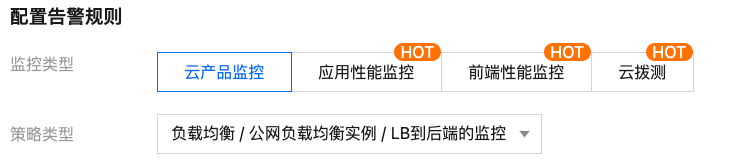
You need to configure monitoring and alarms for the above-mentioned simple CLB instances, to monitor public network connections through metrics (such as the number of new public network connections established, number of public network connections, public network outbound bandwidth, and public network inbound bandwidth) after enabling the public network address. Refer to Alarm Policy for operation steps, and select the policy type as shown in the following figure.


Use Limitations

Currently, the primary instance regions of Guangzhou, Shanghai, Beijing, Chengdu, Chongqing, Nanjing, Hong Kong (China), Singapore, Seoul, Tokyo, Silicon Valley, Virginia, Frankfurt, Jakarta and Riyadh support enabling the public network. For regions where read-only instances can enable the public network, refer to the console. If your instance's region does not support enabling but requires the public network, see Enable Public Network Access through CLB to access TencentDB for MySQL instance via the public network.

Enabling the Public Network Address

1. Log in to the TencentDB for MySQL console. In the instance list, click an Instance ID or Manage in the Operation column to access the instance details page.
2. Under Public IP Address on the instance details page, click Enable.

3. In the pop-up window, click OK.
Note:
After successful enabling, you may access TencentDB for MySQL via the public network by using the domain name and port assigned by the system. Note that it may take approximately 5 minutes for the change to take effect.

Disabling the Public Network Address

Note:
After disabling, you will no longer be able to access TencentDB for MySQL via the public network by using the domain name and port assigned by the system. Furthermore, the domain will be released. We cannot guarantee that the domain will remain unchanged if reapplied. Ensure that your system does not use the public network access address to avoid unnecessary losses.
When the public network is disabled, the Cloud Load Balancer (CLB) instances that support this public network capability will be synchronously taken offline within 3 to 5 minutes.
1. Log in to MySQL Console, in the Instance List, click Instance ID or Manage in the Operation column to enter the Instance Details page.
2. On the Instance Details page, click Disable behind the Public IP Address.
3. In the pop-up window, confirm that everything is correct, and click OK.
4. Return to the Instance Details page, the Public IP Address will no longer display the public network address, indicating that the public network feature is turned off.

Help and Support

Was this page helpful?

Help us improve! Rate your documentation experience in 5 mins.

Feedback