tencent cloud

TencentDB for MySQL

Release Notes and Announcements
Release Notes
Product Announcements
User Tutorial
Product Introduction
Overview
Strengths
Use Cases
Database Architecture
Resource Isolation Policy
Economical Instance
Feature List
Database Instance
High Availability (Multi-AZ)
Regions and AZs
Service Regions and Service Providers
Kernel Features
Overview
Kernel Version Release Notes
Functionality Features
Performance Features
Security Features
Stability Features
TXRocks Engine
LibraDB Engine
Checking and Fixing Kernel Issues
Purchase Guide
Billing Overview
Selection Guide
Purchase Methods
Renewal
Payment Overdue
Refund
Pay-as-You-Go to Monthly Subscription
Instance Adjustment Fee
Backup Space Billing
Database Audit Billing Overview
Commercial Billing and Activity Description for Database Proxy
Description of the Database Proxy Billing Cycle
Viewing Bills
Getting Started
Overview
Creating MySQL Instance
Connecting to MySQL Instance
SQL Insight (Database Audit)
Overview
Viewing Audit Instance List
Enabling Audit Service
Viewing Audit Log
Log Shipping
Configuring Post-Event Alarms
Modifying Audit Rule
Modifying Audit Services
Disabling Audit Service
Audit Rule Template
SQL Audit Rule (Legacy)
Viewing Audit Task
Authorizing Sub-User to Use Database Audit
MySQL Cluster Edition
Introduction to TencentDB for MySQL Cluster Edition
Creating TencentDB for MySQL Cluster Edition Instance
Maintenance Management Instance
Viewing Instance Monitoring
Adjusting Instance Configuration
Operations for Other Features
Migrate or upgrade to TencentDB for MySQL Cluster Edition
Operation Guide
Use Limits
Operation Overview
Instance Management and Maintenance
Instance Upgrade
CPU Elastic Expansion
Read-Only/Disaster Recovery Instances
Database Proxy
Database Management Center (DMC)
Account Management
Parameter Configuration
Backup and Rollback
Data Migration
Network and Security
Monitoring and Alarms
Log Center
Read-Only Analysis Engine
Tag
Practical Tutorial
Using TencentDB for MySQL to Upgrade MySQL 5.7 to MySQL 8.0
Methods and Instructions for Upgrading from MySQL 5.6 to MySQL 5.7
Cybersecurity Classified Protection Practice for Database Audit of TencentDB for MySQL
Building All-Scenario High-Availability Architecture
Usage Specifications of TencentDB for MySQL
Configuring Automatic Application Reconnection
Impact of Modifying MySQL Source Instance Parameters
Limits on Automatic Conversion from MyISAM to InnoDB
Creating VPCs for TencentDB for MySQL
Enhancing Business Load Capacity with TencentDB for MySQL
Setting up 2-Region-3-DC Disaster Recovery Architecture
Improving TencentDB for MySQL Performance with Read/Write Separation
Migrating Data from InnoDB to RocksDB with DTS
Building LAMP Stack for Web Application
Building Drupal Website
Calling MySQL APIs in Python
The primary and secondary instances have inconsistent query data
White Paper
Performance White Paper
Security White Paper
Troubleshooting
Connections
Performance
Instance Data Sync Delay
Failure to Enable Case Insensitivity
Failure to Obtain slow_query_log_file via a Command
API Documentation
History
Introduction
API Category
Instance APIs
Making API Requests
Data Import APIs
Database Proxy APIs
Database Audit APIs
Security APIs
Task APIs
Backup APIs
Account APIs
Rollback APIs
Parameter APIs
Database APIs
Monitoring APIs
Log-related API
Data Types
Error Codes
FAQs
Related to Selection
Billing
Backup
Rollback
Connection and Login
Parameter Modifications
Instance Upgrade
Account Permissions
Performance and Memory
Ops
Data Migration
Features
Console Operations
Logs
Event
Database audit
Instance Switch Impact
API 2.0 to 3.0 Switch Guide
Service Agreement
Service Level Agreement
Terms of Service
Reference
Standards and Certifications
Contact Us
Glossary

Modifying Audit Services

PDF
Focus Mode
Font Size
Last updated: 2025-11-28 18:13:27
This document describes the procedure of modifying the audit service on the console.
Note:
If you choose to extend the log retention period, the change will be enforced immediately. If you choose to shorten the log retention period, logs that have exceeded their storage period will be cleaned immediately.
If you configure that data in recent n days is stored in the frequent access storage, data exceeding the n days threshold will be automatically reallocated to the infrequent access storage. As the duration of frequent access storage extends, audit data compliant with the retention duration will be automatically migrated from infrequent to frequent access storage.
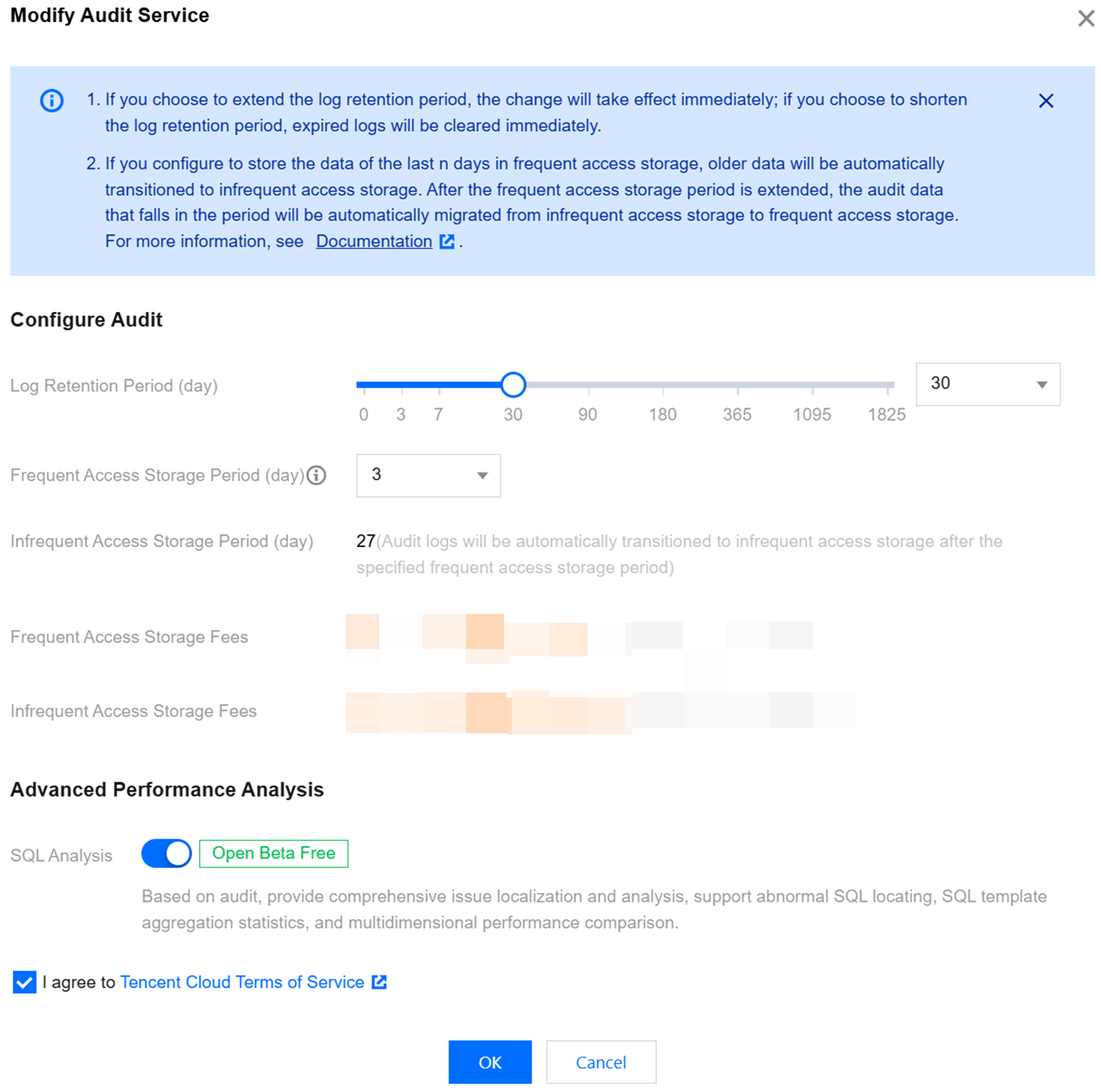
SQL analysis option description: TencentDB for DBbrain provides comprehensive capabilities for locating and analyzing database issues based on the database audit. It supports the localization of abnormal SQL queries, SQL template aggregation statistics, and multi-dimensional performance comparison. This option is enabled by default and can be manually disabled. Once the option is disabled, the SQL analysis capability is disabled.

Prerequisites

You have enabled the audit service. For more information, see Enabling Audit Service.

Modifying the Audit Service of one Individual Instance

1. Log in to the TencentDB for MySQL console.
2. On the left sidebar, choose Database Audit.
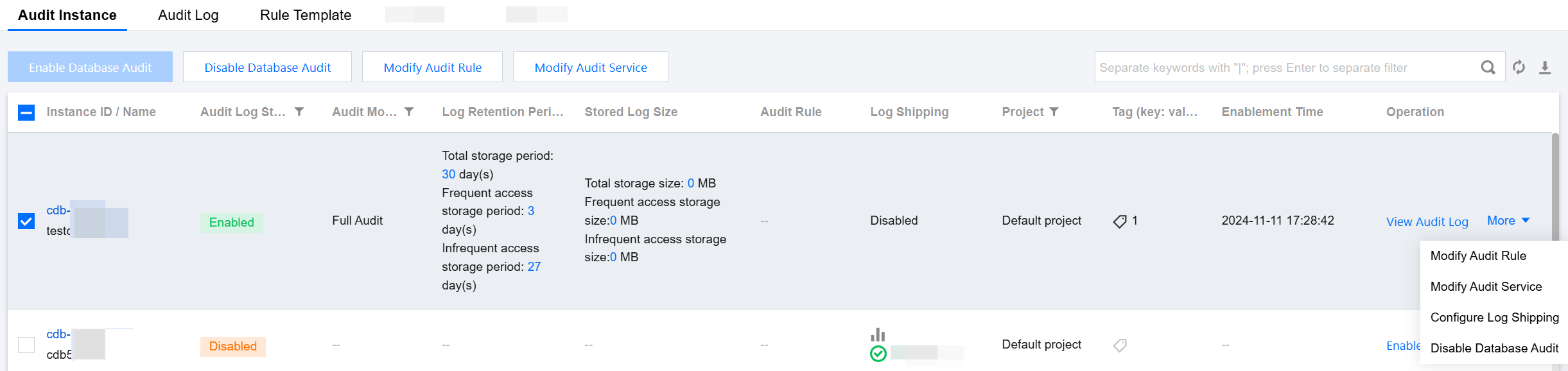
3. After selecting the desired Region at the top, proceed to the Audit Instances page, and then click Audit Status and select the Enabled option to filter the instances with audit enabled.
4. Locate the target instance in the Audit Instances list (or you can quickly find it by filtering resource attributes in the search box), and in the Operation column, select More > Modify Audit Service.

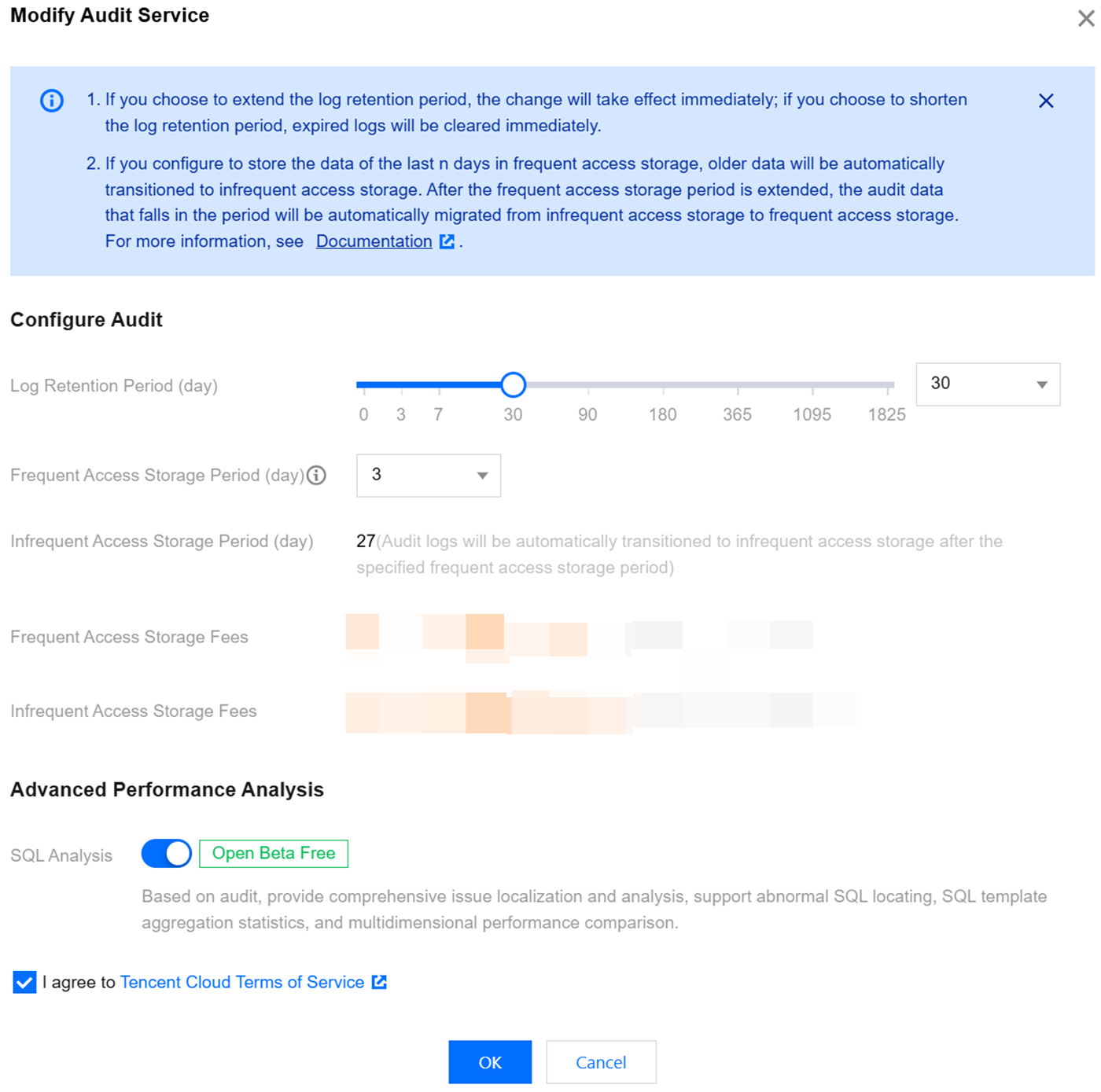
5. On the Modify Audit Service page, after adjusting the Log Retention Period or the Frequent Access Storage Period, click OK.


Modifying Audit Services in Batches

1. Log in to the TencentDB for MySQL console.
2. On the left sidebar, choose Database Audit.
3. After selecting a Region at the top, click on Audit Status and select Enabled on the Audit Instances page to filter instances without active audit process.
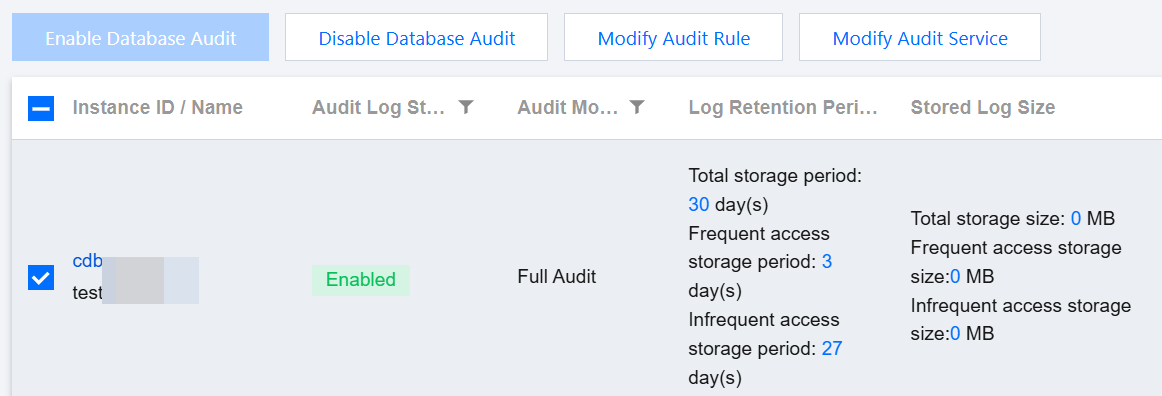
4. Find the target instances in the Audit Instance list, or expediently locate them using resource attribute filters in the search bar. On the Audit Instance page, select multiple target instances, and then click Modify Audit Service located above the list.

5. On the Modify Audit Service page, after adjusting the Log Retention Period or the Frequent Access Storage Period, click OK.
Note:
For ease of comparison, the Batch Modify Audit Service page will display the log retention period both before and after modification. After the adjustment, the selected instances will collectively begin to adapt to the new log retention period. Therefore, ensure the modifications are accurate before proceeding.


Help and Support

Was this page helpful?

Help us improve! Rate your documentation experience in 5 mins.

Feedback