Database proxy is a network proxy service between the TencentDB service and the application service. It is used to proxy all requests when the application service accesses the database. It provides advanced features such as automatic read/write separation, connection pool, and connection persistence and boasts high availability, high performance, Ops support, and ease of use.
This document describes how to enable database proxy in the TencentDB for MySQL console.
Prerequisite
The instance is running.
The instance architecture is two-node, three-node, or cluster edition.
Note
Two-node economical instances do not support database proxy.
If you upgrade the kernel minor version of the source instance, the kernel minor version of all associated read-only instances and disaster recovery instances will also be upgraded.
If the kernel minor version of an instance is early, database proxy cannot be enabled. See Upgrading Kernel Minor Version to perform the upgrade before enabling database proxy. Supported Regions and Versions
The following regions and AZs are supported when you enable database proxy.
Note:
Guangzhou (excluding Zone 1): All AZs in Guangzhou, except Guangzhou Zone 1, are supported when you enable database proxy.
Chengdu: All AZs in the Chengdu region are supported when you enable database proxy.
Beijing (excluding Zone 1, Zone 4, and Zone 8), Shanghai, Guangzhou (excluding Zone 1), Shanghai Finance (excluding Zone 1 and Zone 2), Beijing Finance, Chengdu, Chongqing, Nanjing, and Hong Kong (China).
Tokyo, Bangkok (excluding Zone 1), Virginia, Silicon Valley, Seoul, Singapore (excluding Zone 1), Jakarta (excluding Zone 1 and Zone 3), São Paulo, and Frankfurt.
Versions supported by database proxy:
Two-node and three-node MySQL 5.7 instances (kernel minor version: 20211030 and later).
Two-node and three-node MySQL 8.0 instances (kernel minor version: 20211202 and later).
Cluster edition MySQL 5.7 and MySQL 8.0 instances.
Directions
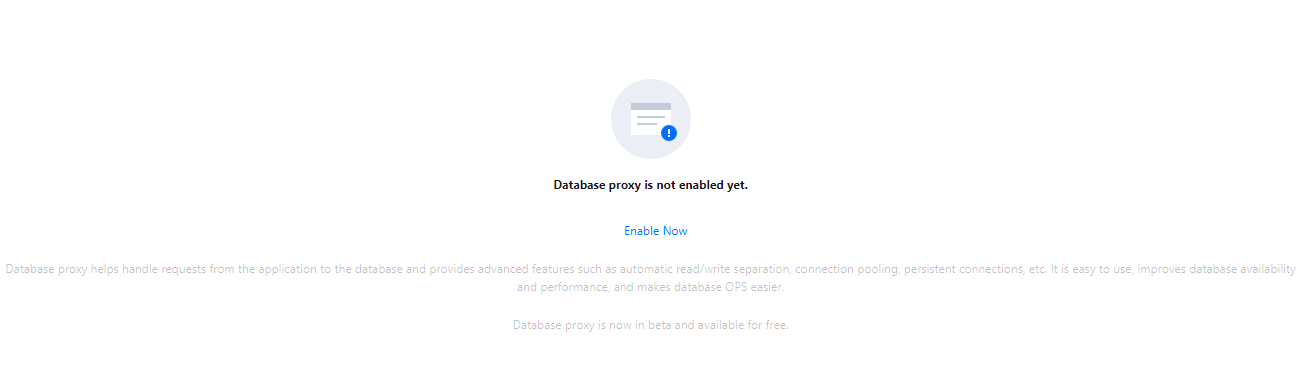
1. Log in to the TencentDB for MySQL console. In the instance list, select the source instance for which to enable database proxy and click its ID or Manage in the Operation column to enter the instance management page. 2. On the instance management page, select the Database Proxy tab and click Enable Now.
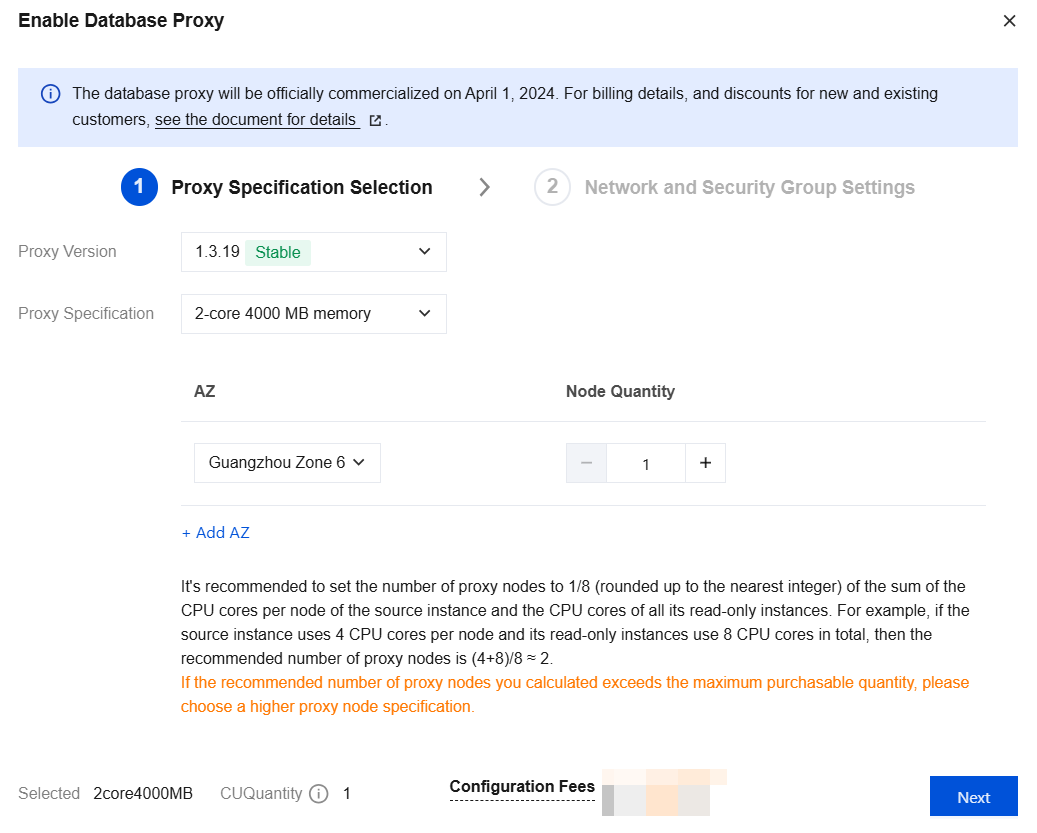
3. In the pop-up window, configure the following items and click Next.
|
Proxy version | |
Proxy Specification | Select 2-core 4000 MB memory, 4-core 8000 MB memory, or 8-core 16000 MB memory. |
AZ and Node Quantity | Select the database proxy AZ. You can click Add AZ to add more AZs. The number of selectable AZs depends on how many AZs are available in the current region. You can select up to three AZs. Select the number of nodes. The calculation method for the recommended number of proxy nodes is related to the proxy specification. If the proxy specification of 2 cores and 4,000 MB memory is selected, the recommended number of proxy nodes is 1/8 (rounded up) of the sum of CPU cores of both the source instance and read-only instances. For example, if the source instance has 4 CPU cores and the read-only instance has 8 CPU cores, the recommended number of proxy nodes is (4 + 8)/8 ≈ 2. If the proxy specification of 4 cores and 8,000 MB memory is selected, the recommended number of proxy nodes is 1/16 (rounded up) of the sum of CPU cores of both the source instance and read-only instances. For example, if the source instance has 8 CPU cores and the read-only instance has 16 CPU cores, the recommended number of proxy nodes is (8 + 16)/16 ≈ 2. If the proxy specification of 8 cores and 16,000 MB memory is selected, the recommended number of proxy nodes is 1/32 (rounded up) of the sum of CPU cores of both the source instance and read-only instances. For example, if the source instance has 64 CPU cores and the read-only instance has 128 CPU cores, the recommended number of proxy nodes is (64 + 128)/32 ≈ 6. Note: If the selected proxy and the source instance are not in the same AZ and you access the instance through the proxy, the write performance may be reduced. If the recommended number of proxy nodes after calculation exceeds the limit for purchase, it is recommended that you select a higher specification. |
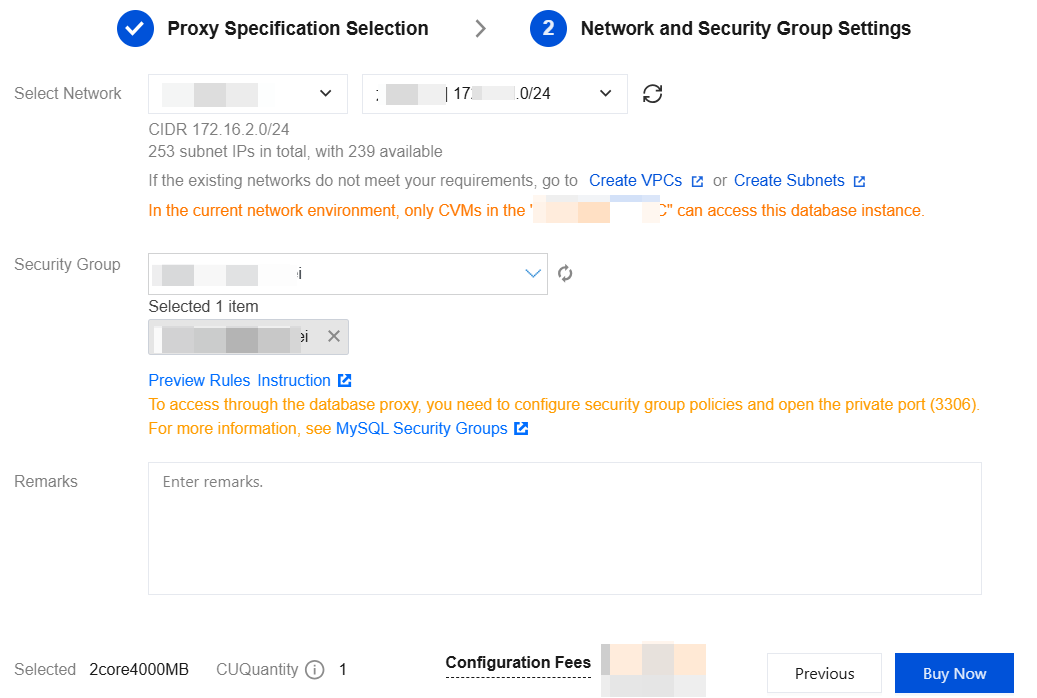
4. Complete the configuration of the network and security group and then click Buy Now.
|
Network selection | Select the network of the database proxy, which can only be a VPC. |
Security group | The security group of the source instance is selected by default. You can also select another existing security group or create a new one as needed. Note: To access through the database proxy, you need to configure security group policies and open the private port (3306). |
Remarks | (Optional) Enter the remarks of the database proxy service to be enabled. |
5. After database proxy is enabled successfully, you can view the basic information and manage proxy nodes on the database proxy page. You can also modify the database proxy access address, network type, and remarks, view connection configuration details, adjust configurations, and rebalance the load in the connection address area.
Note:
You can view the performance monitoring data of each proxy node to determine whether access to nodes is unbalanced. If the number of connections to proxy nodes is not balanced, click Re-Balance Load to redistribute connections.
Rebalancing the load will trigger a proxy node restart, and the services will become temporarily unavailable during the restart process. It is recommended that you restart the node at off-peak hours. Make sure that your business has a reconnection mechanism.