tencent cloud

Content Delivery Network

Updates and Announcements
Release Notes
Announcements
User Tutorial
Product Introduction
Product Overview
Strengths
Use Cases
Term
Use Limits
CDN Performance Descriptions (Spot-check)
Purchase Guide
CDN Purchase Guide
ECDN Purchase Guide
Getting Started
Configuring CDN from Scratch
Adding Domain Names
CNAME Configuration
Domain Name Ownership Verification
FAQs about Domain Name Connection
Configuration Guide
Domain Management
Domain Name Configurations
Statistical Analysis
Purge and Prefetch
Log Management
EdgeOne
Service Query
Offline Cache
Permission Management
Permission Configuration
Console Permissions
Activate Real-time Logging as Sub-account/Collaborator
Use Cases
Accelerating Resources on COS with CDN
Practical Tutorial
Guide to Using the EdgeOne Tool for Migrating Content Delivery Network (CDN) Related Services
CDN - CVM
CDN - COS
Configuring CNAME via DNSPod
Regularly Storing CDN Logs
API Documentation
History
Introduction
API Category
Content Management APIs
Real-time Log APIs
Service Query APIs
Data Query APIs
Making API Requests
Log Query APIs
StopCdnDomain
Configuration Management APIs
Obsoleted APIs
Other APIs
Data Types
Error Codes
FAQ
Features
Billing
FAQs about Domain Name Connection
Cache Configuration FAQs
Purge and Prefetch
Statistical Analysis
FAQs about HTTPS
Connection
Errors
Troubleshooting Methods
Status Codes and Solutions
Node Cache Inconsistency
Slow Access Speed After CDN Activation
Low Traffic Hit Rate
404 Status Code
Page Display - CORS error
Resource Cache Failure
Service Level Agreement
Glossary

Prefetch Cache

PDF
Focus Mode
Font Size
Last updated: 2024-12-30 21:49:20

Feature Overview

After a domain name is connected to the CDN service, it initially has no resources on CDN cache nodes across the entire network. Resources will be cached once triggered by a user request. If the requested resources are expired or not cached on the cache node, CDN intermediate node will be pulled for the resources. If they are expired or not cached on the intermediate node neither, the user's origin server will be pulled.
CDN prefetch feature allows you to submit a resource list for loading resources to cache nodes without user requests.
When a node loads a resource, if there is a valid (not expired) resource with the same name already cached on the node, the resource will not be loaded. We recommend purging resources entirely across the network before you update any resource with the same name.
Nodes load resources from the origin server, of which the bandwidth will increase after a large number of prefetch tasks are submitted.
Acceleration domain name services are deployed in a double-layer acceleration mechanism by default. Prefetching resources in the Chinese mainland, resources are loaded to intermediate nodes within the Chinese mainland by default, while prefetching resources in the regions outside the Chinese mainland, resources are loaded to edge servers outside the Chinese mainland by default.
Note:
Prefetching resources in the regions outside the Chinese mainland, resources are loaded to edge servers outside the Chinese mainland by default, and the traffic incurred on the edge layer is charged.

Use Cases

Installation package releases

Before releasing any new edition or update of installation packages, you can prefetch the resources to CDN cache nodes. After packages are officially released, massive download requests from users will be taken over by CDN cache nodes, increasing download speed and reducing the pressure on the origin server.

Marketing events

Before initiating any marketing events, you can prefetch the related web static resources to CDN cache nodes. After events are officially started, all the requested web static resources will be returned from CDN cache nodes, guaranteeing service availability for a better user experience through abundant bandwidth reserve.

Operations Guide

How to use

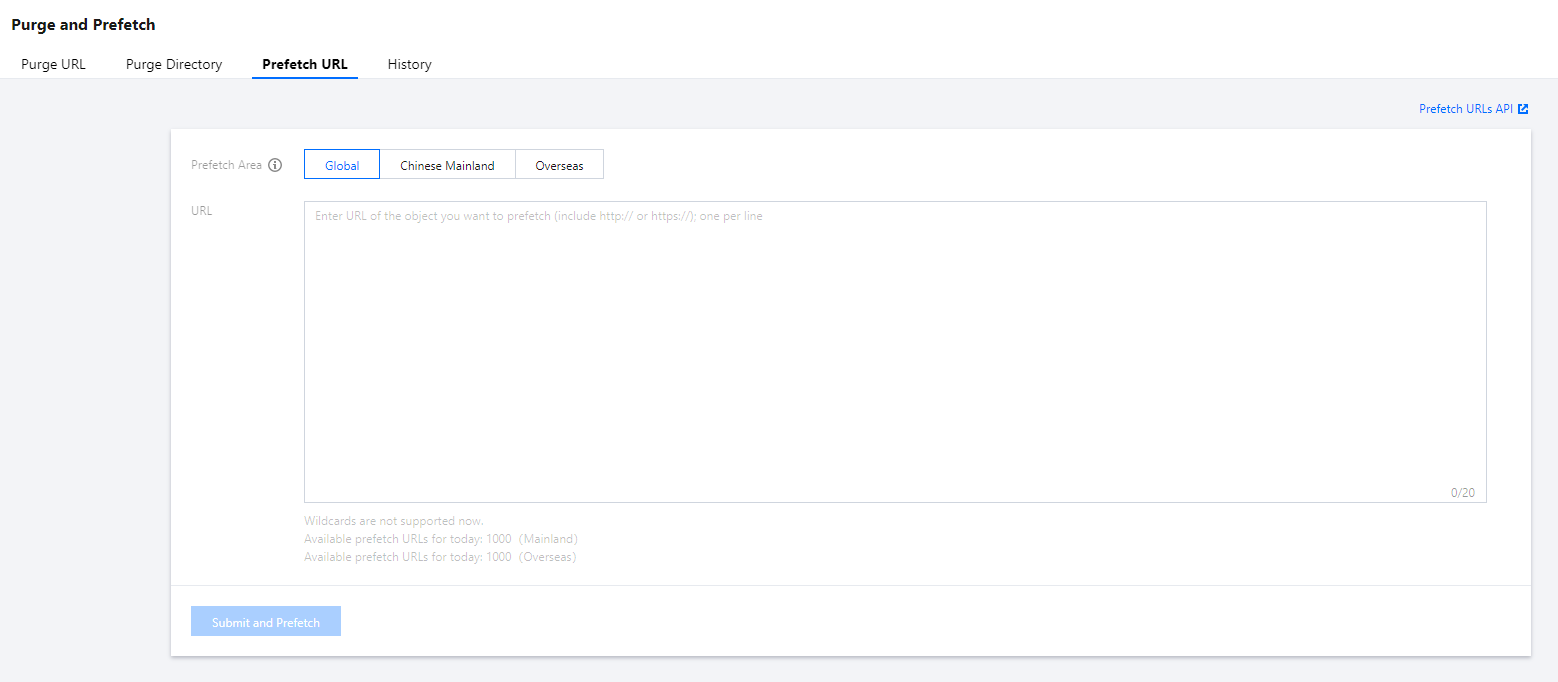
1. Log in to the CDN console, click Purge and Prefetch on the left sidebar, open the Prefetch URL tab to submit a task.
2. You can specify a target region to prefetch resources.
For acceleration domain names in the Chinese mainland, only Chinese Mainland can be specified for acceleration.
For acceleration domain names outside the Chinese mainland, only Overseas (i.e., the regions outside the Chinese mainland) can be specified for acceleration.
For global acceleration domain names, Global, Chinese Mainland, and Overseas (i.e., the regions outside the Chinese mainland) can be specified for acceleration.


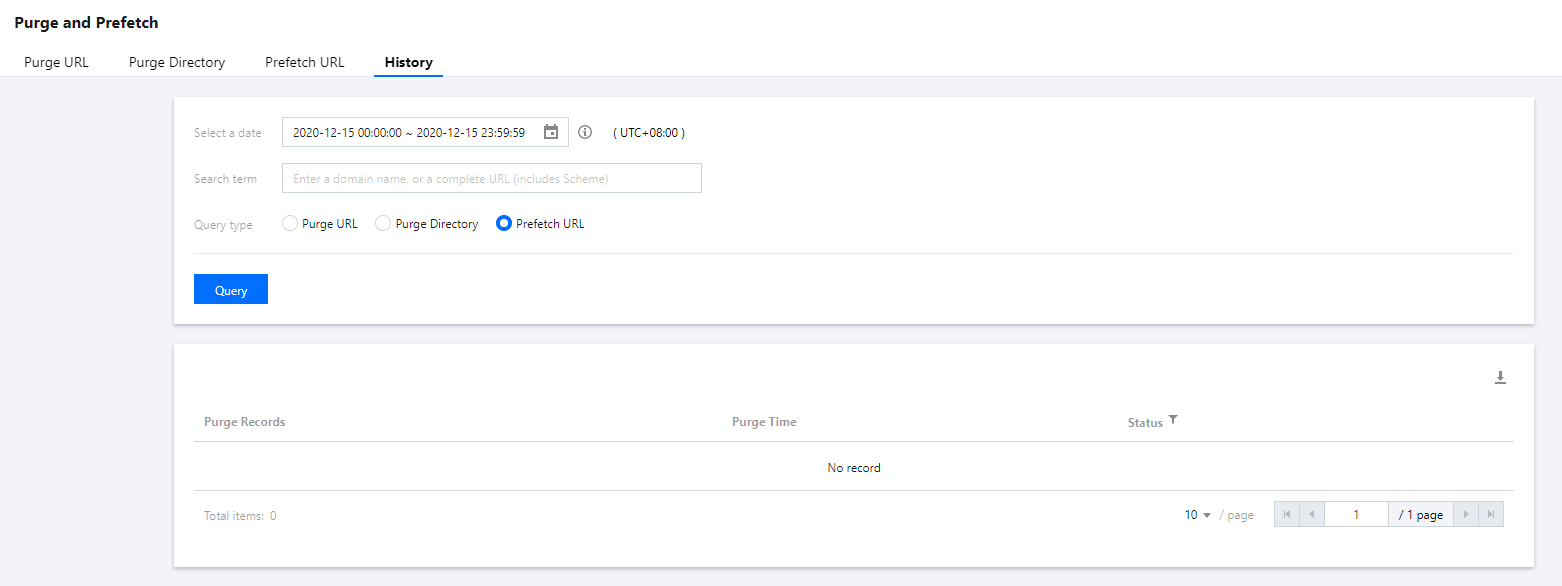
3. In the History tab, you can query prefetch tasks by a specified time period and term. Term queries only support querying with a domain name or a complete URL:


Precautions

Prefetch limits

Up to 1,000 URLs can be prefetched per day for each account in each acceleration region, and up to 20 URLs can be prefetched at a time. After a global prefetch task is conducted, the quota for regions in and outside the Chinese mainland will be used at the same time.
You need to add the http:// or https:// protocol identifier when submitting a prefetch task.
URLs in the format of http://*.test.com cannot be prefetched.
URLs containing Chinese characters cannot be prefetched.

Sub-user permissions configuration

URL prefetch and prefetch history query have been integrated to the latest permission system and support permission configuration at the resource (domain name) level.
For the permission assignment method, please see Console Permissions.

Help and Support

Was this page helpful?

Help us improve! Rate your documentation experience in 5 mins.

Feedback