Real Servers Obtaining the Real Client IP Address Through CLB
Download
Focus Mode
Font Size
Introduction of Obtaining the Real Client IP Address Through CLB
Layer-4 listeners (TCP/UDP/TCP SSL/QUIC) of CLB support obtaining the real client IP addresses directly from the real servers without additional configuration. By default, the source IP addresses obtained from the real servers are the real client IP addresses.
However, when there are one or more NAT gateways between the CLB and the real servers, the real servers cannot receive the real source IP address of the client. For this scenario, you can enable Proxy Protocol configuration for the layer-4 listeners of CLB, initiate Proxy Protocol actively, and carry the real source IP address of the client to the real servers through the Proxy Protocol.
Note:
Using this feature requires the real servers to enable Proxy Protocol simultaneously. As a result, the real server can obtain the real client IP address. If the real server does not have the capability to parse the Proxy Protocol, enabling the feature switch directly may lead to parsing exceptions on real servers, thereby affecting service availability.
This feature does not support online hitless migration. Switching to ProxyProtocol requires stopping service for upgrade. Configure with caution.
Only Proxy Protocol v2 is supported in CLB. It supports multiple transmission protocols, such as TCP and UDP. For more information, see The PROXY protocol.
Overview
This feature is only supported for standard accounts and is not available for traditional accounts. For the method to determine the account type, see Checking Account Type.
Only TCP/UDP/TCP SSL/QUIC listeners of IPv4 and IPv6 instances support this feature.
The Proxy Protocol configuration feature for TCP/UDP listeners of IPv6 CLB remains in grayscale. If this feature is required, submit a ticket for application.
Proxy Protocol Description
The proxy server encapsulates the client's original network connection information in the request header using Proxy Protocol when forwarding requests and then sends it to the real server. The real server can obtain the real network connection information of the client, including the source IP address, source port, and transmission protocol, by parsing the Proxy Protocol header.
By using Proxy Protocol, the real server can accurately obtain the original network connection information of the client, enabling more accurate logging, access control, traffic monitoring, and other operations.
Proxy Protocol V2
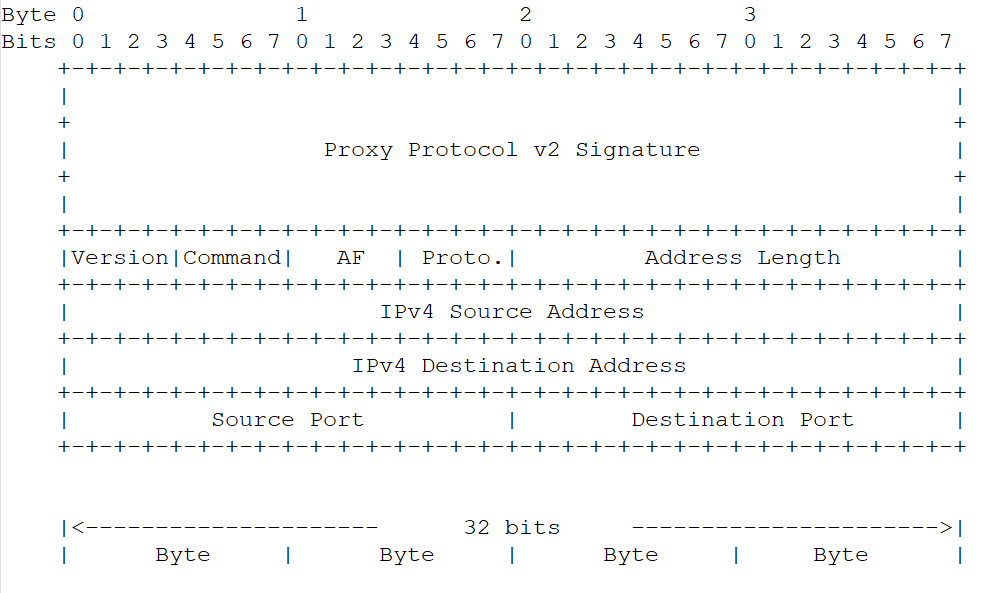
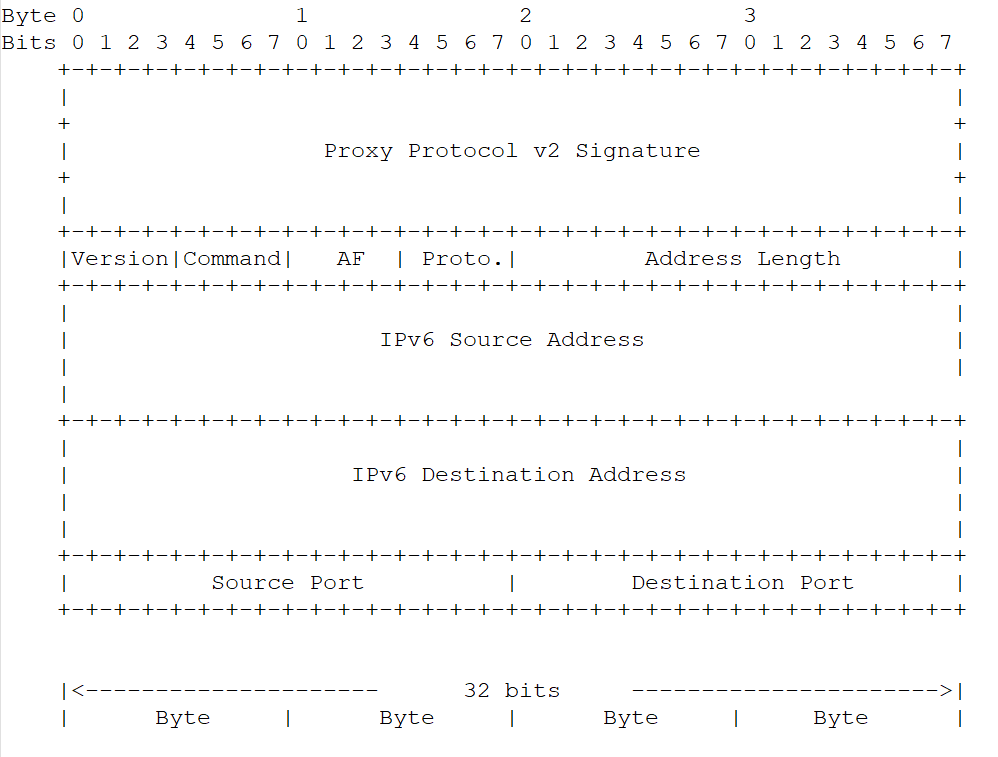
Proxy Protocol V2 uses a binary format, supporting TCPv4, TCPv6, UDPv4, and UDPv6 protocols. Its format is as follows:
IPv4 Format
IPv6 Format
Prerequisites
Before Proxy Protocol is enabled, ensure your real server supports Proxy Protocol v2. Otherwise, the new connections will fail.
This document takes the TCP listener of IPv4 CLB as an example for introduction.
Directions
Step 1: Enabling Proxy Protocol Configuration for the TCP Listener
1. Log in to the CLB console, and click Instance Management in the left sidebar.
2. On the CLB Instance List page, select a region in the upper left corner, and click Configure Listener in the operation column on the right side of the instance list.
3. Under the TCP/UDP/TCP SSL/QUIC listener, click the details of the target listener to check if ProxyProtocol is enabled. If it is not enabled, edit the listener, check the ProxyProtocol configuration in the advanced settings, and then submit to save the configuration.

Step 2: Enabling Proxy Protocol for the Real Server
Take CentOS 7.9 and Nginx 1.20.1 configuration as examples for introduction. The steps need to be subject to the actual usage environment.
1. Log in to the real server and execute the nginx -t command to view the path of the configuration file. The default path is /etc/nginx/nginx.conf, which is subject to the actual environment.
2. Modify the Proxy Protocol content in the configuration file and save the changes. For modification points, see the following descriptions.
http {# Ensure $proxy_protocol_addr is set. This variable is used to record the real client IP address.log_format main '$proxy_protocol_addr - $remote_addr- $remote_user [$time_local] "$request" ''$status $body_bytes_sent "$http_referer" ''"$http_user_agent" "$http_x_forwarded_for"';# Taking the listening port 80 as an example, add the proxy_protocol field.server { listen 80 proxy_protocol;#...}}
3. Execute the sudo nginx -s reload command to reload the Nginx configuration file.
Step 3: Verifying That the Real Server Can Obtain the Real Client IP Address
When Nginx serves as the real server, you can determine whether the real client IP address is obtained successfully by checking Nginx logs.
The default storage path of the Nginx log file is /var/log/nginx/access.log.
In each row of logs, the IP address corresponding to the $proxy_protocol_addr variable is the real client IP address.

Help and Support
Was this page helpful?
You can also Contact sales or Submit a Ticket for help.
Help us improve! Rate your documentation experience in 5 mins.
Feedback