tencent cloud

Cloud Load Balancer

Release Notes and Announcements
CLB Release Notes
Product Announcements
Product Introduction
Overview
Strengths
Use Cases
Principles
Product Comparison
Use Limits
Service Regions and Service Providers
Purchase Guide
Billing Overview
Billing
CLB Resource Package
Purchase Methods
Payment Overdue
Product Attribute Selection
Getting Started
Getting Started with Domain Name-Based CLB
Getting Started with CLB
Getting Started with IPv6 CLB
Deploying Nginx on CentOS
Deploying Java Web on CentOS
Operation Guide
CLB Instance
CLB Listener
Real Server
Health Check
Certificate Management
Log Management
Monitoring and Alarm
Cloud Access Management
Classic CLB
Practical Tutorial
Deploy certificate to CLB (mutual authentication)
Enabling Gzip Compression & Testing
HTTPS Forwarding Configurations
Obtaining Real Client IPs
Best Practices for Configuring Load Balancing Monitoring Alerts
Implementing HA Across Multiple AZs
Load Balancing Algorithm Selection and Weight Configuration Examples
Configuring WAF protection for CLB listening domain names
Configure IAP to authenticate web access to the CLB domain and path
Configure IAP to authenticate programmatic access to CLB's domain and path
Ops Guide
Solution to Excessive Clients in TIME_WAIT Status
Load Balancer HTTPS Service Performance Test
Stress Testing FAQ
CLB Certificate Operation Permissions
Troubleshooting
UDP Health Check Exception
API Documentation
History
Introduction
API Category
Instance APIs
Listener APIs
Backend Service APIs
Target Group APIs
Redirection APIs
Other APIs
Classic CLB APIs
Load Balancing APIs
Making API Requests
Data Types
Error Codes
CLB API 2017
FAQs
Billing
CLB Configuration
Troubleshooting Health Check Issues
HTTPS
WS/WSS Protocol Support
HTTP/2 Protocol Support
Default Domain Name Blocking Prompt
Service Level Agreement
Contact Us
Glossary
DocumentationCloud Load BalancerOperation Guide Certificate ManagementCertificate Requirements and Certificate Format Conversion

Certificate Requirements and Certificate Format Conversion

PDF
Focus Mode
Font Size
Last updated: 2024-01-04 14:34:05
This document introduces the requirements on SSL certificates and describes how to convert certificate formats.

Certificate Application Process

1. Use the OpenSSL to generate a private key file locally, i.e., privateKey.pem. Please keep it private.
openssl genrsa -out privateKey.pem 2048
2. Use the OpenSSL to generate a certificate request file, i.e., server.csr. It can be used for certificate application.
openssl req -new -key privateKey.pem -out server.csr
3. Obtain the content of the certificate request file and visit CA sites to apply for a certificate.

Certificate Format Requirements

The certificate that needs to be applied for should be in PEM format on Linux. CLB does not support certificates in other formats. For more information, see Converting Certificates to PEM format.
If your certificate is issued by a root CA, the certificate is unique, and the configured website will be considered trustworthy by browsers and other accessing devices with no additional certificates required.
If your certificate is issued by an intermediate CA, your certificate file will consist of multiple certificates. In this case, you need to manually combine the server certificate and intermediate certificate for upload.
If your certificate has a certificate chain, please convert it to PEM format and merge with the certificate content for upload.
The concatenation rule is as follows: put the server certificate before the intermediate certificate with no blank lines in between.
Note:
You can check for applicable rules or instructions provided by the CA when issuing the certificate.
Certificate format and certificate chain format Below are examples of certificate and certificate chain formats. Please confirm the format before upload:
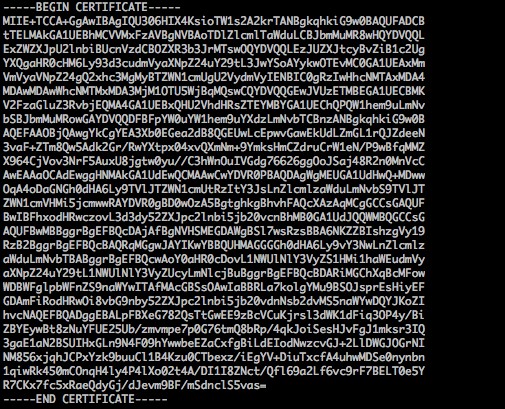
1. Certificate issued by a root CA: PEM format on Linux, as shown below:

Certificate rules are:
Your certificate should start with "——-BEGIN CERTIFICATE——-" and end with "——-END CERTIFICATE——-", which should be uploaded together.
Each line should contain 64 characters, while the last line can contain less than 64 characters.
2. Certificate chain from an intermediate CA: ——-BEGIN CERTIFICATE——- ——-END CERTIFICATE——- ——-BEGIN CERTIFICATE——- ——-END CERTIFICATE——- ——-BEGIN CERTIFICATE——- ——-END CERTIFICATE——-
Certificate chain rules:
No blank lines between certificates.
All certificates should meet the requirements as above.

RSA Private Key Format Requirements

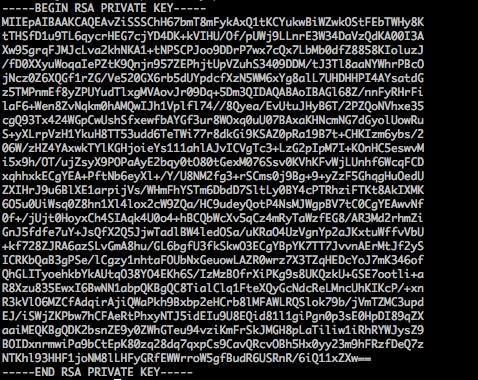
Below is an example:

RSA private key can include all private keys (RSA and DSA), public keys (RSA and DSA), and (X.509) certificates. It stores data in Base64-encoded DER format and is wrapped by ASCII headers, making it suitable for transmission in text mode between systems.
RSA private key rules:
Your certificate should start with "——-BEGIN RSA PRIVATE KEY——-" and end with "——-END RSA PRIVATE KEY——-", which should be uploaded together.
Each line should contain 64 characters, while the last line can contain less than 64 characters.
If your private key does not start with "——-BEGIN PRIVATE KEY——-" and end with "——-END PRIVATE KEY——-", you can convert it in the following way:
openssl rsa -in old_server_key.pem -out new_server_key.pem
You can then upload new_server_key.pem content together with the certificate.

Converting Certificates to PEM Format

Currently, CLB only supports certificates in PEM format. Certificates in other formats need to be converted to PEM format first before uploading to CLB. We recommend you use OpenSSL. The following shows how to convert several common formats to PEM.
DER to PEM
P7B to PEM
PFX to PEM
CER/CRT to PEM
DER format is generally used on Java platforms. Certificate conversion:
openssl x509 -inform der -in certificate.cer -out certificate.pem
Private key conversion:
openssl rsa -inform DER -outform PEM -in privatekey.der -out privatekey.pem
P7B format is generally used on Windows Server and Tomcat. Certificate conversion:
openssl pkcs7 -print_certs -in incertificat.p7b -out outcertificate.cer
You need to get the content between "——-BEGIN CERTIFICATE——-" and "——-END CERTIFICATE——-" in outcertificat.cer to upload as certificate. Private key conversion: private keys can generally be exported on IIS servers.
PFX format is generally used on Windows Server. Certificate conversion:
openssl pkcs12 -in certname.pfx -nokeys -out cert.pem
Private key conversion:
openssl pkcs12 -in certname.pfx -nocerts -out key.pem -nodes
```
You can convert certificates in CER/CRT formats to PEM by directly modifying their file extension names. For example, you can directly rename the servertest.crt certificate file as servertest.pem.


Help and Support

Was this page helpful?

Help us improve! Rate your documentation experience in 5 mins.

Feedback