通过迁移工具迁移服务器
下载
聚焦模式
字号
本文档介绍如何通过 go2tencentcloud 客户端导入迁移源的方式将您的源端服务器在线迁移至腾讯云 CVM。该方式适用于 IDC 服务器上云、跨云迁移和腾讯云内跨地域迁移等绝大多数服务器迁移场景,并且可以指定多种迁移工具参数完成自定义迁移需求。
迁移流程
通过 go2tencentcloud 客户端导入迁移源进行在线迁移的流程如下图所示:

迁移步骤
步骤一:迁移前准备
建议您暂停服务器上的应用程序并进行数据备份,以避免迁移时对现有应用程序可能产生的影响。
源端服务器:可以选择源服务器快照功能等方式备份数据,源端服务器是指待迁移的服务器。
目标云服务器:可以选择 创建快照 等方式备份目标云服务器数据。
若您使用子账号进行控制台迁移:
迁移目标为云服务器实例时,子账号需要 QcloudCSMFullAccess 和 QcloudCVMFullAccess 权限,您可以使用目标端主账号登录 访问管理控制台 授予。
迁移目标为云服务器镜像时,子账号需要 QcloudCSMFullAccess 、QcloudCVMFullAccess 和 QcloudCVMFinanceAccess 权限,您可以使用目标端主账号登录 访问管理控制台 授予。
在 API 密钥管理 页面中创建并获取目标端账号的
SecretId 和 SecretKey。迁移前,需根据实际情况进行检查。检查内容如下表:
若迁移目标为云服务器实例,则需检查源端服务器及目标云服务器。
若迁移目标为云服务器镜像,则仅需检查源端服务器。
Linux 源端服务器 | 请确保当前系统时间与标准时间同步,否则迁移工具请求访问腾讯云 API 会失败。 |
Windows 源端服务器 | 1. (可选)检查和安装 Cloudbase-Init,详情请参见 Windows 操作系统安装 Cloudbase-Init。您可以选择迁移前在源端服务器安装,也可迁移后在目标实例安装: 若在迁移前安装,则迁移后将会进行自动配置网络、激活等初始化操作。 若未在迁移前安装,您可能需要 使用 VNC 登录实例 并手动修改网络配置。 2. 建议您暂时关闭杀毒软件,以免误杀迁移工具而导致迁移失败。 |
目标云服务器 | 1. 存储空间:目标云服务器的云硬盘(包括系统盘和数据盘)数量要大于或等于源端服务器磁盘数量,目标云服务器云硬盘容量大小要大于或等于源端服务器磁盘容量大小。为方便起见,建议目标云服务器云硬盘的数量和容量大小与源端服务器保持一致。 2. 安全组:安全组中开放80、443和3389端口。 3. 带宽设置:建议尽可能调大两端的带宽,以便更快迁移。迁移过程中,会产生约等于数据量的流量消耗,如有必要请提前调整网络计费模式。 4. 网络连通性:源端服务器和目标云服务器之间需要保持网络连通性(如果使用内网传输需要保持源端服务器和目标云服务器内网连通)。 |
说明:
源端服务器检查可以使用工具命令自动检查,如
sudo ./go2tencentcloud_x64 --check。go2tencentcloud 迁移工具在开始运行时,默认自动检查源端服务器。在迁移任务开始运行时,默认自动检查目标云服务器。如果需要略过检查并强制迁移,可以这样启动工具:
sudo ./go2tencentcloud_x64 -ignore-check。go2tencentcloud 迁移工具会自动对目标云服务器进行磁盘分区格式化,并迁移源端服务器磁盘(包含系统盘和已挂载的数据盘)上的数据到目标云服务器对应的云硬盘上。迁移前无需登录进入目标云服务器进行磁盘分区初始化等操作。
步骤二:导入迁移源
通过迁移工具导入迁移源
1. 在待迁移的源端服务器执行以下命令 下载 迁移工具 go2tencentcloud.zip,并进入对应目录。
wget https://go2tencentcloud-1251783334.cos.accelerate.myqcloud.com/latest/go2tencentcloud.zip
Running Environment
Operating System: Ubuntu 24.04.2 LTS / x86_64
Runtime Version: GNU bash, version 5.2.21(1)-release (x86_64-pc-linux-gnu)
unzip go2tencentcloud.zip
cd go2tencentcloud/go2tencentcloud-linux
说明:
go2tencentcloud 目录下的文件将不会被迁移,请勿将需迁移的文件放置在该目录下。2. (可选)排除源端服务器上不需迁移的文件或目录。
3. 导入迁移源。
3.1 以64位 Linux 源端服务器为例,以 root 权限依次执行以下命令运行工具。
chmod +x go2tencentcloud_x64
sudo ./go2tencentcloud_x64
3.2 根据提示输入已在 准备事项 中获取的账户 API 访问密钥的
SecretId 和 SecretKey,并按 Enter。如下图所示:
当迁移工具界面出现如下图所示信息时,表示迁移源已经成功导入控制台,可前往控制台查看迁移源。

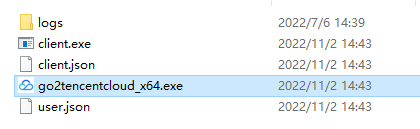
1. 将迁移工具 go2tencentcloud.zip 下载 或上传至源端服务器,解压得到 go2tencentcloud 文件夹,打开其中的 go2tencentcloud-windows,得到如下图所示的目录:
2. 通过以下方式运行 go2tencentcloud_x64.exe 应用程序。
方式一:右键以管理员身份运行 go2tencentcloud_x64.exe 应用程序,在弹窗中输入 SecretId、SecretKey。
方式二:以管理员身份打开 cmd 或 PowerShell 命令行 :cd /d "go2tencentcloud_x64.exe 所在目录的绝对路径" ,运行 go2tencentcloud_x64.exe 应用程序。
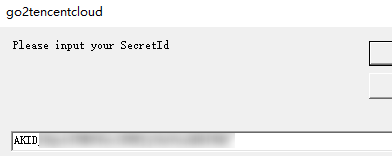
3. 在弹窗中输入腾讯云的 API 密钥(SecretId 和 SecretKey)。
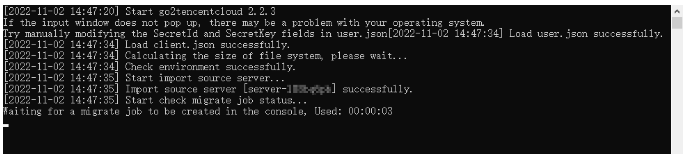
4. 当迁移工具界面出现如下图所示信息时,表示迁移源已经成功导入控制台,可前往控制台查看迁移源。
说明:
若未提示 Import source server successfully, 表示导入迁移源失败, 可查看日志(默认为迁移工具目录下的 logs/log 文件)解决问题之后重新运行迁移工具导入迁移源。
迁移源导入成功之后,若关闭 Linux 源端服务器 SSH 会话连接或关闭 Windows 源端服务器远程桌面会话,迁移工具进程不会终止。
通过控制台查看迁移源

注意:
迁移源导入成功之后,请勿关闭源端服务器中的迁移工具进程直至迁移任务完成。否则迁移源会显示离线,迁移任务无法完成。
步骤三:创建迁移任务
1. 创建迁移任务
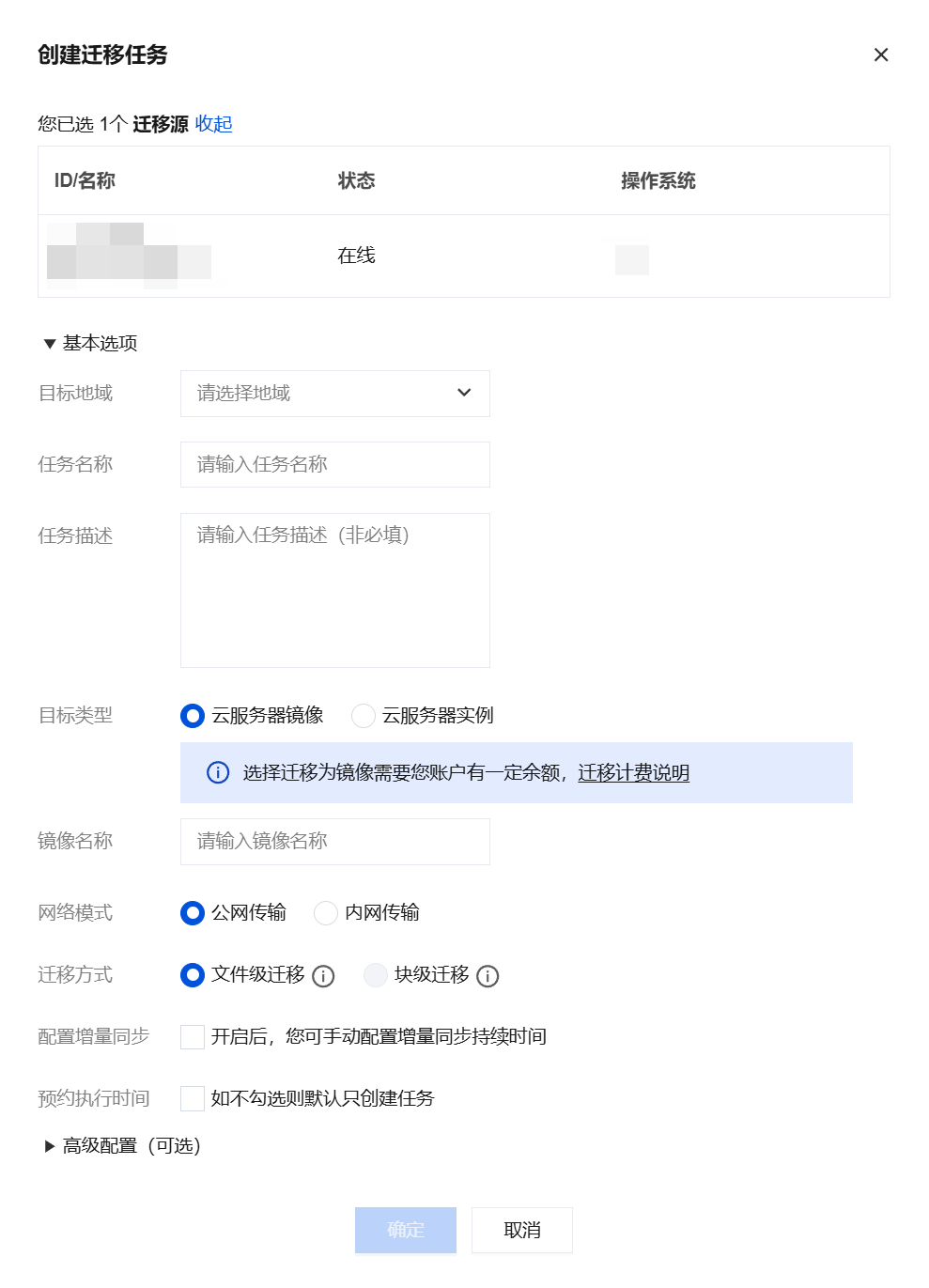
迁移任务详细配置说明如下表:
基本选项:
配置选项 | 是否必填 | 说明 |
目标地域 | 是 | |
任务名称 | 是 | 迁移任务的名称。 |
任务描述 | 否 | 迁移任务的描述。 |
目标类型 | 是 | 设置迁移源迁移至腾讯云的目标类型。 云服务器镜像:迁移任务完成之后将为迁移源生成目标腾讯云镜像。 镜像名称:为迁移源生成的目标腾讯云镜像名称。镜像名称在目标地域重复时,迁移任务会自动添加任务 ID 到镜像名称中。 云服务器实例:选择一台目标地域的云服务器实例作为迁移目标。 目标实例:建议目标云服务器的操作系统尽量和源端服务器的操作系统类型一致。例如,源端服务器为 CentOS 7 系统时,选择一台 CentOS 7 系统的云服务器作为迁移目标。 注意: |
网络模式 | 是 | 设置迁移传输数据时使用的网络类型。 公网传输:迁移传输数据到目标云服务器或中转实例时使用公网传输。 内网传输:迁移传输数据到目标云服务器或中转实例时使用内网传输。迁移前需要确保源机器跟目标云服务器或者目标子网之间内网连通。 私有网络:迁移到云服务器镜像时,中转实例将创建在该私有网络 VPC 中。 子网:迁移到云服务器镜像时,中转实例将创建在该子网中。 |
迁移方式 | 是 | 设置 Linux 块级迁移数据的迁移方式类型。 Linux 文件级迁移:迁移颗粒度为文件级,高兼容性,相对较低的传输效率。 Linux 块级迁移:迁移颗粒度为磁盘逻辑存储单位“块”级,高传输效率,相对较低的兼容性。 |
| | Windows 块级迁移:迁移颗粒度为磁盘逻辑存储单位“块”级,Windows 迁移默认采用块级迁移,具备高兼容性和高传输效率。 |
配置增量同步 | 否 | 自定义配置增量同步时长,持续同步数据,灵活控制迁移交割时间。 不开启:由迁移工具自动识别并执行增量迁移,通常执行一次。 开启后:您可自主选择增量同步执行时长,工具会持续同步增量数据至腾讯云,您也可以在任务列表手动停止增量同步。 |
预约执行时间 | 否 | 创建迁移任务后,在设置的时间自动启动迁移任务。预约执行时间最早可设置为当前时间后10分钟。 |
高级配置(可选):
配置选项 | 是否必填 | 说明 |
传输限制(KB/s) | 否 | 迁移过程中,数据传输的带宽上限限制,单位为 KB/s,范围为[0, 25600], 默认不限速。 Windows 迁移暂不支持该选项。 |
Checksum 验证 | 否 | 开启后,可增强数据一致性校验,但是可能会降低传输速度。Windows 迁移暂不支持该选项。 |
2. 启动迁移任务。
说明:
预约执行的任务可跳过本步骤,到达预约执行时间后,迁移任务将会自动开始执行。
创建迁移任务后,可单击迁移任务页签,查看迁移任务。如下图所示:

单击任务所在行右侧的开始/重试,并在弹出确认窗口中单击确定,即可开始迁移任务。此时任务状态变更为迁移中。如下图所示:

注意:
迁移目标是云服务器时,开始迁移后目标云服务器将进入迁移模式,请不要对目标云服务器进行重装系统、关机、销毁、重置密码等操作,直至迁移完成退出迁移模式。
迁移目标是云服务器镜像时,开始迁移后将在您的账户下创建一台名为
do_not_delete_csm_instance 的中转实例,请不要对中转实例进行重装系统、关机、销毁、重置密码等操作,直至迁移完成系统会自动销毁本次创建的中转实例。步骤四:迁移后检查
1. 控制台查看迁移进度
当迁移任务状态为成功时,表示成功完成迁移。如下图所示:

说明:
由于传输数据耗时受源端服务器的数据大小和网络带宽等因素影响,请耐心等待迁移任务的完成。
迁移任务开始之后,可在迁移任务所在行单击暂停停止迁移任务。
迁移工具支持断点续传,暂停任务之后,点击开始/重试即可从上次暂停点继续迁移。
迁移任务仅支持在数据传输阶段暂停,在控制台的迁移任务中单击暂停后,迁移工具会在数据传输阶段暂停数据传输。
如果迁移过程耗时太长,且需停止本次迁移,您可以先暂停迁移任务,并单击删除,即可取消本次迁移任务。
2. 迁移后检查
迁移结果失败:
迁移结果成功:
若迁移目标为云服务器,请检查目标云服务器能否正常启动、目标云服务器数据与源端服务器是否一致、网络是否正常或者其他系统服务是否正常。
若迁移目标为云服务器镜像,可单击迁移任务所在行的云服务器镜像 ID,进入 云服务器镜像页面 即可查看该镜像信息,您可使用该镜像创建云服务器。
文档反馈