tencent cloud

Cloud Virtual Machine

Release Notes and Announcements
Release Notes
Public Image Release Notes
Official End of Support Plan for the Operating System
Announcements
Product Introduction
CVM Overview
Strengths
Basic Concepts
Regions and Zones
Tutorial
Service Regions and Service Providers
Billing
Billing Overview
Billing Modes
Billing Items
Billing Mode Conversion Overview
Purchasing Instances
Configuration Adjustment Billing Guide
Overdue Payments
Getting Started
Purchasing a Customized Linux Instance
Purchasing a Customized Windows Instance
User Guide
Operation Guide Overview
Use Limits
Instances
Spot Instances
Reserved Instances
Images
Storage
Backup and Restoration
Network
Security
Passwords/Keys
Monitoring and Alarms
Ops Management
Convenience Features
Migrating a Server
Online Migration
Migration Consultation
Troubleshooting
CVM Login Failures
Windows Instance Login Failures
Linux Instance Login Failures
Other Login Failures
Instance Running Failures
Linux Instance Memory Failures
Network Failures
Use Cases
Suggestions on CVM Model Selection
Environment Building
Website Building
Application Building
Visual GUI Building
Uploading Local Files to CVM
Network Performance Test
Other Practical Tutorials
API Documentation
History
Introduction
API Category
Making API Requests
Region APIs
Instance APIs
Cloud Hosting Cluster APIs
Image APIs
Instance Launch Template APIs
Placement Group APIs
Key APIs
Security Group APIs
Network APIs
Data Types
Error Codes
Security and Compliance
CAM
Network
FAQs
Regions and Zones
Billing
Instances
Storage
Images
Server Migration
Network
Security
Operating Systems
Ops and Monitoring
CAM
NTP Service
Scenarios
Agreements
CVM Service Level Agreements
Red Hat Enterprise Linux Image Service Agreement
Public IP Service Level Agreement
Glossary

Migration Time Estimation

PDF
Focus Mode
Font Size
Last updated: 2025-09-01 16:37:57
This document describes how to estimate the time for online migrating the system and applications from a source server in your IDC or cloud platform to Tencent Cloud CVM.
The migration time is subject to the data transfer speed during migration. You can estimate it by testing the transfer speed between the source server and destination CVM.

Estimating Migration Time in Different Scenarios

Scenario 1: Migration from a Source Server to a Tencent CVM Instance

If the destination type of a migration task is CVM instance, the estimated migration time is mainly the actual data transfer time.
For example, if the size of the data on all disks to be migrated on the source server is 50 GB and the outbound bandwidth is 100 Mbps, the estimated total migration time will be 1.14 hours as calculated below:
1. Convert the unit
Convert the unit of the actual bandwidth to MB/s: 100 Mbps = 100 / 8 = 12.5 MB/s
Convert the unit of the actual disk data volume to MB: 50 GB = 50 * 1024 = 51200 MB
2. Estimate the actual data migration time 51200 / 12.5 = 4096 seconds = 1.14 hours

Scenario 2: Migration from a Source Server to a Tencent CVM Image

If the destination type of a migration task is CVM image, the migration time includes the actual data transfer time and image creation time.
For example, if the size of the data on all disks to be migrated on the source server is 50 GB and the outbound bandwidth is 100 Mbps, the estimated total migration time will be 1.23 hours as calculated below:
1. Convert the unit
Convert the unit of the actual bandwidth to MB/s: 100 Mbps = 100 / 8 = 12.5 MB/s
Convert the unit of the actual disk data volume to MB: 50 GB = 50 * 1024 = 51200 MB
2. Estimate the actual data migration time 51200 / 12.5 = 4096 seconds = 1.14 hours
3. Calculate the image creation time at a speed of about 160 MB/s 51200 / 160 = 320 seconds = 0.089 hour
4. Calculate the total migration time 1.14 + 0.089 = 1.23 hours

Relevant Operations: Testing Data Transfer Speed

You can use the iperf3 tool to test the data transfer speed, such as bandwidth and speed of data transfer from client to server.

Factors affecting transfer speed

Outbound bandwidth of the source server and inbound bandwidth of the destination instance. For example, if the outbound bandwidth of the source server is 50 Mbps and the inbound bandwidth of the destination instance is 100 Mbps, the actual transfer speed won't exceed 50 Mbps theoretically.
During the migration, the bandwidth isn't always fully used, and you can dynamically adjust the inbound bandwidth of the destination or relay instance.
If the source server and destination instance are in different regions, the transfer speed will be lower than that when they are in the same region.
Note:
When you use online migration in the console, if the migration destination is a CVM image, the relay instance do_not_delete_csm_instance with a bandwidth cap of 50 Mbps will be created during migration.
You can dynamically adjust the inbound bandwidth of the destination or relay instance in the console during migration to control the migration speed.

Speed test for migration to Linux CVM instance

For example, if you use the online migration feature in the console to migrate a server to a CentOS 7.5 CVM instance, you can test the transfer speed in the following steps:
1. Create a pay-as-you-go CentOS 7.5 CVM instance in the migration destination region.
Note:
If the migration destination is a CVM image, a CentOS 7.5 relay instance will be created during migration. To test its speed, we recommend you choose an available Standard model with a low CPU and memory configuration, which is more like the actual migration scenario.
The default port of the iperf3 server is TCP 5201. You need to add it to and open it in the inbound traffic configuration in the security group of the CentOS 7.5 instance.
2. Install iperf3 on the source server and in the testing destination instance respectively.
Run the following command to install iperf3 in the destination CentOS 7.5 instance:
yum -y install iperf3
Install iperf3 on the source server. Use the installation command corresponding to the Linux distribution on the source server for installation.
3. Run the following command to start iperf3 in the testing destination CentOS 7.5 instance as the server:
iperf3 -s
If "Server listening on 5201" is returned, the start succeeded.
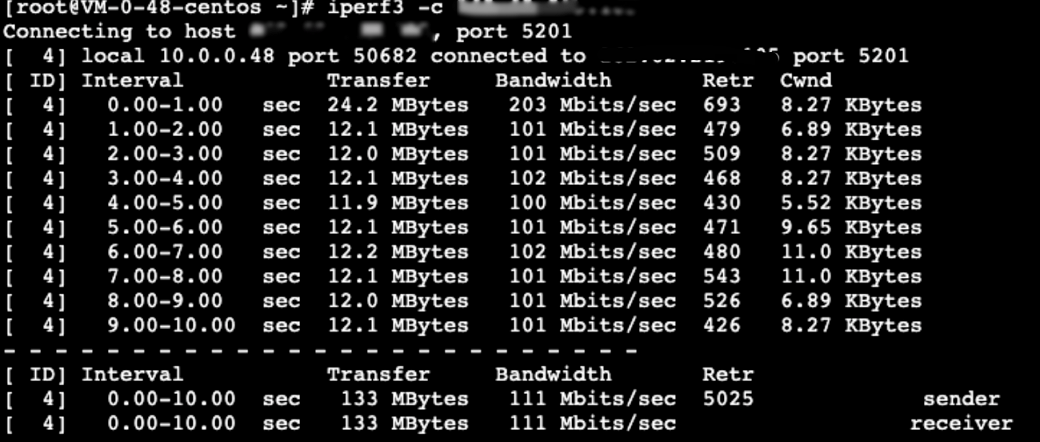
4. Run the following command to start iperf3 on the source server as the client:
iperf3 -c [destination instance IP]
The returned test result is as shown below, indicating that the transfer speed between the source server and the test CentOS 7.5 instance is 111 Mbps.


Help and Support

Was this page helpful?

Help us improve! Rate your documentation experience in 5 mins.

Feedback