Release Notes
Receive Maximum
Overview
In IoT applications, device capabilities vary, and some resource-constrained devices may not be able to handle large volumes of incoming messages simultaneously. To address this, MQTT 5.0 introduces a flow control mechanism based on sending quotas, with the Receive Maximum property as its core component. Receive Maximum prevents the message sending rate from exceeding the receiver's processing capacity, thereby avoiding crashes caused by overload and improving communication reliability and stability.
What Is Receive Maximum
Receive Maximum is a parameter negotiated during connection setup. It appears in both the client's CONNECT packet and the server's CONNACK packet. It indicates the maximum number of unacknowledged QoS 1 or QoS 2 PUBLISH packets that either party (client or server) is willing to handle concurrently—that is, the maximum available sending quota.
Simply put, when client A connects to the server:
Client A can set a Receive Maximum value, such as 10, in the CONNECT packet. This essentially tells the server: "You can simultaneously send me up to 10 QoS > 0 messages. Do not send the 11th until I have acknowledged them."
Similarly, the server can return a Receive Maximum value, such as 50, in the CONNACK packet. This essentially tells client A: "You can have up to 50 QoS > 0 messages 'in flight' to me at once."
How It Works
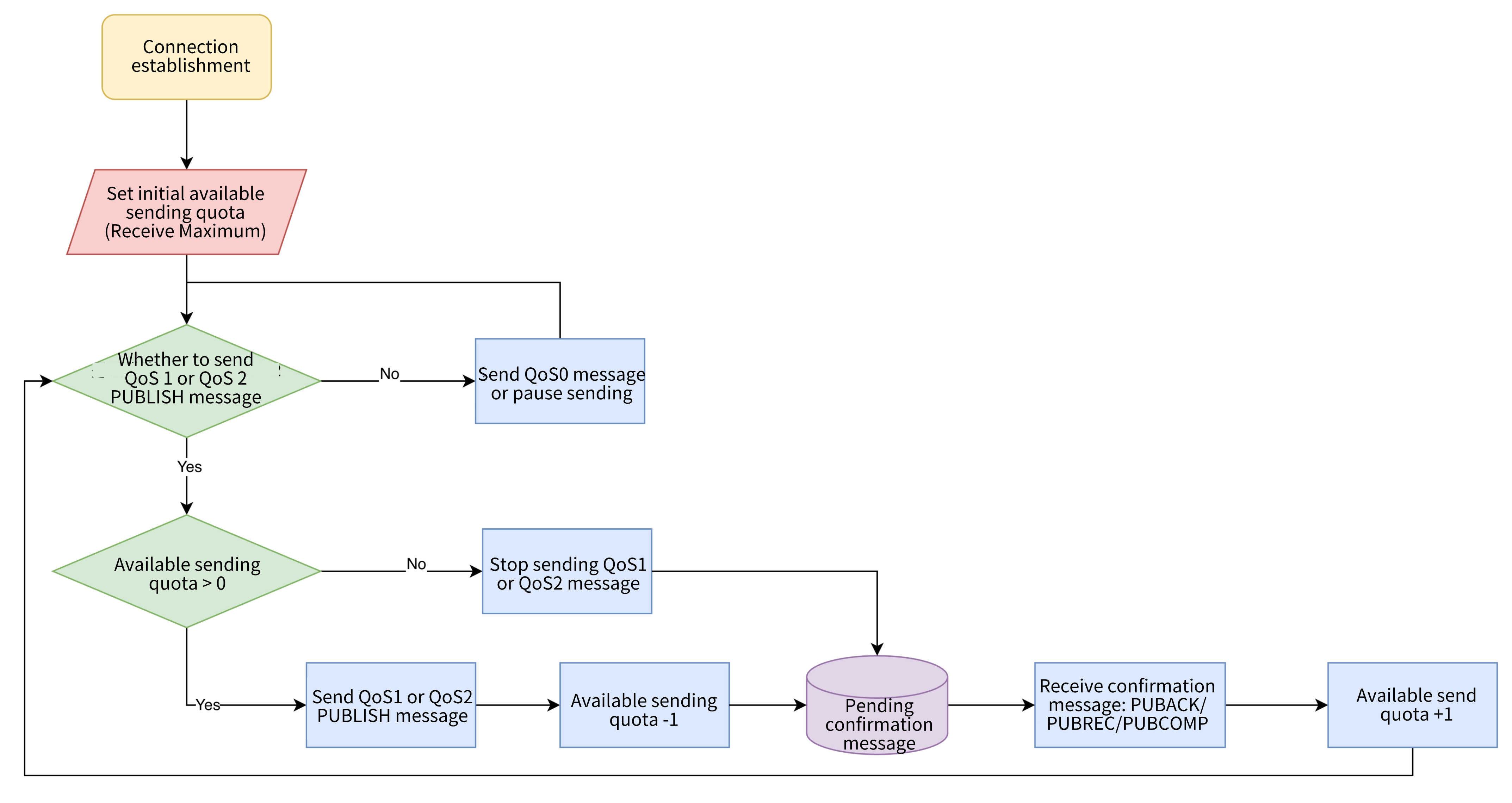
Receive Maximum relies on a dynamic "sending quota" counter:
1. Initial State: When a connection is established, the sender's initial available quota equals the Receive Maximum value declared by the receiver.
2. Message Sending: Each time the sender transmits a QoS 1 or QoS 2 PUBLISH packet, its available quota decreases by 1.
3. Acknowledgment Receipt: When the receiver returns the corresponding acknowledgment packet (PUBACK for QoS 1, or PUBREC/PUBCOMP for QoS 2), the sender's available quota increases by 1.
4. Quota Exhaustion: If the available quota drops to 0, the sender must stop sending any new QoS 1 or QoS 2 messages until it receives acknowledgment packets and the quota recovers.
5. Violation Handling: If the receiver detects that the peer violates this rule (for example, sending QoS > 0 messages when the quota is 0), it must treat this as a protocol violation and disconnect to protect itself.
Note:
The Receive Maximum mechanism applies only to QoS 1 and QoS 2 messages. QoS 0 messages (at-most-once delivery) have no corresponding acknowledgment packet and are therefore not subject to this quota.
The MQTT 5.0 specification provides a non-mandatory recommendation for this scenario:
When the sender's quota is 0, it may choose to continue sending QoS 0 messages or pause transmission.
The best practice is to pause sending, because a slowdown in QoS 1/2 PUBLISH packet responses typically means that the receiver's processing capacity has degraded, and continuing to send QoS 0 messages would only make the situation worse.
Advantages and Value
Despite the limitations in controlling QoS 0 messages, the Receive Maximum mechanism still provides significant benefits:
Overload Prevention: Provides reliable protection for core message transmission (QoS 1/2), ensuring that the receiver does not crash due to message flooding.
Dynamic and Efficient: The acknowledgment-based quota recovery mechanism enables the sender to make full use of network bandwidth and the receiver's processing capacity, maximizing overall resource utilization.
No Pre-negotiation Required: Both parties declare their capabilities during connection setup, eliminating the need for complex negotiation at the application layer and keeping the communication process transparent.
Heterogeneous System Compatibility: This mechanism provides great flexibility when integrating devices from different vendors with varying processing capabilities.
Receive Maximum is a key feature introduced in MQTT 5.0 to improve protocol reliability and resource management. Through an elegant sending quota model, it effectively addresses flow control for QoS 1 and QoS 2 messages. Although its control over QoS 0 messages is advisory rather than mandatory—presenting certain limitations—this mechanism remains a significant advancement in MQTT evolution. We strongly recommend that you leverage this feature in MQTT 5.0-supported environments to build more robust and stable IoT applications.
Help and Support
Was this page helpful?
You can also Contact sales or Submit a Ticket for help.
Help us improve! Rate your documentation experience in 5 mins.
Feedback