tencent cloud

TDMQ for MQTT

Release Notes and Announcements
Release Notes
Product Introduction
TDMQ Product Series Introduction and Selection
What Is TDMQ for MQTT
Scenarios
Technical Architecture
Product series
MQTT Protocol Compatibility Notes
Comparison with Apache
High Availability
Product Constraints and Usage Quota
Basic Concepts
Supported Regions
Billing
Billing Overview
Renewal Instructions
Viewing Consumption Details
Overdue Payment Instructions
Refund
Getting Started
Guide for Getting Started
Preparations
Public Network Access
VPC Network Access
User Guide
Usage Process Guide
Configuring Account Permission
Creating a Cluster
Managing Topic
Connecting to the Cluster
Querying Messages
Managing Client
Managing a Cluster
Viewing Monitoring Metrics and Configuring Alarm Policies
Data Integration
Integrating Data Into SCF
Integrating Data Into CKafka
Integrating Data into RocketMQ
Development Guide
MQTT 5 Advanced Features
Data Plane HTTP API Description
Quota and Flow Control Mechanism Description
Configuring a Custom Domain Name
Configuring SQL Filtering
Configuring Point-to-Point Subscription
MQTT over QUIC
Managing Client Subscription
Message Enhancement Rule
Use Cases
Must-Knows for MQTT Client Development
Observability
Topic and Wildcard Subscriptions
​​API Reference
History
Introduction
API Category
Making API Requests
Cluster APIs
Topic APIs
Authorization Policy APIs
User APIs
Client APIs
Message Enhancement Rule APIs
Message APIs
Data Types
Error Codes
SDK Reference
Access Point Format
Java SDK
C SDK
Javascript/Node.JS/Mini Program
Go SDK
iOS SDK
JavaScript SDK
Dart SDK
Python SDK
.NET
Security and Compliance
Permission Management
FAQs
Related Agreement
Privacy Policy
Data Privacy And Security Agreement
TDMQ for MQTT Service Level Agreement
Contact Us
문서TDMQ for MQTTUser GuideConfiguring Account PermissionGranting Access Permissions to a Root Account

Granting Access Permissions to a Root Account

PDF
포커스 모드
폰트 크기
마지막 업데이트 시간: 2026-04-01 16:30:53

Background

Since MQTT needs to access application programming interfaces (APIs) of other cloud products, you need to grant relevant permissions to the root account when using it to create an MQTT cluster for the first time.

Prerequisites

Note:
After you register a Tencent Cloud account, the system creates a root account for you by default to access Tencent Cloud resources conveniently.

Operation Steps

1. Log in with your root account to the TDMQ for MQTT console.
2. In the left sidebar, choose Resource > Cluster, and click Create Cluster.
3. On the cluster purchase page, select a Virtual Private Cloud (VPC) network in the Network Configuration section, and select Authorize binding the access point domain name of the newly purchased cluster to the specified VPC network. A pop-up window for authorization is displayed.

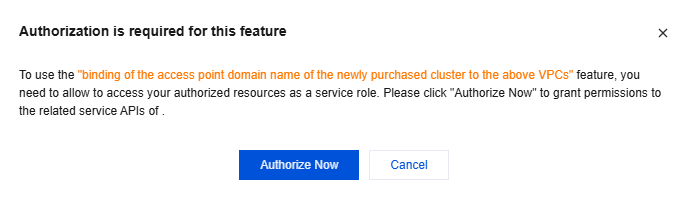
4. Click Authorize Now to go to the CAM console, click Authorize, and the authorized service role for MQTT will access your other cloud service resources.
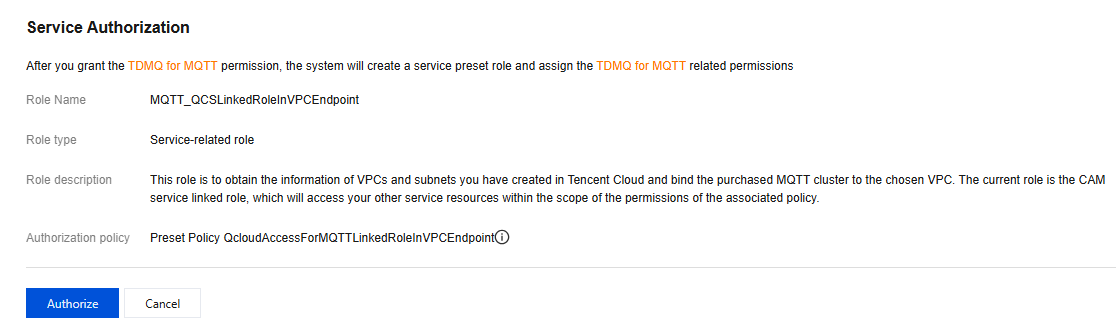
5. After authorization is completed, you can continue to create an MQTT cluster and use related services.

도움말 및 지원

문제 해결에 도움이 되었나요?

피드백