개인 정보 보호 정책
데이터 개인 정보 보호 및 보안 계약
src/***/tdmq/mqtt/example directory.QuickStart.java. Here, the simple message sending and receiving program under the paho/v5 directory is used as an example.package com.tencent.tdmq.mqtt.example.paho.v5;import java.nio.ByteBuffer;import java.nio.charset.StandardCharsets;import java.util.List;import java.util.concurrent.TimeUnit;import org.eclipse.paho.mqttv5.client.IMqttToken;import org.eclipse.paho.mqttv5.client.MqttCallback;import org.eclipse.paho.mqttv5.client.MqttClient;import org.eclipse.paho.mqttv5.client.MqttConnectionOptions;import org.eclipse.paho.mqttv5.client.MqttDisconnectResponse;import org.eclipse.paho.mqttv5.client.persist.MemoryPersistence;import org.eclipse.paho.mqttv5.common.MqttException;import org.eclipse.paho.mqttv5.common.MqttMessage;import org.eclipse.paho.mqttv5.common.packet.MqttProperties;import org.eclipse.paho.mqttv5.common.packet.UserProperty;public class SubscriberQuickStart {public static void main(String[] args) throws MqttException, InterruptedException {// Get the access point from the MQTT console:// For users implementing VPC connectivity via Private Link, use the private network access point.// For users accessing over the public network, ensure the public network security policy permits access, and the machine running the program has public network connectivity.String serverUri = "tcp://mqtt-xxx.mqtt.tencenttdmq.com:1883";// A valid client identifier contains digits 0–9, lowercase letters a–z, and uppercase letters A–Z, with a total length of 1–23 characters.// See https://docs.oasis-open.org/mqtt/mqtt/v5.0/os/mqtt-v5.0-os.html#_Toc3901059.String clientId = "SubscriberQuickStart";// In the console, on the Authentication tab, create an account and copy the username and password.String username = "user0";String password = "secret0";// MQTT topic filtersString[] topicFilters = new String[]{"home/test", "home/#", "home/+"};int[] qos = new int[]{1, 1, 1};MqttClient client = new MqttClient(serverUri, clientId, new MemoryPersistence());client.setTimeToWait(3000);MqttConnectionOptions options = new MqttConnectionOptions();options.setUserName(username);options.setPassword(password.getBytes(StandardCharsets.UTF_8));options.setCleanStart(true);options.setAutomaticReconnect(true);client.setCallback(new MqttCallback() {@Overridepublic void disconnected(MqttDisconnectResponse response) {System.out.println("Disconnected: " + response.getReasonString());}@Overridepublic void mqttErrorOccurred(MqttException e) {e.printStackTrace();}@Overridepublic void messageArrived(String topic, MqttMessage message) {byte[] payload = message.getPayload();String content;if (4 == payload.length) {ByteBuffer buf = ByteBuffer.wrap(payload);content = String.valueOf(buf.getInt());} else {content = new String(payload, StandardCharsets.UTF_8);}System.out.printf("Message arrived, topic=%s, QoS=%d content=[%s]%n",topic, message.getQos(), content);List<UserProperty> userProperties = message.getProperties().getUserProperties();printUserProperties(userProperties);}@Overridepublic void deliveryComplete(IMqttToken token) {System.out.println("Delivery complete for packet-id: " + token.getMessageId());}@Overridepublic void connectComplete(boolean reconnect, String serverURI) {System.out.println(reconnect ? "Reconnected" : "Connected" + " to " + serverURI);try {// SubscribeIMqttToken token = client.subscribe(topicFilters, qos);int[] reasonCodes = token.getReasonCodes();for (int i = 0; i < reasonCodes.length; i++) {System.out.printf("Subscribed to topic %s with QoS=%d, Granted-QoS: %d%n",topicFilters[i], qos[i], reasonCodes[i]);}if (token.isComplete()) {List<UserProperty> userProperties = token.getResponseProperties().getUserProperties();printUserProperties(userProperties);}} catch (MqttException e) {e.printStackTrace();}}@Overridepublic void authPacketArrived(int i, MqttProperties properties) {System.out.println("Received auth packet with id: " + i);}});client.connect(options);TimeUnit.MINUTES.sleep(5);client.disconnect();client.close();}static void printUserProperties(List<UserProperty> userProperties) {if (null != userProperties) {for (UserProperty userProperty : userProperties) {System.out.printf("User property: %s = %s%n", userProperty.getKey(), userProperty.getValue());}}}}
Parameter | Description |
serverUri | The Broker connection address can be copied from the Access Information module on the Basic Information page of the target cluster in the console. Here, use the public network access point with the following format: tcp://mqtt-xxxxx-nj-public.mqtt.tencenttdmq.com:1883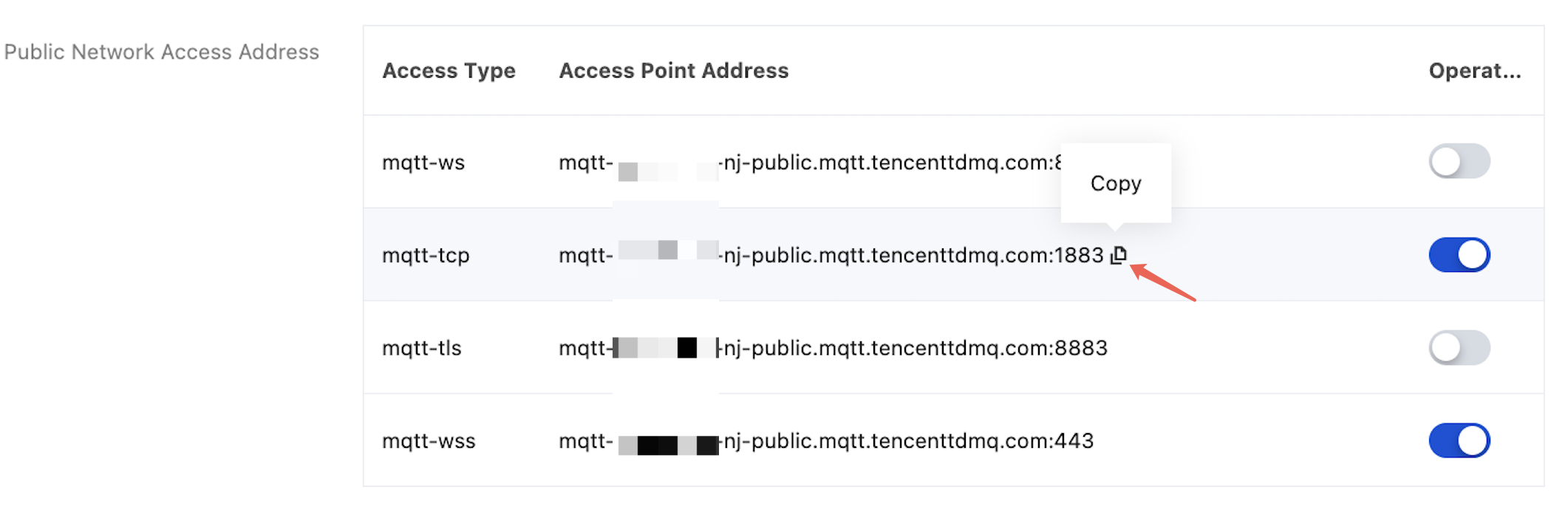 |
username | Username for the connection. Copy it from the Authentication Management page of the cluster in the console. |
password | Password for the username. Copy it from the Authentication Management page of the cluster in the console.  |
topicName | Fill in the topic name. The first-level topic must be created in advance in the console. You can customize the second-level topic name. |
PublisherQuickStart.java. The results are shown below:Connected to tcp://mqtt-xxx.mqtt.tencenttdmq.com:1883Subscribed to topic home/test with QoS=1, Granted-QoS: 1Subscribed to topic home/# with QoS=1, Granted-QoS: 1Subscribed to topic home/+ with QoS=1, Granted-QoS: 1Prepare to publish message 0Published message 0Message arrived, topic=home/test, QoS=1 content=[Hello MQTT 0]Prepare to publish message 1Published message 1Message arrived, topic=home/test, QoS=1 content=[Hello MQTT 1]Prepare to publish message 2Published message 2Message arrived, topic=home/test, QoS=1 content=[Hello MQTT 2][... Intermediate messages omitted ...]Prepare to publish message 14Published message 14Message arrived, topic=home/test, QoS=1 content=[Hello MQTT 14]Prepare to publish message 15Published message 15Message arrived, topic=home/test, QoS=1 content=[Hello MQTT 15]Disconnected: Normal disconnection
피드백