tencent cloud

Performance Testing Service

Overview
Purchase Guide
Billing Overview
Pay-as-You-Go (postpaid)
Purchasing Channels
Payment Overdue
Refund Instructions
Quick Start
Operation Guide
Performance Testing in Simple Mode
Performance Testing in Script Mode
Performance Testing in JMeter Mode
Project Management
Scenario Management
Traffic Recording
Environment Management
Scheduled Performance Testing
Performance Testing Report
Access Control
Alarm Management
Tag Management
Error Code Manual
Practice Tutorial
Using Prometheus To Monitor Performance Testing Metrics
Using PTS to Playback Requests Recorded by GoReplay
API Documentation
History
Introduction
API Category
Making API Requests
PTS-related APIs
Data Types
Error Codes
JavaScript API List
Overview of JavaScript API List
pts/global
pts/http
pts
pts/dataset
pts/grpc
pts/jsonpath
pts/protobuf
pts/redis
pts/sql
pts/url
pts/util
pts/ws
pts/socketio
pts/socket
FAQs
Related Agreements
Service Level Agreement
Use Limits
Privacy Policy
Data Processing And Security Agreement

Script Overview

PDF
Focus Mode
Font Size
Last updated: 2025-03-10 16:46:52
PTS is compatible with JavaScript ES2015 (ES6)+ syntax and provides additional functions to help you quickly orchestrate performance testing scenarios in script mode.
You can describe the request orchestration, variable definition, result assertion, common functions, and other logic required for your performance testing scenario by using JavaScript code in the online editor of the console. For detailed API documentation, see PTS API.
PTS also provides various types of script templates (such as common usage of various protocols and some common functions) in Sample Templates for Common Scripts on the right side of the script editor in the console for your reference to write your own scripts.

Script Structure

A PTS scenario script can consist of importing dependency modules, defining global variables, defining global Options, defining functions, and defining checkpoints. For detailed script content, see the following section.

Importing Dependency Modules

After importing the required modules, you can use the APIs in the modules.
import http from 'pts/http';
import { check, sleep } from 'pts';

Defining Global Variables

If global variables are needed, they can be defined outside the functions. For example:
const globalVar = "var"
const globalObj = {
"k": "v",
}

export default function () {
console.log(globalVar); // var
console.log(globalObj.k); // v
};

Defining Global Options

You can control the default behavior of the engine through global Options.
export const option = {
http: {
http2: true,
maxIdleConns: 50,
basicAuth: {
username: 'user',
password: 'passwd',
}
},
tlsConfig: {
'localhost': {
insecureSkipVerify: false,
//Users need to upload the request file ca.crt in the scenario.
rootCAs: [open('ca.crt')],
//Users need to upload the request files client.crt and client.key in the scenario.
certificates: [{cert: open('client.crt'), key: open('client.key')}]
}
}
}

Defining Functions

The logic executed by each concurrent user (VU) in each iteration is defined in the main function (default function).
In addition to the main functions, you can also define the preprocessing (setup) and post-processing (teardown) functions, as shown below:
The preprocessing function runs once after each performance testing starts.
The post-processing function runs once before each performance testing ends.
// Global variable, which is defined outside the function.
const global = { stage: "global" };

// Use the setup function for preprocessing to return custom key-value pairs.
export function setup() {
return { stage: "setup" };
}

// Main function (input parameters can receive key-value pairs returned by the setup function).
export default function(data) {
console.log(JSON.stringify(global)); // {"stage":"global"}
console.log(JSON.stringify(data)); // {"stage":"setup"}
}

// Use the teardown function for post-processing.
export function teardown(data) {
console.log(JSON.stringify(global)); // {"stage":"global"}
console.log(JSON.stringify(data)); // {"stage":"setup"}
}

Defining Checkpoints

You can determine whether a request is successful from a business perspective by configuring checkpoints.
import http from 'pts/http';
import { check } from 'pts';

export default function () {
// get request with headers and parameters
const resp1 = http.get('http://httpbin.org/get', {
headers: {
Connection: 'keep-alive',
'User-Agent': 'pts-engine',
},
query: {
name1: 'value1',
name2: 'value2',
},
});
console.log(resp1.json().args.name1); // 'value1'
check('status is 200', () => resp1.statusCode === 200);
check('body.args.name1 equals value1', () => resp1.json().args.name1 === 'value1');
}

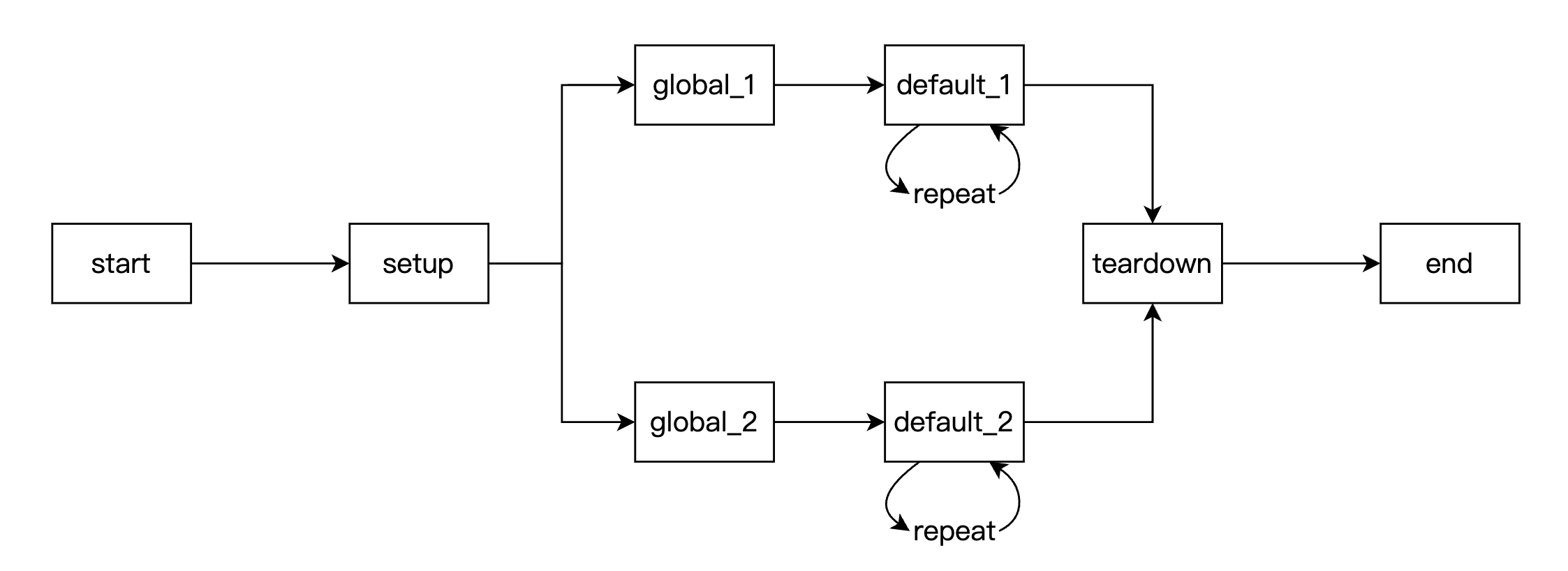
Lifecycle

Preprocessing (setup) and post-processing (teardown) functions: They run once per performance testing machine.
Code for defining global variables: It runs once per VU. Some static file reading and other operations are recommended to be defined in global, so that each concurrency only needs to read the file once. This avoids opening files repeatedly during the scenario iteration.
Code for the main function (default): It runs once per iteration for each VU, and each VU will continuously iterate until it reaches the duration limit or iteration limit configured in the current performance testing.
For example, when there are two VUs on a performance testing machine, the flowchart is as follows:

Note:
For the concept of VU, see FAQs.


Help and Support

Was this page helpful?

Help us improve! Rate your documentation experience in 5 mins.

Feedback