tencent cloud

Tencent Cloud Super App as a Service

Release Notes and Announcements
Announcement: Tencent Cloud Mini Program Platform Renamed to Tencent Cloud Super App as a Service on January 2, 2025
Console Updates
Android SDK Updates
iOS SDK Updates
Flutter SDK Updates
IDE Updates
Base Library Updates
Product Introduction
Overview
Strengths
Use Cases
Purchase Guide
Billing Overview
Pay-As-You-Go Billing
Renewal Guide
Service Suspension Instructions
Getting Started
Plan Management
Overview
Console Account Management
Storage Configuration
Acceleration Configuration
Branding Configurations
Platform Features
Console Login
Users and Permission System
Mini Program Management
Mini Game Management
Superapp Management
Commercialization
Platform Management
User Management
Team Management
Operations Management
Security Center
Code Integration Guide
Getting Demo and SDK
Android
iOS
Flutter
Superapp Server
GUID Generation Rules
Mini Program Development Guide
Mini Program Introduction and Development Environment
Mini Program Code Composition
Guide
Framework
Components
API
Server Backend
JS SDK
Base Library
IDE Operation Instructions
Mini Game Development Guide
Guide
API
Server Backend
Practice Tutorial
Mini Program Login Practical Tutorial
Mini Program Subscription Message Practical Tutorial
Payment Practical Tutorial
Ad Integration Practical Tutorial
Mini Game Subscription Message Practical Tutorial
API Documentation
History
Introduction
API Category
Making API Requests
Operation Management APIs
User Management APIs
Team Management APIs
Sensitive API-Related APIs
Role Management APIs
Platform Management APIs
Other Console APIs
Mini Program or Mini Game APIs
Management-Sensitive APIs
Global Domain Management APIs
Superapp APIs
Data Types
Agreements
Service Level Agreement
Data Processing and Security Agreement
SDK Privacy Policy Module
SDK Data Processing and Security Agreement Module

Renewal Guide

PDF
Focus Mode
Font Size
Last updated: 2025-12-22 14:53:28

Prepaid plan

Expiration notifications

When the prepaid plan for Tencent Cloud Super App as a Service (TCSAS) that you've purchased on an annual or monthly basis is about to expire, the system will send renewal reminders 7 days, 5 days, 3 days, and 1 day prior to the expiration date. These notifications, which include alerts about the upcoming expiration and prompt you to renew promptly, will be delivered via email, message center, and SMS to the creator of the Tencent Cloud account using this service.
Note:
Please refer to Balance Notifications to set notification recipients and delivery methods.
You must complete the renewal within 7 days after the expiration of the prepaid plan. Otherwise, the service will be suspended, and you will be unable to use the console features. The service will be resumed upon renewal.

Renewal method

TCSAS prepaid plans support two renewal methods:Auto-renewal and manual renewal.
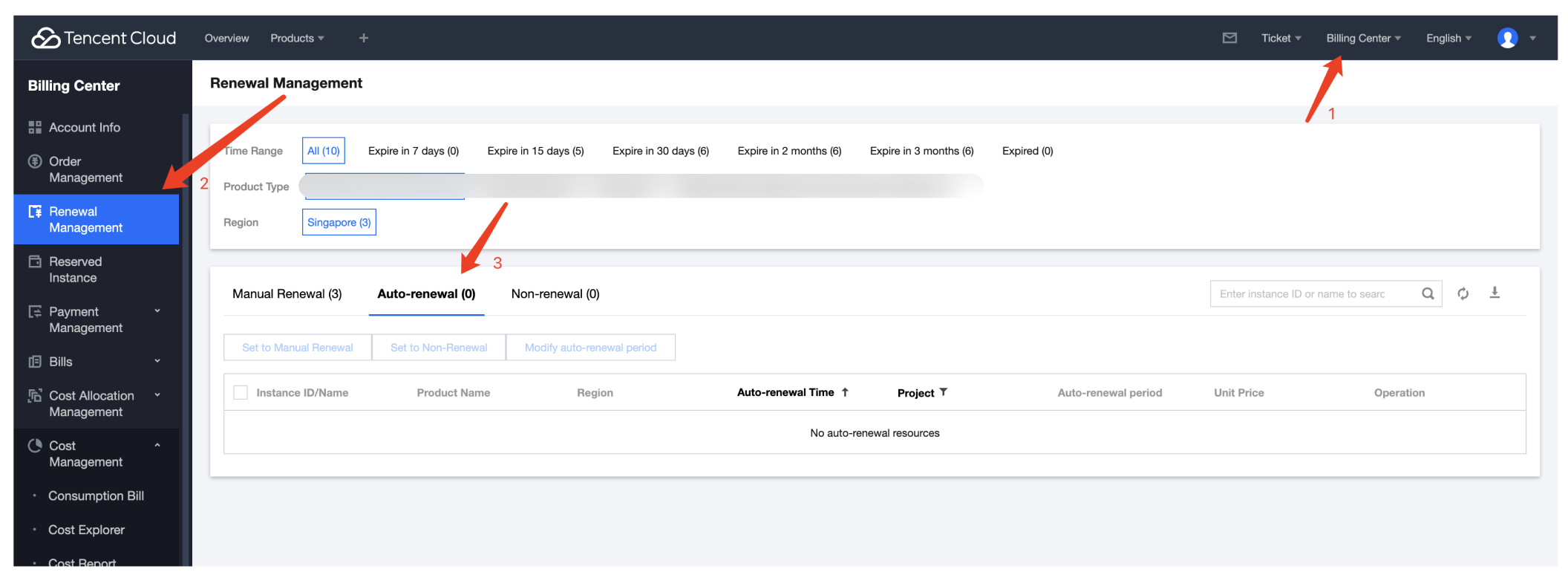
Log in to the Tencent Cloud console, navigate to the Billing Center, and select Renewal Management in the left sidebar. You can view your purchased TCSAS prepaid plans based on the expiration time range.


Enable Auto-renewal

When you purchase a TCSAS prepaid plan, you can check the Auto renewal option at the bottom of the page to enable auto-renewal.


Auto-renewal rules

Service offerings: The prepaid plans for TCSAS include the Professional edition, Enterprise edition, Mini-game Enterprise edition, and Exclusive edition, as well as any add-on service plans or other features that require prepayment before use.
Auto-renewal cycle: The auto-renewal cycle and mode will be based on your settings. For example, if you select a cycle of 1 month, the system will automatically renew the service for 1 month each time before expiration. You can disable the auto-renewal at any time. To manage your automatic renewals, go to the Tencent Cloud console, navigate to the Billing Center, and select Renewal Management in the left sidebar to enter the Renewal Management page. Click Auto-renewal, locate the service with auto-renewal enabled in the auto-renewal list. You can disable the auto-renewal or switch to manual renewal.
Deduction amount: Fees will be charged based on the price of the plan you purchased.
Deduction time and method: We will automatically renew your service before its expiration date. If the deduction fails due to insufficient account balance, the relevant service will be terminated after the 7-day grace period following the expiration date.

Help and Support

Was this page helpful?

Help us improve! Rate your documentation experience in 5 mins.

Feedback