tencent cloud

Tencent Cloud Super App as a Service

Release Notes and Announcements
Announcement: Tencent Cloud Mini Program Platform Renamed to Tencent Cloud Super App as a Service on January 2, 2025
Console Updates
Android SDK Updates
iOS SDK Updates
Flutter SDK Updates
IDE Updates
Base Library Updates
Product Introduction
Overview
Strengths
Use Cases
Purchase Guide
Billing Overview
Pay-As-You-Go Billing
Renewal Guide
Service Suspension Instructions
Getting Started
Plan Management
Overview
Console Account Management
Storage Configuration
Acceleration Configuration
Branding Configurations
Platform Features
Console Login
Users and Permission System
Mini Program Management
Mini Game Management
Superapp Management
Commercialization
Platform Management
User Management
Team Management
Operations Management
Security Center
Code Integration Guide
Getting Demo and SDK
Android
iOS
Flutter
Superapp Server
GUID Generation Rules
Mini Program Development Guide
Mini Program Introduction and Development Environment
Mini Program Code Composition
Guide
Framework
Components
API
Server Backend
JS SDK
Base Library
IDE Operation Instructions
Mini Game Development Guide
Guide
API
Server Backend
Practice Tutorial
Mini Program Login Practical Tutorial
Mini Program Subscription Message Practical Tutorial
Payment Practical Tutorial
Ad Integration Practical Tutorial
Mini Game Subscription Message Practical Tutorial
API Documentation
History
Introduction
API Category
Making API Requests
Operation Management APIs
User Management APIs
Team Management APIs
Sensitive API-Related APIs
Role Management APIs
Platform Management APIs
Other Console APIs
Mini Program or Mini Game APIs
Management-Sensitive APIs
Global Domain Management APIs
Superapp APIs
Data Types
Agreements
Service Level Agreement
Data Processing and Security Agreement
SDK Privacy Policy Module
SDK Data Processing and Security Agreement Module

Merchant Binding

PDF
Focus Mode
Font Size
Last updated: 2025-11-13 15:46:40
The mini program team admin can bind merchant for the mini program team through Commercialization - Bind merchant in the console. Once the merchant is bound, the mini programs or mini games within the team can integrate the payment feature.

Prerequisites

Ensure that the payment feature is enabled in the superapp before using the payment capabilities.

Roles and permissions

Capability | Role
Super admin
Platform admin
Mini program administrator
Mini program senior developer
Mini program developer
Mini program operator
View binding information and binding records
Read-only
Read-only
Bind/unbind/change bindings
Read-only
Read-only
-
-
-
Super admin/Platform admin: Has read-only access to Bind merchant account module, can view binding information and binding records, but cannot bind/unbind/change bindings.
Mini program administrator: Has access to Bind merchant account module, can view binding information and binding records, and has the permissions to bind/unbind/change bindings.
Mini program senior developer/Mini program developer/Mini program operator: Has access to Bind merchant account module, can view binding information and binding records, but cannot bind/unbind/change bindings.

Bind a merchant

Directions

1. Go to Commercialization - Bind merchant , click Request to bind, request to bind a merchant.
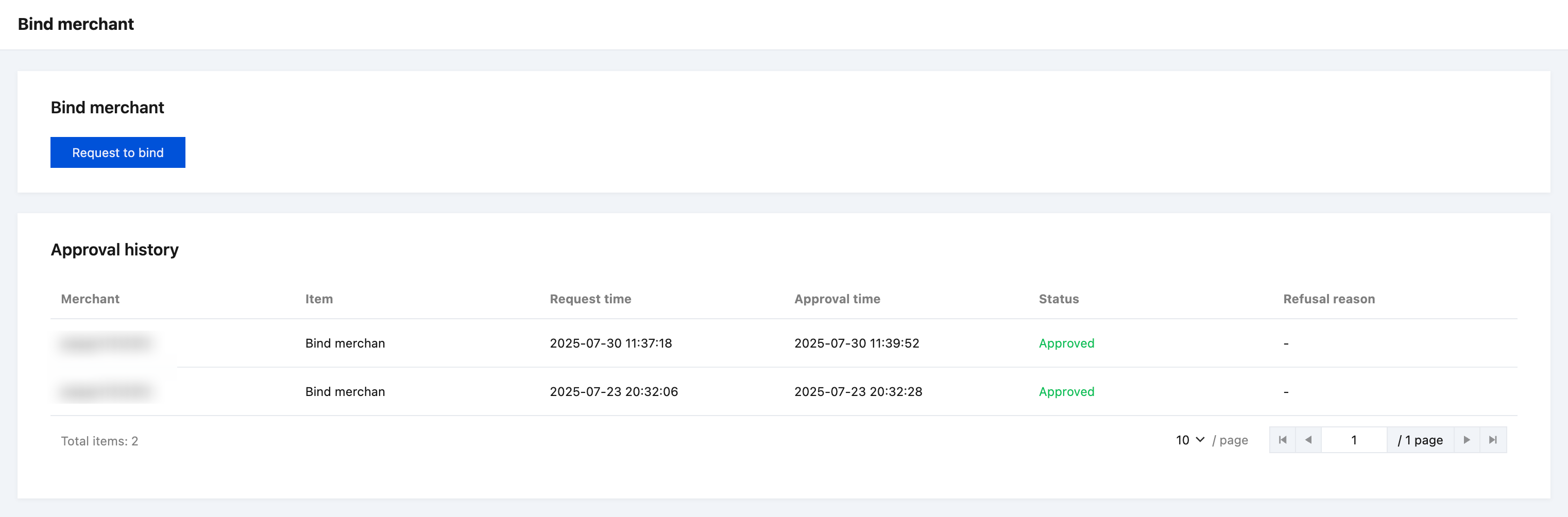
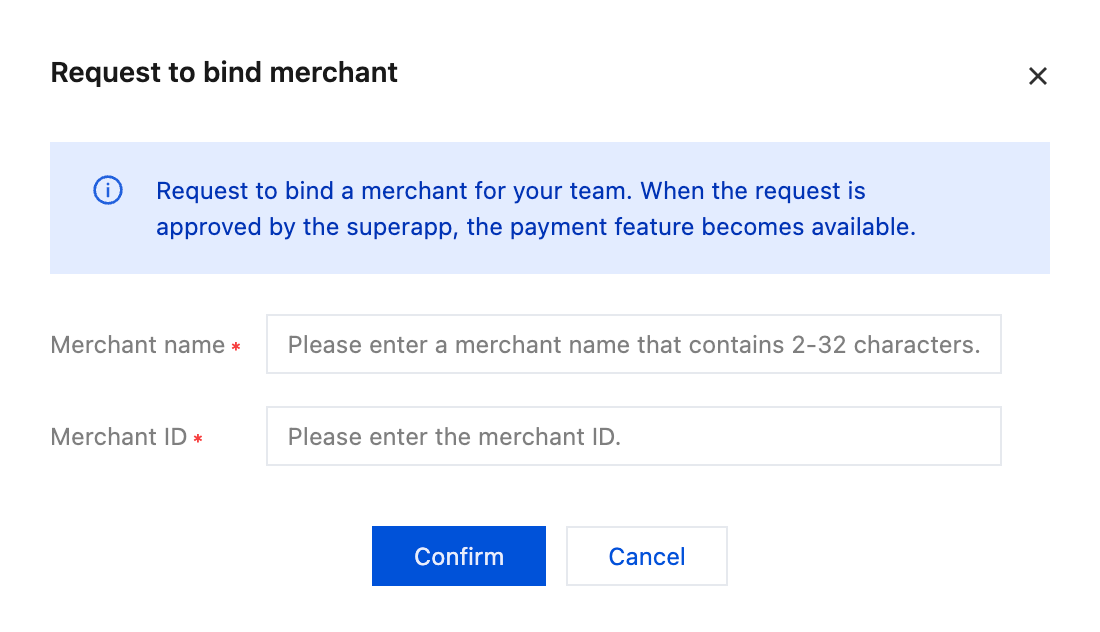
2. Enter the merchant information to be bound, then click Confirm and wait for the superapp’s approval.
3. Approve
Once approved, the status changes to Effective, and you can see the payment currency supported by the superapp.

4. Other operations
You can click Change to switch to another merchant, or click Unbind to stop using the current merchant.



Help and Support

Was this page helpful?

Help us improve! Rate your documentation experience in 5 mins.

Feedback