tencent cloud

Low-code Interactive Classroom

Release Notes and Announcements
Announcement on the Renaming of Low-Code Interactive Classroom Product
Announcement on the Upgrade of Low-Code Interactive Classroom
Product Introduction
Overview
Use Cases
Features
Strengths
Purchase Guide
Billing Overview
Monthly Packages
Billing Examples
Purchase Instructions
Payment Overdue
Refunds
Demo Download and Experience
Client Integration Guide
Web and H5
Android
iOS
Windows and macOS
Console Guide
Overview
Usage
Applications
Quick Run-through
API Documentation
History
Introduction
API Category
Making API Requests
User Login APIs
Room Management APIs
Group Management APIs
Application Configuration APIs
Recording Management APIs
Courseware Management APIs
User Management APIs
Developer APIs
Data Types
Error Codes
Interface Customization
Getting Started
Event Listening
Service Callbacks
Advanced Features
Custom Business Domain
Mobile Screen Sharing
Mobile Preloading
Practical Tutorial
Integration with Scheduling System
Integration with Account System
Integration with Recording and Playback
Integration with Courseware Module
LCIC Policy
Privacy Policy
Data Processing And Security Agreement
FAQs
Billing
Recording
Console and API authorization issues
Interactive Whiteboard Lag
Screen Sharing
Dealing with Firewall Restrictions
Web
Electron
Device Performance Requirements
Service Agreement
Service Level Agreement

Integration with Recording and Playback

PDF
Focus Mode
Font Size
Last updated: 2023-07-13 17:13:51
Note:
A complete classroom process, including pre-class scheduling, in-class teaching, and post-class playback. This article will use how to integrate with the business to complete the integration of classroom playback logic for reference by the business side.

Interface example

the list

The class list page is shown in the figure below:


details

Click View under the list operation column to enter the details page:

It can be seen that the business layer needs to be able to see the classroom history after the classroom is over. It can be broken down into the following abilities:
list
classroom information
playback file information
search
delete
details
classroom information
playback address
delete
download

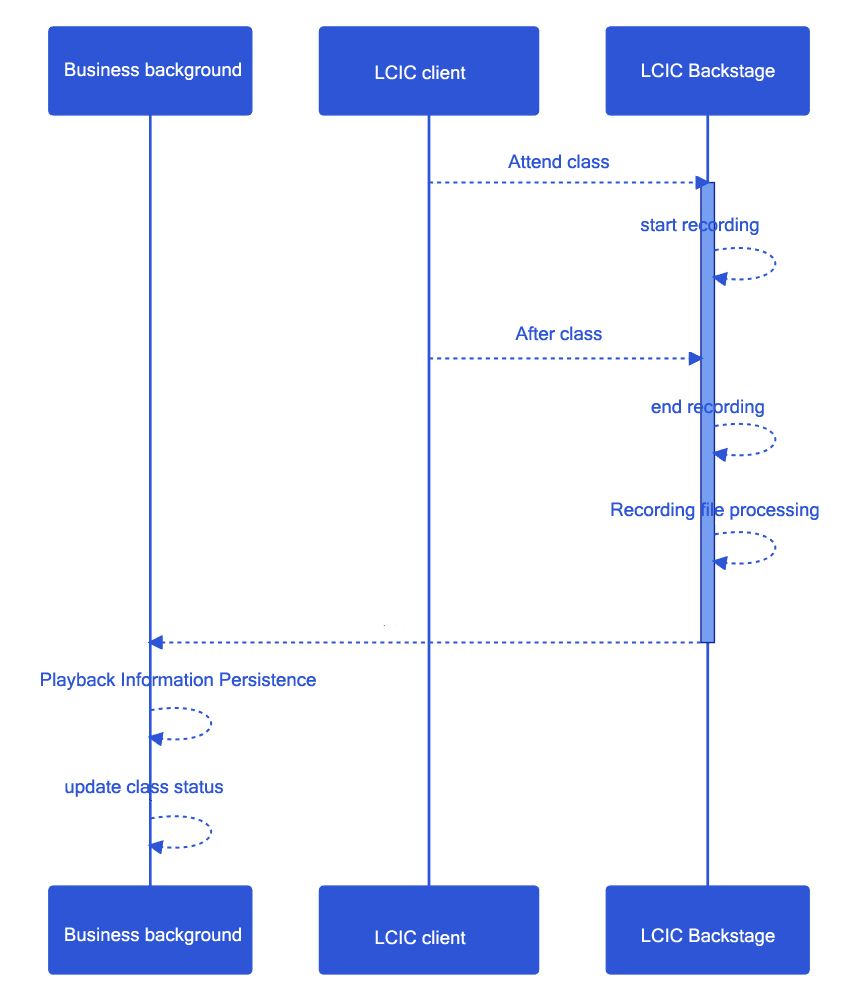
Sequence diagram of connection between playback recording and business layer


For the business layer, it is only necessary to complete the processing of the classroom playback notification in the connection of the callback service.
Callback service processing failed
If the callback is not received correctly due to a service exception, our callback service will make multiple attempts, but will give up trying if the multiple attempts still fail.
At this point, the business layer can obtain the playback address through the class information interface.

Help and Support

Was this page helpful?

Help us improve! Rate your documentation experience in 5 mins.

Feedback