Billing Modes
Unduh
Mode fokus
Ukuran font
Prepaid
The billing method for the CFW main package and feature extension is: prepaid.
Type | Description |
Overview | Tencent Cloud Firewall provides users with three paid editions: Premium Edition, Enterprise Edition, and Ultimate Edition. These three editions adopt the prepaid (yearly/monthly subscription) mode: Users make a one-time payment for one month, multiple months, or multiple years based on their usage requirements. After successful payment, the relevant resources of Tencent Cloud Firewall will be allocated by the system for user use. Upon expiration, if the user does not renew, the resources will be reclaimed. |
Advantages | During long-term protection, the unit price is lower than that of pay-as-you-go. Long-term reservation of cloud resources to avoid situations where no cloud resources are available. |
Applicable Scenario | When users exhibit the following characteristics, it is recommended to adopt the prepaid mode. Has a relatively stable business scenario. Requires long-term utilization of cloud resources. |
Postpaid
The following features of CFW support scaling up specifications in a postpaid manner:
Function | Description | Price |
Log analysis | Postpaid based on actual storage specifications. Suitable for users who cannot estimate log volume and require log storage to be unaffected. | USD 0.006/GB/day for the range of 1,000 GB to 6,120 GB. USD 0.004/GB/day for the portion exceeding 6,120 GB. |
NAT Firewall | Elastic protection is triggered when traffic exceeds the instance specification, with postpaid billing, providing protection capabilities to handle temporary traffic peaks. Note: Provides protection capability at a 1:1 ratio to the north-south protection bandwidth (prepaid). | 2.41 USD/Mbps/day |
VPC Firewall | Elastic protection is triggered when traffic exceeds the instance specification, with postpaid billing, providing protection capabilities to handle temporary traffic peaks. Note: Provides protection capability at a 1:1 ratio to the VPC firewall bandwidth (prepaid). | 0.09 USD/Mbps/day |
Billing Examples
Suppose you enable NAT Firewall elastic protection at 12:00 on a certain day. On that day, the traffic of this NAT Firewall Instance is 550M, the instance bandwidth specification is 500M, and the elasticity cost for that day is (550-500) × 2.41 × (24 - 12)/24 = 60.25 USD.
Suppose you enable pay-as-you-go storage for Log Analysis at 00:00 on a certain day. Your log storage specification is 1,500 GB, and 36 GB of new logs are generated that day. The cost for that day is 1,536 × 0.006 = 9.216 USD.
Suppose you enable VPC Firewall elastic protection at 06:00 on a certain day. On that day, the traffic of this VPC Firewall Instance is 1,000M, the instance bandwidth specification is 800M, and the elasticity cost for that day is (1,000-800) × 0.09 × (24 - 6)/24 = 13.5 USD.
Billing Process
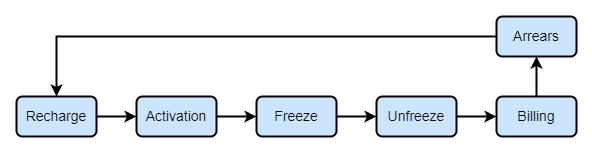
1. First, top up your account to ensure the account balance exceeds the pre-frozen amount. After the top-up is completed, you can normally activate the pay-as-you-go service.
2. After a pay-as-you-go product is activated and purchased, the system initiates pay-as-you-go billing. Common billing cycles include: hour, day, and month.
3. After the freeze activation, the system estimates the freeze amount and freezes the balance based on the product billing cycle and historical usage.
4. On the settlement date (or at the settlement time), the system will unfreeze the amount frozen for the device, release it to the available balance, and then perform the settlement.
5. When a bill reaches its billing cycle, the system calculates the charges and deducts fees based on usage and unit price, and then generates the bill.
6. When your account is overdue, the elastic features of NAT and VPC Firewall will be disabled. If your CFW main package is still valid, NAT and VPC Firewall will continue to provide protection based on instance specifications.
Bantuan dan Dukungan
Apakah halaman ini membantu?
Anda juga dapat Menghubungi Penjualan atau Mengirimkan Tiket untuk meminta bantuan.
masukan