SMS OTP Authentication
Download
포커스 모드
폰트 크기
Scenarios
IDSEC supports the use of an SMS OTP authentication source, which verifies user identities using phone numbers and one-time verification codes.
Operation Steps
1. Log in to the IDSEC console, choose Authentication Management > General Authentication Source in the left sidebar, and go to the General Authentication Source page.
2. On the General Authentication Source page, click Create authentication source to go to the New Authentication Source page.
3. On the Create authentication source page, select SMS OTP Authentication and click Next.
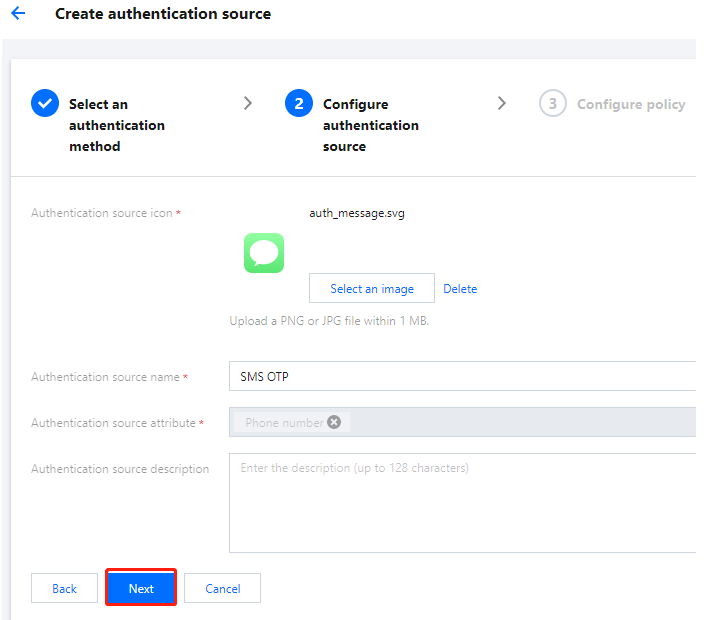
4. On the Create authentication source page, configure the authentication source icon, name, attributes, and description, and then click Next.
Note:
Authentication source icon: It is displayed in lists and portals. Users can click Re-upload to replace the default icon.
Authentication source name: A user-identifying authentication source.
Authentication source attributes: The SMS OTP authentication source uses the user's mobile phone number attribute by default, and this configuration cannot be modified.
Authentication source description: A brief description of the authentication source.
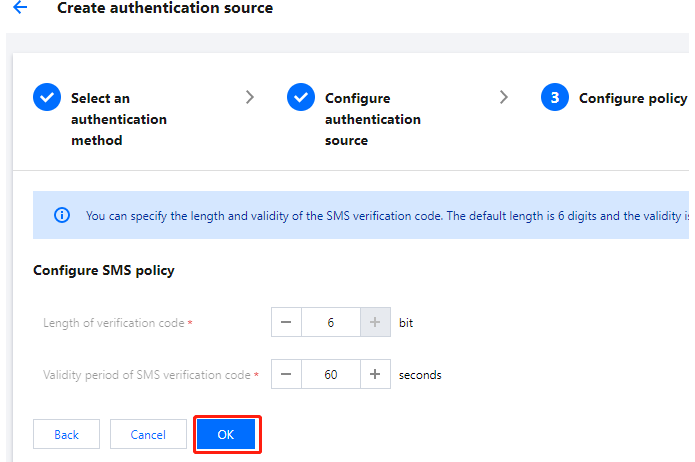
5. On the Create authentication source page, configure the relevant parameters and click OK to create the authentication source.
Note:
Length of verification code : It is configured as the length of the verification code generated when a user sends an SMS, ranging from 1 to 6 digits.
Validity period of verification code : Users configure the validity period for this code, which ranges from 1 to 300 seconds.
피드백