tencent cloud

Customer Identity and Access Management

Product Introduction
Overview
Strengths
Use Cases
Purchase Guide
Operation Guide
User pool management
User management
Application management
Authentication management
Audit management
Custom settings
Development Guide
Overview
Access via Authentication API
Get User Information
Update User Information
Modify User Password
Reset User Password
Get Token
Get JWT Public Key
Refresh Token
Revoke Token
Get OpenID Provider Configuration
API Documentation
History
Introduction
API Category
Making API Requests
User Management APIs
Data Sync APIs
Audit Management APIs
Data Types
Error Codes
FAQs
Features
Billing
CIAM Policy
Privacy Policy
Data Processing And Security Agreement

Creating a custom attribute

PDF
Focus Mode
Font Size
Last updated: 2023-12-22 11:42:07

Scenarios

After creating user directories, you can create custom attributes.
Note:
There are three types of attributes, namely built-in attributes, preset attributes and custom attributes. The built-in attributes cannot be modified/deleted, while the preset attributes and custom attributes can be modified and deleted. Once the end user data is generated, the associated preset attributes and custom attributes cannot be modified.

Steps

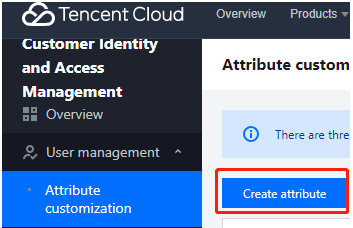
1. Log in to the Customer Identity and Access Management console and select User management -> Custom attributes in the left navigation pane.
2. On the Custom attributes page, click Create attribute.
img

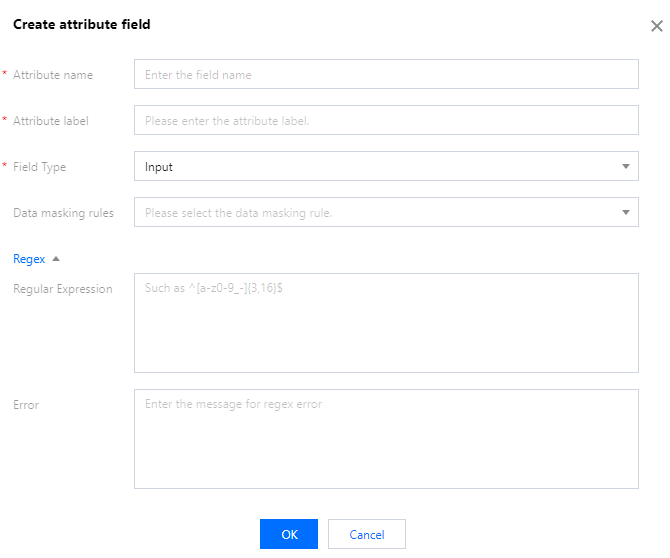
3. In the Create attribute field window displayed, fill in the basic information and click OK to add the attribute. If needed, you can also add a regular expression and an error message for this attribute.
img


Help and Support

Was this page helpful?

Help us improve! Rate your documentation experience in 5 mins.

Feedback