tencent cloud

Tencent Cloud Automation Tools

Release Notes
Product Introduction
Overview
Strengths
Scenarios
Cloud Access Management
Use Limits
Purchase Guide
Getting Started
Operation Guide
Installing TAT Agent
Executing Without Logging In
Executing on Multiple Instances
Querying Command Execution Status
Troubleshooting
Windows Troubleshooting
API Documentation
History
Introduction
API Category
Making API Requests
Remote Command APIs
Scheduled Execution APIs
Managed Instance APIs
Scenario APIs
Statistics APIs
Data Types
Error Codes
FAQs
Contact Us
Glossary
TAT Policy
Privacy Policy
Data Processing And Security Agreement

Executing on Multiple Instances

PDF
Focus Mode
Font Size
Last updated: 2022-05-27 19:30:29

Overview

After creating a command, you can execute it on one or more CVM or Lighthouse instances. The execution status and results on different instances are independent. This document describes how to execute the command on multiple CVM instances.

Prerequisites

The instances are in Running status.
The TAT agent is installed on the target instance. See Installing TAT Agent.
The target instance in based on a VPC.

Directions

Console
API
1. Log in to the CVM console and select My Commands under TencentCloud Automation Tools from the left sidebar.
2. In the My commands page, select the region, locate the target command and click Execute.


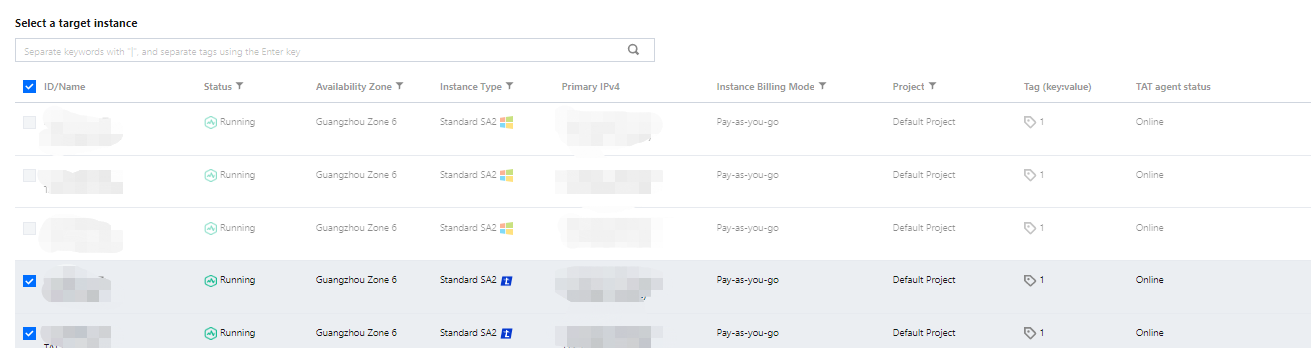
3. In the Execute command page, modify the command configuration and select the target instances.


4. Click Execute command.
You can call the InvokeCommand API to execute the command on multiple servers.

Subsequent Operations

After the task execution, you can check the task result in My commands - Logs - Log details.

Help and Support

Was this page helpful?

Help us improve! Rate your documentation experience in 5 mins.

Feedback