tencent cloud

Tencent Cloud EdgeOne

Release Notes and Announcements
Release Notes
Security Announcement
Announcements
Product Introduction
Overview
Strengths
Use Cases
Comparison Between EdgeOne and CDN Products
Use Limits
Purchase Guide
Description of Trial Plan Experience Benefits
Free Plan Guide
Billing Overview
Billing Items
Subscriptions
Renewals
Instructions for overdue and refunds
Comparison of EdgeOne Plans
About "clean traffic" billing instructions
DDoS Protection Capacity Description
Getting Started
Choose business scenario
Quick access to website security acceleration
Quick deploying a website with Pages
Domain Service&Origin Configuration
Domain Service
HTTPS Certificate
Origin Configuration
Site Acceleration
Overview
Access Control
Smart Acceleration
Cache Configuration
File Optimization
Network Optimization
URL Rewrite
Modifying Header
Modify the response content
Rule Engine
Image&Video Processing
Speed limit for single connection download
DDoS & Web Protection
Overview
DDoS Protection
Web Protection
Bot Management
API Discovery(Beta)
Edge Functions
Overview
Getting Started
Operation Guide
Runtime APIs
Sample Functions
Best Practices
Pages
L4 Proxy
Overview
Creating an L4 Proxy Instance
Modifying an L4 Proxy Instance
Disabling or Deleting an L4 Proxy Instance
Batch Configuring Forwarding Rules
Obtaining Real Client IPs
Data Analysis&Log Service
Log Service
Data Analysis
Alarm Service
Site and Billing Management
Billing Management
Site Management
Version Management
General Policy
General Reference
Configuration Syntax
Request and Response Actions
Country/region and Corresponding Codes
Terraform
Overview
Installing and Configuring Terraform
Practical Tutorial
EdgeOne Skill User Guide
Automatic Warm-up/Cache Purge
Resource Abuse/hotlinking Protection Practical
HTTPS Related Practices
Acceleration Optimization
Scheduling Traffic
Data Analysis and Alerting
Log Platform Integration Practices
Configuring Origin Servers for Cloud Object Storage (Such As COS)
CORS Response Configuration
API Documentation
History
Introduction
API Category
Making API Requests
Site APIs
Acceleration Domain Management APIs
Site Acceleration Configuration APIs
Edge Function APIs
Alias Domain APIs
Security Configuration APIs
Layer 4 Application Proxy APIs
Content Management APIs
Data Analysis APIs
Log Service APIs
Billing APIs
Certificate APIs
Origin Protection APIs
Load Balancing APIs
Diagnostic Tool APIs
Custom Response Page APIs
API Security APIs
DNS Record APIs
Content Identifier APIs
Legacy APIs
Ownership APIs
Image and Video Processing APIs
Multi-Channel Security Gateway APIs
Version Management APIs
Data Types
Error Codes
FAQs
Product Features FAQs
DNS Record FAQs
Domain Configuration FAQs
Site Acceleration FAQs
Data and Log FAQs
Security Protection-related Queries
Origin Configuration FAQs
Troubleshooting
Reference for Abnormal Status Codes
Troubleshooting Guide for EdgeOne 4XX/5XX Status Codes
520/524 Status Code Troubleshooting Guide
521/522 Status Code Troubleshooting Guide
Tool Guide
Agreements
Service Level Agreement
Origin Protection Enablement Conditions of Use
TEO Policy
Privacy Policy
Data Processing And Security Agreement
Contact Us
Glossary
DocumentationTencent Cloud EdgeOneDomain Service&Origin ConfigurationHTTPS CertificateRelated ReferencesThe Difference Between one-way authentication and Mutual authentication

The Difference Between one-way authentication and Mutual authentication

PDF
Focus Mode
Font Size
Last updated: 2025-09-01 14:53:33
One-way authentication only requires the server to have a certificate, and the client doesn't need to have one. Mutual authentication requires both the client and the server to have certificates, and both parties must verify each other successfully to complete the SSL handshake.

SSL One-way Authentication

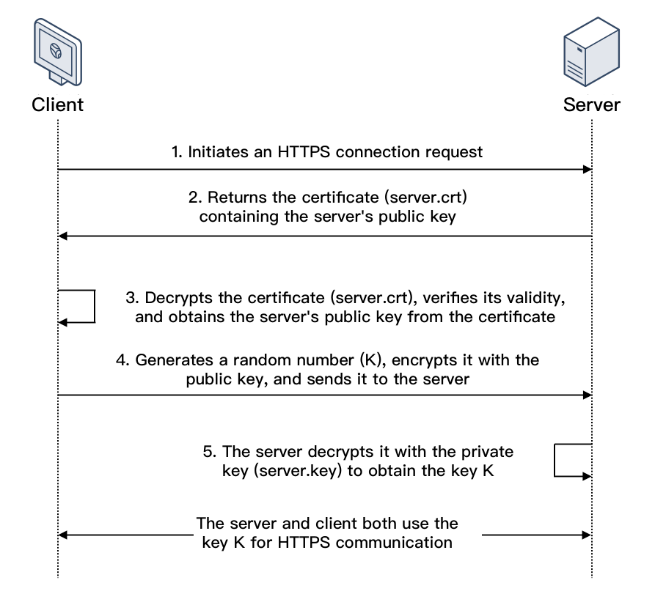
In SSL one-way authentication, only the server identity but not the client identity needs to be verified. The process of SSL one-way authentication is as shown below:


1. A client initiates an HTTPS connection request to the server together with the supported SSL protocol versions, encryption algorithms, generated random numbers, and other information.
2. The server returns an SSL protocol version, encryption algorithm, generated random number, server certificate (server.crt), and other information to the client.
3. The client verifies the validity of the certificate (server.crt) for the factors below and obtains the server's public key from the certificate.
4. After the certificate is verified, the client will generate a random number (the key K; which is used as the symmetric encryption key for the communication), encrypt it with the public key obtained from the server certificate, and then send it to the server.
5. After receiving the encrypted information, the server will use its private key (server.key) to decrypt it to obtain the symmetric encryption key (the key K).The symmetric encryption key (the key K) will be used by the server and client for communication to guarantee information security.
SSL Mutual Authentication

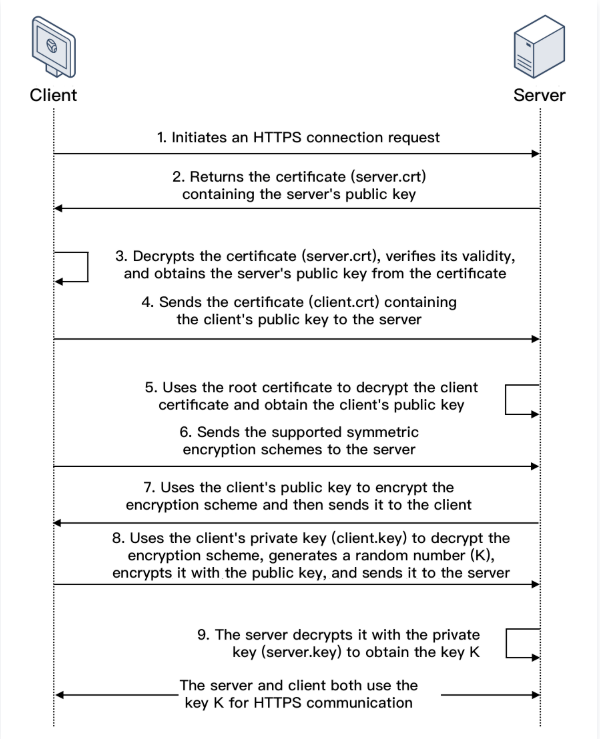
In SSL mutual authentication, the server identity and the client identity both need to be verified. The process of SSL mutual authentication is as shown below:


1. A client initiates an HTTPS connection request to the server together with the supported SSL protocol versions, encryption algorithms, generated random numbers, and other information.
2. The server returns an SSL protocol version, encryption algorithm, generated random number, server certificate (server.crt), and other information to the client.
3. The client verifies the validity of the certificate (server.crt) for the factors below and obtains the server's public key from the certificate.
4. The server requires the client to send the client certificate (client.crt), and the client does so as required.
5. The server verifies the client certificate (client.crt). After it is verified, the server will use the root certificate to decrypt the client certificate and obtain the client's public key.
6. The client sends the supported symmetric encryption schemes to the server.
7. The server selects the encryption scheme with the highest encryption level from the schemes sent from the client, uses the client's public key to encrypt it, and returns it to the client.
8. The client uses its private key (client.key) to decrypt the encryption scheme and generate a random number (the key K; which is used as the symmetric encryption key for the communication), encrypts it with the public key obtained from the server certificate, and then sends it to the server.
9. After receiving the encrypted information, the server will use its private key (server.key) to decrypt it to obtain the symmetric encryption key (the key K).The symmetric encryption key (the key K) will be used by the server and client for communication to guarantee information security.

Help and Support

Was this page helpful?

Help us improve! Rate your documentation experience in 5 mins.

Feedback