Quickly Enabling HTTPS Access with EdgeOne Free Certificate
ダウンロード
フォーカスモード
フォントサイズ
最終更新日: 2025-10-28 17:47:32
AI翻訳
This document introduces how to use the free certificate service provided by EdgeOne, to help your website quickly achieve HTTPS access and reduce the workload of subsequent certificate updates and maintenance.
Background
HTTPS access has become a mainstream demand on the Internet. It can ensure secure data transmission for you to access websites, preventing such problems as information leakage and message hijacking. Additionally, in search engines, websites not enabling HTTPS are identified by the browser as unsecure websites and their search weights are also affected. Therefore, it is essential for websites to enable HTTPS access.
To achieve HTTPS access, you should find an appropriate free certificate authority (CA) to apply for a free certificate or purchase a more credible paid certificate. The following challenges exist:
1. Complex application process: Certificate application needs to be completed separately for each domain name and requires DNS validation or HTTP validation based on the CA's requirements. If there are a large number of domain names, DNS entries must be added for each domain name one by one to complete validation. The workload is relatively high.
2. High deployment and maintenance costs: After the certificate application is completed, you should deploy the certificate yourself on the server. If there are many certificates, you should deploy and maintain a correct certificate for each domain name to avoid HTTPS access errors. The update and maintenance workload is high.
3. Prone to expiration: Certificates must be renewed before expiration, otherwise HTTPS access alarms will occur. Especially for free certificates, the current validity period is 3 months generally, so frequent renewals are required.
4. High costs of paid certificates: Although the number of paid certificates can be reduced by applying for a wildcard domain name certificate and auto-renewal is supported, paid certificates are unsuitable for small websites or businesses with many domain names due to high costs.
Solution Strengths
The free certificate service provided by EdgeOne simplifies the implementation of HTTPS access, eliminating the cumbersome process of manual application, deployment, and maintenance of certificates. You can enable HTTPS for your websites with simple operations and enjoy auto-renewal and additional access acceleration and security protection services. Compared to purchasing paid SSL certificates or applying for free certificates from other authorities, it has the following advantages:
1. Simple application: You only need to click Apply for Free Certificate in the console, and EdgeOne will automatically complete the subsequent certificate application and validation process.
2. Easy deployment: Once the certificate application is completed, the certificate will be automatically issued and deployed, without the need to manually download and deploy the certificate.
3. Auto-renewal: The free certificate can be automatically renewed, without the need for manual maintenance, so as to avoid failure of HTTPS access to websites due to certificate expiration.
4. Additional services: After accessing EdgeOne, your site not only enables HTTPS access, but also obtains access acceleration and security protection capabilities, further enhancing the website access experience.
Certificate Type
EdgeOne Free Certificate
Paid SSL Certificate
Free Certificate Applied For by Yourself
Fees
Free
Requires additional payment.
Free
Application method
Automatic application and validation
Requires DNS validation or HTTP validation during the application.
Requires DNS validation or HTTP validation during the application.
Deployment mode
Automatic deployment
Supports quick deployment within the same cloud resource and requires manual deployment for other resources.
Requires manual deployment.
Update method
Automatic update
SSL certificates purchased from Tencent Cloud can be automatically renewed/updated after hosting. Certificates from other sources require manual updates.
Method 1: Apply for a free certificate to manually update it before expiration.
Method 2: Maintain a code script to achieve automatic application/update of free certificates.
Issuance speed
Issued immediately after validation.
1 business day or above, depending on the certificate type.
Issued immediately after validation.
Certificate credibility
General
High
General
Note:
1. Free Certificates are issued by the TrustAsia and Let's Encrypt. If your site is currently accessed through NS, you can apply for a wildcard domain name certificate. If it is accessed through CNAME, EdgeOne only supports the application of single domain name certificates and does not support the application of wildcard domain name certificates.
2. The certificate has a validity period of 90 days. The platform will automatically apply for renewal 15 days before expiry, so there is no need for you to manually update it. If you are currently using NS access and switch to CNAME access, the applied wildcard domain name certificate will not be able to auto-renew upon expiration.
3. Free certificates do not support downloading.
4. If the domain is accessed via CNAME or DNSPod hosted access, you need to complete the CNAME configuration and wait for the CNAME status to take effect before applying for a free SSL certificate for the domain. In the CNAME or DNSPod hosted access mode, EO will apply for the free certificate through HTTP verification. During the verification process, the EO node will directly respond with the verification value. It is recommended to avoid using line/region-based resolution when configuring CNAME records, as this may lead to difficulties in obtaining the correct verification value, resulting in the failure of the free certificate application.
Sample Scenario
For example, the current website plans to use the services of 5 domain names including example.com, www.example.com, api.example.com, image.example.com, and video.example.com, all of which require enabling HTTPS access. Below is a comparison of the differences in the HTTPS access implementation paths between accessing and not accessing EdgeOne.
Not Accessing EdgeOne
When EdgeOne is not accessed, for implementing HTTPS access to websites, you should register a domain name, deploy the origin server services, and then choose a suitable CA to apply for the specified certificate. If there are multiple domain names, you should apply for a separate certificate for each domain name, or directly purchase a wildcard domain name certificate, and then deploy the certificate and enable the HTTPS service on each origin server separately, so as to achieve HTTPS access.
Before the certificate expires, you should renew it by applying for a new certificate from the CA in advance, and then update and redeploy it on the server. If there are a large number of domain names, HTTPS access errors may occur due to untimely certificate updates. Therefore, more maintenance work is required for HTTPS certificates.
Accessing EdgeOne for Free Certificates
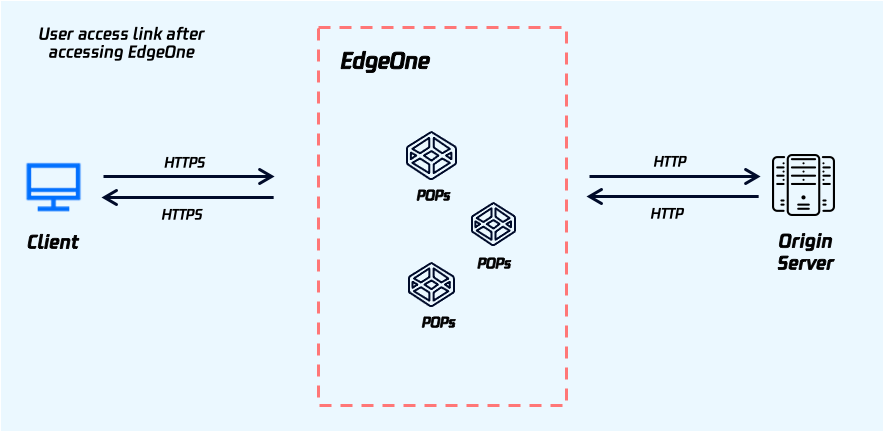
After domain name access to EdgeOne, you can apply for a free certificate through EdgeOne, to automatically complete certificate application, issuance, and deployment and quickly achieve HTTPS access. Your origin server does not need to deploy an HTTPS certificate, and HTTP access can still be used for origin-pull.
Before the certificate expires, EdgeOne will automatically renew the certificate and deploy it to EdgeOne, saving you a lot of maintenance work.
Directions
1. Refer to Quick Start to complete site access and domain name access.
2. After domain name access, if your site uses CNAME access, you should complete CNAME configuration for your domain name and wait for the CNAME status to take effect; if your site uses NS access, you should complete modifying DNS servers and wait for the resolution to take effect. Then proceed to the next step.
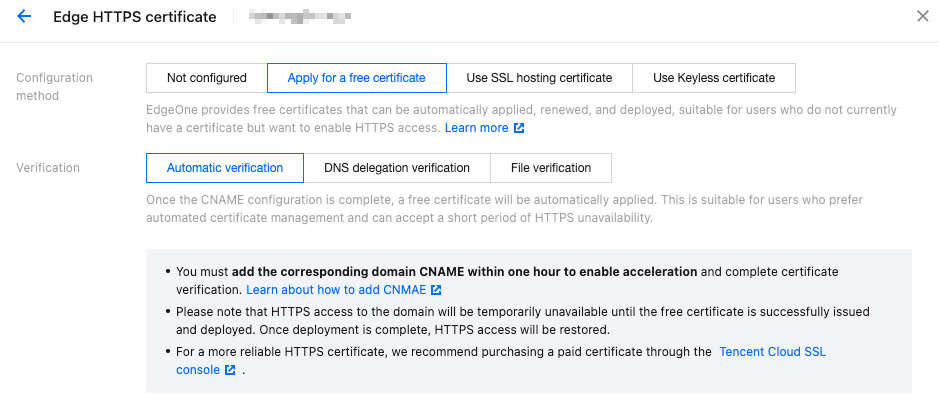
3. In Domain Name Management, select example.com and click Edit in the HTTPS Configuration column.Find the Edge HTTPS configuration card, click Configure, select Apply for Free Certificate as the configuration method, and click Save.
4. After the application is completed, issue and deploy the free certificate.
5. After deployment is completed, visit the current site again to achieve HTTPS access.
6. Repeat steps 2-4 for the domain names www.example.com, api.example.com, image.example.com, and video.example.com to apply for a free certificate in a similar manner.