Passing Real Client IP Through SPP
Download
フォーカスモード
フォントサイズ
Use Cases
The Simple Proxy Protocol (SPP for short below) is a custom protocol header format used for proxy servers to pass the real client IP and other related information to backend servers. It is applied in logging, access control, load balancing, troubleshooting, and other scenarios. The SPP header has a fixed length of 38 bytes, making it simpler compared to the Proxy Protocol V2.
If your current backend service is a UDP service and already supports the SPP or you prefer a simpler parsing method, you can use the SPP to pass the real client IP. EdgeOne L4 proxy supports passing the real client IP to the business server based on the SPP standard. You can parse this protocol on the server side to obtain the real client IP and port.
Note:
The L4 proxy is only available with the Enterprise Edition package.
EdgeOne Handling Process for SPP
Requesting Access
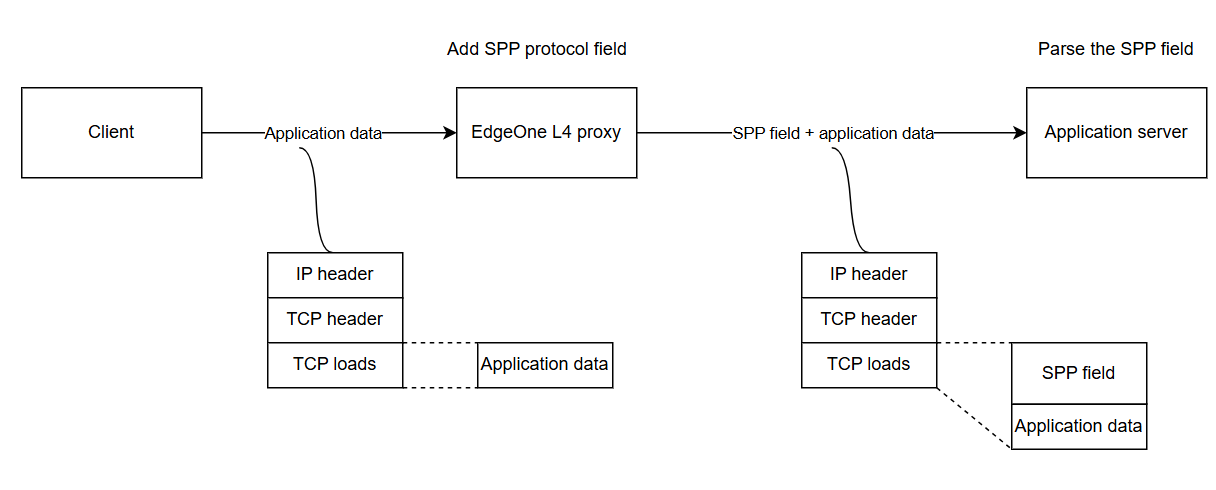
As shown in the above figure, when you use the SPP to pass the client IP and port, the EdgeOne L4 proxy will automatically add the real client IP and port with a fixed length of 38 bytes before each payload according to the SPP header format. You can obtain the real client IP and port by parsing the SPP header field on the origin server.
Origin Server Response
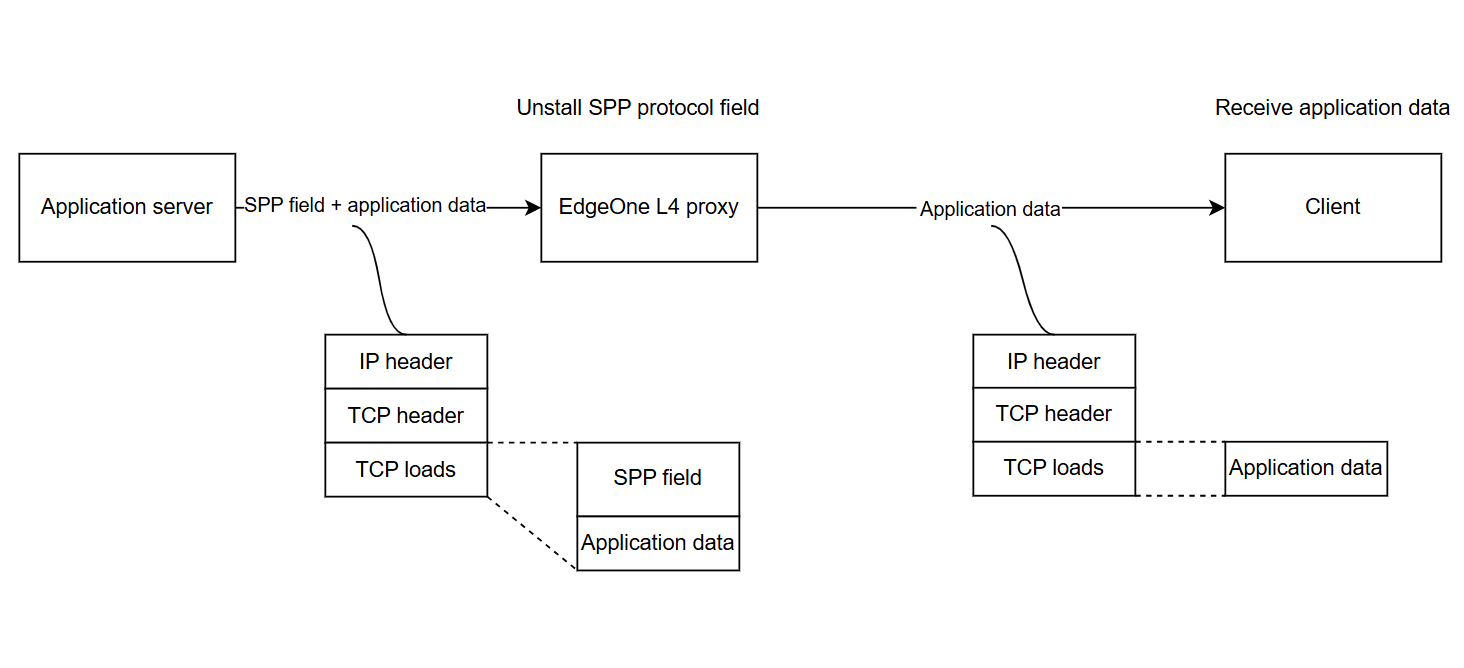
As shown in the above figure, when the origin server responds, the response packet must carry the SPP header and be returned to the EdgeOne L4 proxy, which will automatically uninstall the SPP header.
Note:
If the origin server does not return the SPP header, it will cause the EdgeOne L4 proxy to truncate the business data in the payload.
Directions
Step 1: Configuring L4 Proxy Forwarding Rules
1. Log in to the Tencent Cloud EdgeOne console, enter Service Overview in the left menu bar, and click the site to be configured under Website Security Acceleration.
2. On the site details page, click L4 Proxy.
3. On the L4 proxy page, select the L4 proxy instance you want to modify and click Configure.
4. Select the Layer 4 proxy rule that requires passing the real client IP and click Edit.
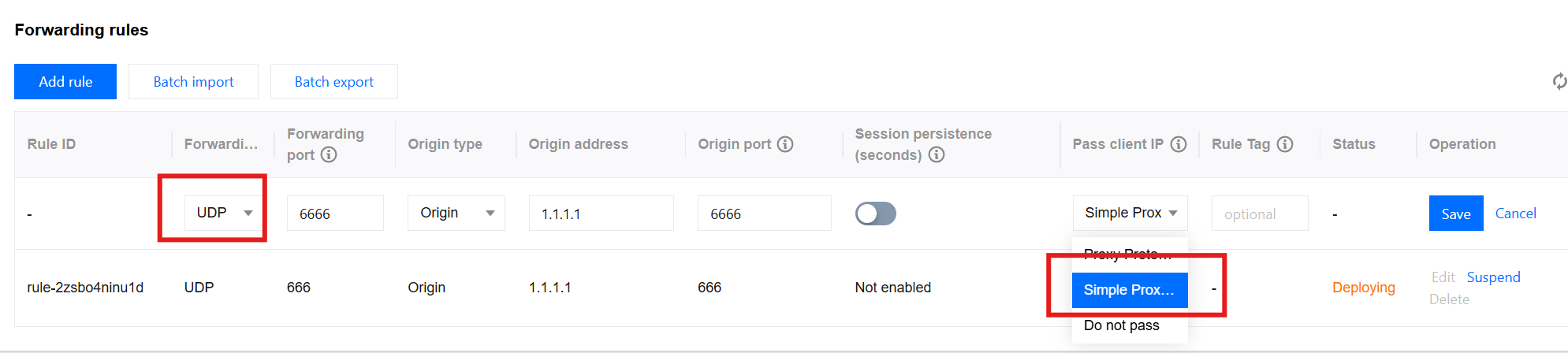
5. Enter the corresponding business origin server address and port, select UDP for the forwarding protocol, select Simple Proxy Protocol for passing the client IP, and then click Save.
Step 2: Parsing the SPP Field on the Origin Server to Obtain the Real Client IP
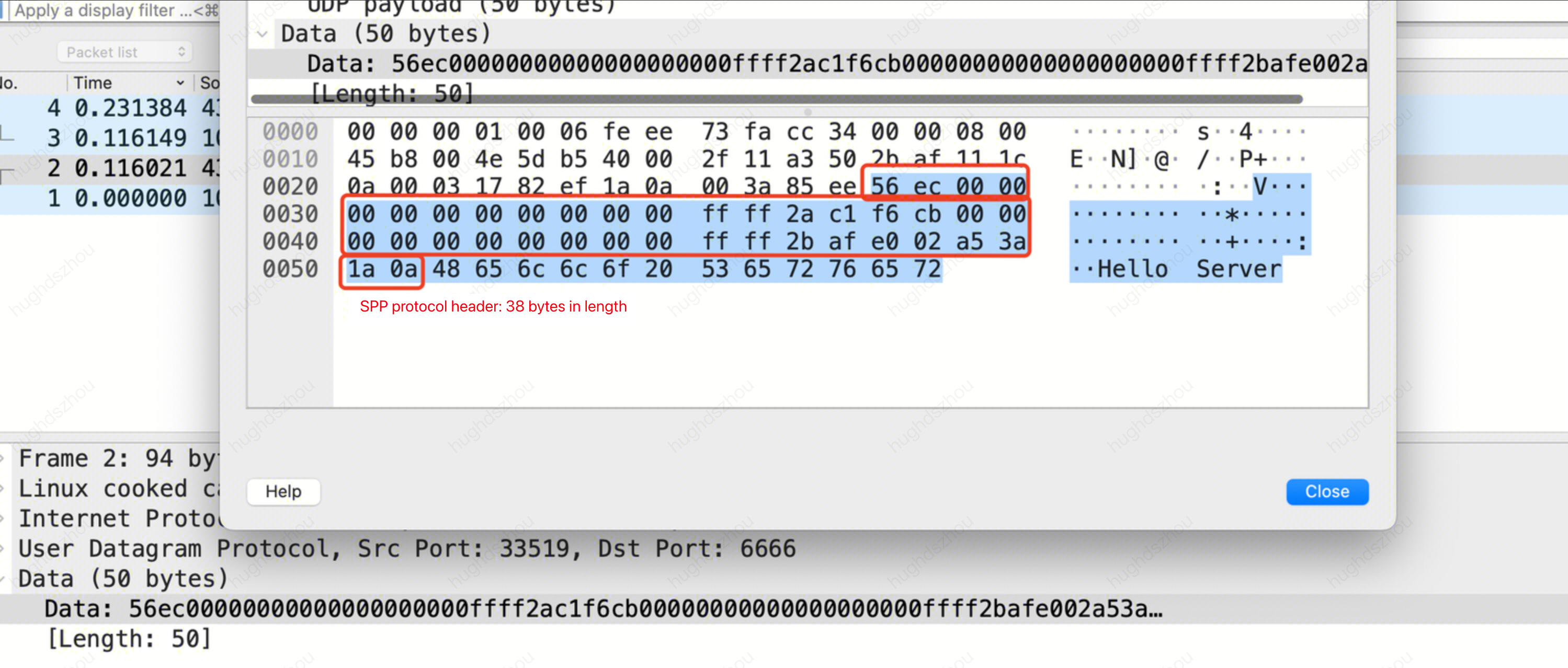
You can refer to SPP Header Format and Sample Code for parsing the SPP field on the origin server. When the SPP is used to pass the real client IP, the format of the service packet data obtained by the server is as follows:
You can
refer to the following sample code for parsing the business data to obtain the real client IP.package mainimport ("encoding/binary""fmt""net")type NetworkConnection struct {Magic uint16ClientAddr net.IPProxyAddr net.IPClientPort uint16ProxyPort uint16}func handleConn(conn *net.UDPConn) {buf := make([]byte, 1024) // Create a buffer.n, addr, err := conn.ReadFromUDP(buf) // Read the data packet from the connection.if err != nil {fmt.Println("Error reading from UDP connection:", err)return}// Convert the received bytes to a NetworkConnection struct.nc := NetworkConnection{Magic: binary.BigEndian.Uint16(buf[0:2]),ClientAddr: make(net.IP, net.IPv6len),ProxyAddr: make(net.IP, net.IPv6len),}if nc.Magic == 0x56EC {copy(nc.ClientAddr, buf[2:18])copy(nc.ProxyAddr, buf[18:34])nc.ClientPort = binary.BigEndian.Uint16(buf[34:36])nc.ProxyPort = binary.BigEndian.Uint16(buf[36:38])// Print the SPP header information, including magic, real client IP and port, as well as proxy IP and port.fmt.Printf("Received packet:\\n")fmt.Printf("\\tmagic: %x\\n", nc.Magic)fmt.Printf("\\tclient address: %s\\n", nc.ClientAddr.String())fmt.Printf("\\tproxy address: %s\\n", nc.ProxyAddr.String())fmt.Printf("\\tclient port: %d\\n", nc.ClientPort)fmt.Printf("\\tproxy port: %d\\n", nc.ProxyPort)// Print the actual and effective payload.fmt.Printf("\\tdata: %v\\n\\tcount: %v\\n", string(buf[38:n]), n)} else {// Print the actual and effective payload.fmt.Printf("\\tdata: %v\\n\\tcount: %v\\n", string(buf[0:n]), n)}// Respond with a packet. Note: The 38-byte SPP header must be returned completely.response := make([]byte, n)copy(response, buf[0:n])_, err = conn.WriteToUDP(response, addr) // Send data.if err != nil {fmt.Println("Write to udp failed, err: ", err)}}func main() {localAddr, _ := net.ResolveUDPAddr("udp", ":6666") // Create a UDP address using the local address and port.conn, err := net.ListenUDP("udp", localAddr) // Create a listener.if err != nil {panic("Failed to listen for UDP connections:" + err.Error())}defer conn.Close() // Close the connection at the end.for {handleConn(conn) // Handle the incoming connection.}}
#include <stdio.h>#include <stdlib.h>#include <string.h>#include <arpa/inet.h>#include <netinet/in.h>#include <sys/socket.h>#define BUF_SIZE 1024struct NetworkConnection {uint16_t magic;struct in6_addr clientAddr;struct in6_addr proxyAddr;uint16_t clientPort;uint16_t proxyPort;};void handleConn(int sockfd) {struct sockaddr_in clientAddr;socklen_t addrLen = sizeof(clientAddr);unsigned char buf[BUF_SIZE];ssize_t n = recvfrom(sockfd, buf, BUF_SIZE, 0, (struct sockaddr *)&clientAddr, &addrLen);if (n < 0) {perror("Error reading from UDP connection");return;}// Convert the received bytes to a NetworkConnection struct.struct NetworkConnection nc;nc.magic = ntohs(*(uint16_t *)buf);if (nc.magic == 0x56EC) { // Magic with the value 0x56EC indicates an SPP header.memcpy(&nc.clientAddr, buf + 2, 16);memcpy(&nc.proxyAddr, buf + 18, 16);nc.clientPort = ntohs(*(uint16_t *)(buf + 34));nc.proxyPort = ntohs(*(uint16_t *)(buf + 36));printf("Received packet:\\n");printf("\\tmagic: %x\\n", nc.magic);char clientIp[INET6_ADDRSTRLEN];char proxyIp[INET6_ADDRSTRLEN];inet_ntop(AF_INET6, &nc.clientAddr, clientIp, INET6_ADDRSTRLEN);inet_ntop(AF_INET6, &nc.proxyAddr, proxyIp, INET6_ADDRSTRLEN);// Print the SPP header information, including magic, real client IP and port, as well as proxy IP and port.printf("\\tclient address: %s\\n", clientIp);printf("\\tproxy address: %s\\n", proxyIp);printf("\\tclient port: %d\\n", nc.clientPort);printf("\\tproxy port: %d\\n", nc.proxyPort);// Print the actual and effective payload.printf("\\tdata: %.*s\\n\\tcount: %zd\\n", (int)(n - 38), buf + 38, n);} else {printf("\\tdata: %.*s\\n\\tcount: %zd\\n", (int)n, buf, n);}// Respond with a packet. Note: The 38-byte SPP header must be returned completely.sendto(sockfd, buf, n, 0, (struct sockaddr *)&clientAddr, addrLen);}int main() {int sockfd = socket(AF_INET, SOCK_DGRAM, 0);if (sockfd < 0) {perror("Failed to create socket");exit(EXIT_FAILURE);}// Create a UDP address using the local address and port.struct sockaddr_in serverAddr;serverAddr.sin_family = AF_INET;serverAddr.sin_addr.s_addr = INADDR_ANY;serverAddr.sin_port = htons(6666);if (bind(sockfd, (struct sockaddr *)&serverAddr, sizeof(serverAddr)) < 0) {perror("Failed to bind");exit(EXIT_FAILURE);}while (1) {handleConn(sockfd);}}
Step 3: Testing and Verification
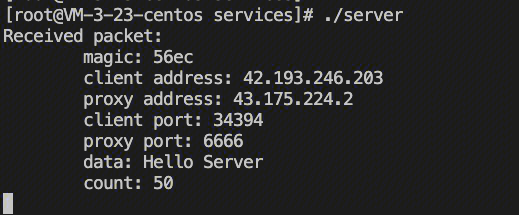
You can use a server as the client, construct client requests, and use the nc command to simulate UDP requests. The details of the command are as follows:
echo "Hello Server" | nc -w 1 -u <IP/DOMAIN> <PORT>
Here, IP/Domain indicates the access IP or domain name of your L4 proxy instance. You can view the corresponding information of the L4 proxy instance in the EdgeOne console. Port indicates the forwarding port configured for the rule in Step 1.

The server receives the request and parses the client IP address as follows:
Related References
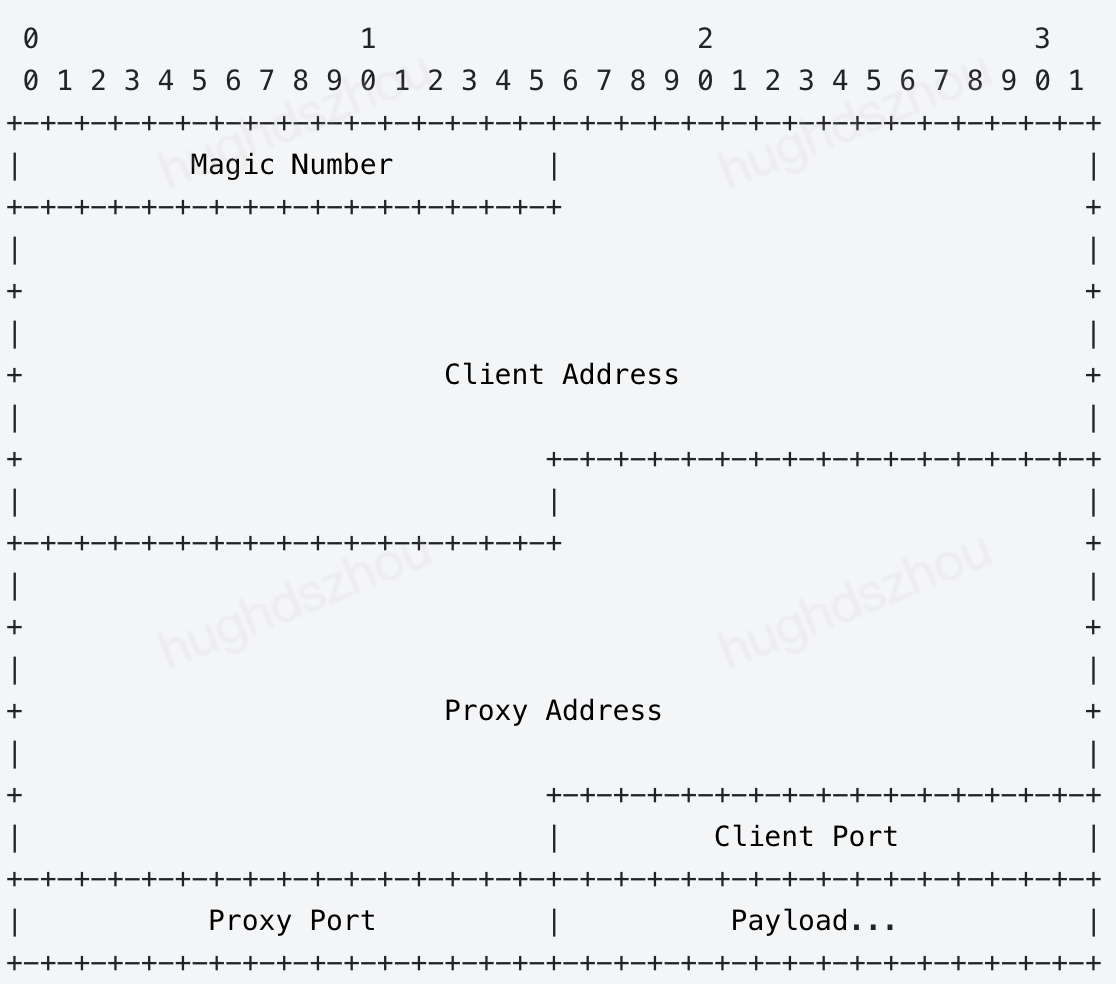
SPP Header Format
Magic Number
In the SPP format, Magic Number is 16 bits long with a fixed value of 0x56EC. It is mainly used to identify the SPP and also specify the fixed length of SPP header to be 38 bytes.
Client Address
IP address of the client initiating a request, which is 128 bits long. If the request is initiated by an IPV4 client, the value indicates IPV4; if initiated by an IPV6 client, the value indicates IPV6.
Proxy Address
IP address of the proxy server, which is 128 bits long and can be parsed in the same way as the Client Address.
Client Port
Port for the client to send UDP packets, which is 16 bits long.
Proxy Port
Port for the proxy server to receive UDP packets, which is 16 bits long.
Payload
Actual data following the header in a packet.
フィードバック