Billing Usage
Download
フォーカスモード
フォントサイズ
Overview
The Billing Usage page of EdgeOne provides usage data for billing items, allowing you to estimate fees based on this data before actual billing. After billing, you can view the bill details in the Tencent Cloud Billing Center console. You can also view more detailed usage reports on this page and filter by resource tag, billing region, package, site, domain, and L4 proxy instance. This document explains the relationship between the component name fields in the Tencent Cloud Billing Center's detailed bill and the metric names on the EdgeOne Billing Usage page.
Note
1. The data displayed on the Billing Usage page may differ from that on other pages (Traffic Analysis, Service Overview, and Site Overview). If you are concerned with fees-related issues, it is recommended to refer to the Billing Usage page. The relationships among the various data provided by EdgeOne are as follows:
Tencent Cloud billing usage data = Data displayed on the Billing Usage page ≈ Data displayed on the Traffic Analysis, Service Overview, and Site Overview Pages > Data calculated using raw logs.The explanation for the differences between billing usage data and the data in logs can be found in Why are the traffic data in the console and the traffic data derived from logs inconsistent?
2. Due to latency and algorithm impacts, the data on this page may have some latency and generally stabilizes after 3 hours.
Relationship Between Metrics on the Billing Usage Page and Billing Items
For Personal/Basic/Standard Edition Users
Component Name Field in Tencent Cloud Billing Center Detailed Bill | Metric Name Displayed on EdgeOne Billing Usage Page | Billing Standard |
SCDN - Traffic - Hourly Settlement | Corresponds to the total usage generated by the following services: Content acceleration traffic: L7 (application layer) traffic generated by all domains when Smart Acceleration is not enabled; only downstream traffic is counted; Smart acceleration traffic: L7 (application layer) traffic generated by all domains when Smart Acceleration is enabled; both upstream and downstream traffic is counted. | |
HTTP/HTTPS Security Requests - Hourly Settlement | HTTP/HTTPS Requests: Application layer requests generated by all domains, regardless of protocol or whether they are static or dynamic requests. | |
Value-Added Service Usage Unit - Hourly Settlement | Corresponds to the total value-added service usage units generated by the following value-added services: Smart Acceleration Requests: HTTP/HTTPS requests generated by domains with Smart Acceleration enabled; QUIC Requests: Requests using the QUIC protocol generated by domains with HTTP/3 (QUIC) enabled; Bot Requests: HTTP/HTTPS requests generated by domains with Bot management enabled; |
For Enterprise Edition Users
Component Name Field in Tencent Cloud Billing Center Detailed Bill | Metric Name Displayed on EdgeOne Billing Usage Page | Billing Standard |
L7 content acceleration - Traffic | Content acceleration traffic: L7 (application layer) traffic generated by all domains when Smart Acceleration is not enabled; only downstream traffic is counted. | |
L7 smart acceleration - Traffic | Smart acceleration traffic: L7 (application layer) traffic generated by all domains when Smart Acceleration is enabled; both upstream and downstream traffic is counted. | |
L4 acceleration - Traffic | L4 acceleration traffic: The sum of L4 (transport layer) upstream and downstream traffic generated by all L4 proxy instances. | |
DDoS Defender - Clean traffic transfer or Exclusive DDoS Protection - Traffic | DDoS Defender - Clean traffic transfer: Clean traffic generated by domains/L4 proxy instances with DDoS protection level of advanced or ultimate. | |
Chinese Mainland Network Optimization - Traffic | Cross-MLC-border acceleration traffic: Business traffic generated by sites/L4 proxy instances with the Cross-MLC-border Acceleration feature enabled. | |
HTTP/HTTPS Security Requests - Monthly Settlement | HTTP/HTTPS Requests: Application layer requests generated by all domains, regardless of protocol or whether they are static or dynamic requests. | |
Value-Added Service Usage Unit - Monthly Settlement | Corresponds to the total value-added service usage units generated by the following value-added services: Smart Acceleration Requests: HTTP/HTTPS requests generated by domains with Smart Acceleration enabled; QUIC Requests: Requests using the QUIC protocol generated by domains with HTTP/3 (QUIC) enabled; Bot Requests: HTTP/HTTPS requests generated by domains with Bot management enabled; | |
Exclusive DDoS Protection - Elastic Protection Bandwidth Package | Elastic DDoS Protection Bandwidth: The part of attack bandwidth exceeding the guaranteed protection bandwidth generated by exclusive DDoS protection instances within Chinese mainland. Note: Valid only for customers who activated EO exclusive DDoS protection before January 12, 2026. |
Supported Filter Criteria
Selecting the time period for data queries is supported. You can query data from February 9, 2022 onwards on this page, with a maximum single filter duration of 31 days.
Filtering based on the following criteria is supported, with an "and" relationship between multiple conditions:
Billing region: Filter by the billing region of the traffic, which is the region where the EdgeOne node serving user clients is located. For details, see Mapping Relationship Between Billing Regions and Countries.
Site tag: Filter by the resource tag key-value pairs bound to the site.
EdgeOne billing package: Filter by all sites included in the package.
Site: Filter by specified site, including sites deleted within the last 3 months.
Acceleration domain: Filter by specified acceleration domain, and cannot simultaneously add L4 proxy instance filter criterion.
L4 proxy instance: Filter by L4 proxy instance, and cannot simultaneously add acceleration domain filter criterion.
Example: Querying Billing Usage for Sites Bound with Specified Tags
Sample Scenario
Tencent Cloud Tag feature provides a flexible resource management method. By tagging cloud resources, users can more easily organize, search, and manage their resources on Tencent Cloud. If a company has deployed multiple projects on Tencent Cloud, to improve the efficiency and accuracy of resource management, the company classifies existing cloud resources. Based on dimensions such as projects, environments (such as development, testing, and production), and cost centers, the company plans a tag system. For example, for the project dimension, the company can set the tag key as
Project and the tag value as the specific project name; for the environment dimension, set the tag key as Environment and the tag value as Dev, Test, Prod, or other values. According to the planned tag system, the company tags the existing resources using the EdgeOne console or APIs. For example, a site belonging to project A and in the development environment would be tagged with Project: Project A and Environment: Dev. After the current billing cycle ends and the bill is issued, the company wants to review the billing usage by tag for the previous billing cycle.Directions
1. Log in to the EdgeOne console, and click Billing Management > Billing Usage in the left sidebar.
2. On the Billing Usage page, click Last month to quickly filter data from 00:00 on the 1st day of last month to 23:59 on the last day.

3. Click Select site tags, choose the Tag Key and Tag Value you want to view, such as
Project: Project A and Environment: Dev, and click OK.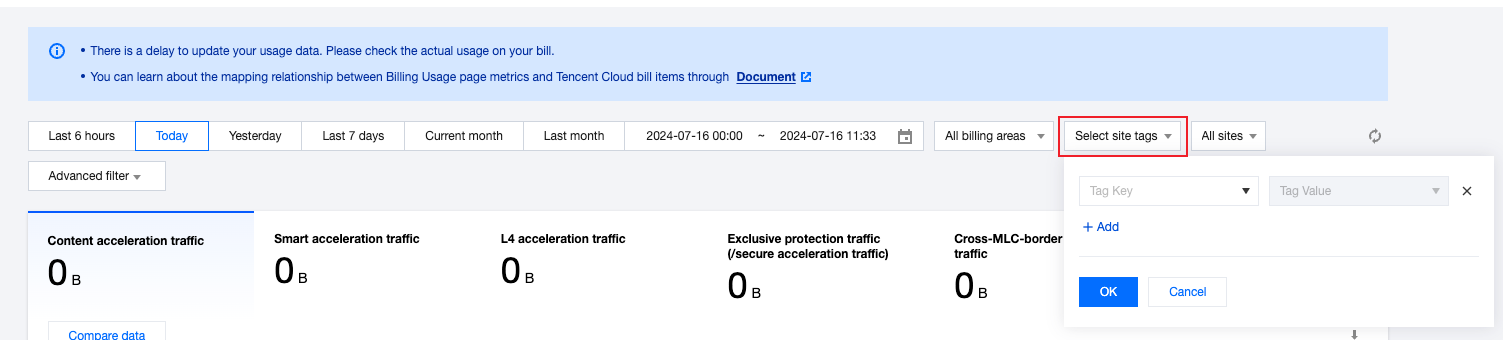
4. The page will automatically display all sites bound with the selected tag key-value pairs. You can view or download the billing usage of these sites.

APIs
フィードバック