通过 TOA 传递 TCP 协议客户端真实 IP
下载
聚焦模式
字号
本文介绍了使用四层代理加速时,如何通过 TOA 获取 TCP 协议的客户端真实 IP。
使用场景
当数据报文通过四层加速通道进行加速时,数据报文的源 IP 地址和源 Port 均会发生修改,导致源站无法直接获取到真实客户端的 IP 和 Port 信息。为了将客户端真实 IP 和 Port 信息可传递给源站服务器,在创建加速通道时,您可选择通过 TOA 来传递客户端 IP 和 Port 信息。四层加速通道会将真实客户端的 IP 和 Port 信息放入自定义的 tcp option 字段中。您需要在源站服务器上通过安装 TOA 模块来获取真实客户端地址信息。
说明:
四层代理仅企业版套餐可用。
操作步骤
步骤一:传递客户端 IP 方式选择为 TOA

步骤二:后端服务加载 TOA 模块
您可以通过以下两种方式加载 TOA 模块:
方法一(推荐):根据源站 Linux 版本,下载对应版本已编译好的 toa.ko 文件直接进行加载。
方法二:如果方法一中没有找到您当前的源站 Linux 版本,您可以通过下载 TOA 源码文件自行编译并加载。该源码仅支持 x86_64 版本,如果您需要支持 arm64 版本请 联系我们。
注意:
因不同安装环境的差异,如果您使用方法一加载过程中遇到问题,请尝试使用方法二,自行安装编译环境后加载。
1. 根据腾讯云上 Linux 的版本,下载对应的 TOA 包并解压。
centos
TencentOS
debian
suse linux
ubuntu
2. 解压完成后,执行 cd 命令进入刚解压的文件夹后,按照以下方法执行加载 TOA 模块:
/bin/bash -c "$(curl -fsSL https://edgeone-document-file-1258344699.cos.ap-guangzhou.myqcloud.com/TOA/install_toa.sh)"
加载成功后显示如下:

# 解压tar包tar -zxvf CentOS-7.2-x86_64.tar.gz# 进入解压后的包目录cd CentOS-7.2-x86_64# 加载toa模块insmod toa.ko# 拷贝到内核模块目录下cp toa.ko /lib/modules/`uname -r`/kernel/net/netfilter/ipvs/toa.ko# 设置系统启动时自动加载toa模块echo "insmod /lib/modules/`uname -r`/kernel/net/netfilter/ipvs/toa.ko" >> /etc/rc.local
可通过下面命令确认是否已加载成功:
lsmod | grep toa
出现 TOA 时表示已加载成功,如下图所示:

1. 安装编译环境。
1.1 查看当前内核版本号,确认 kernel-devel ,kernel-headers 已安装,并保证版本号与内核版本保持一致。
1.2 确认已安装 gcc 和 make。
1.3 如果以上环境依赖没有安装,可参考如下命令进行安装:
yum install -y gccyum install -y makeyum install -y kernel-headers kernel-devel
apt-get install -y gccapt-get install -y makeapt-get install -y linux-headers-$(uname -r)
2. 安装完编译环境后,执行以下命令完成源码下载,编译和加载。
/bin/bash -c "$(curl -fsSL https://edgeone-document-file-1258344699.cos.ap-guangzhou.myqcloud.com/TOA/compile_install_toa.sh)"
# 创建并进入编译目录mkdir toa_compile && cd toa_compile# 下载源代码tar包curl -o toa.tar.gz https://edgeone-document-file-1258344699.cos.ap-guangzhou.myqcloud.com/TOA/toa.tar.gz# 解压tar包tar -zxvf toa.tar.gz# 编译toa.ko文件,编译成功后会在当前目录下生成toa.ko文件make# 加载toa模块insmod toa.ko# 拷贝到内核模块目录下cp toa.ko /lib/modules/`uname -r`/kernel/net/netfilter/ipvs/toa.ko# 设置系统启动时自动加载toa模块echo "insmod /lib/modules/`uname -r`/kernel/net/netfilter/ipvs/toa.ko" >> /etc/rc.local
3. 执行下面指令确认是否已加载成功:
lsmod | grep toa
出现 toa 则表示已加载成功,如下图所示:

步骤三:验证获取客户端 IP 信息
您可以通过搭建 TCP 服务,并通过另外一台服务器模拟客户端请求进行验证,示例如下:
1. 在当前服务器上,可以通过 Python 创建一个 HTTP 服务来模拟 TCP 服务,如下所示:
# 基于python2python2 -m SimpleHTTPServer 10000# 基于python3python3 -m http.server 10000
2. 用另一台服务器充当客户端,构造客户端请求,以 Curl 请求来模拟 TCP 请求:
# 利用curl发起http请求, 其中域名为四层代理域名,10000为四层代理转发端口curl -i "http://a8b7f59fc8d7e6c9.example.com.edgeonedy1.com:10000/"
3. 如果 TOA 已加载完成,在已加载 TOA 的服务器会看到客户端的真实地址信息,如下图红框所示:

如果您当前的业务是以下两种场景,只需要获取 IPv4 或 IPv6 其中一种类型客户端地址,那么参照上述步骤完成服务端加载 TOA 模块即可获取到客户端真实 IP 地址。
源站是 IPv4,只需要获取 IPV4 客户端地址。
源站是 IPv6,只需要获取 IPV6 客户端地址。
但是,如果您当前的业务源站需要同时获取到 IPv4 和 IPv6 两种类型客户端地址,则需要在加载 TOA 模块的同时修改源站业务代码,请继续参考如下指引:修改源站业务代码,支持同时获取 IPv4/IPv6 客户端真实地址信息。
修改源站业务代码,同时获取IPv4/IPv6客户端真实 IP
说明:
本章节操作仅在源站需同时获取 IPv4 和 IPv6 客户端地址信息时参考,该操作将指引您如何修改源站业务代码。
源站在建立服务监听时,可参考采用如下两种方式:
1. 采用 IPv4 的地址结构(
struct sockaddr_in)搭建服务,其监听的是 IPv4 格式的地址。2. 采用 IPv6 的地址结构(
struct sockaddr_in6)搭建服务,其监听的是 IPv6 格式的地址。示例代码
#include <sys/socket.h>#include <stdio.h>#include <unistd.h>#include <netinet/in.h>#include <memory.h>#include <arpa/inet.h>int main(int argc, char **argv){int l_sockfd;// 服务器地址采用v4结构struct sockaddr_in serveraddr;// 业务修改点: 客户端地址必须采用v6结构struct sockaddr_in6 clientAddr;int server_port = 10000;memset(&serveraddr, 0, sizeof(serveraddr));// 创建socketl_sockfd = socket(AF_INET, SOCK_STREAM, 0);if (l_sockfd == -1){printf("Failed to create socket.\\n");return -1;}// 初始化服务器地址信息memset(&serveraddr, 0, sizeof(struct sockaddr_in));serveraddr.sin_family = AF_INET;serveraddr.sin_port = htons(server_port);serveraddr.sin_addr.s_addr = htonl(INADDR_ANY);int isReuse = 1;setsockopt(l_sockfd, SOL_SOCKET,SO_REUSEADDR,(const char*)&isReuse,sizeof(isReuse));// 关联socket和服务器地址信息int nRet = bind(l_sockfd,(struct sockaddr*)&serveraddr, sizeof(serveraddr));if(-1 == nRet){printf("bind error\\n");return -1;}// 监听socketlisten(l_sockfd, 5);int clientAddrLen = sizeof(clientAddr);memset(&clientAddr, 0, sizeof(clientAddr));// 接受来自客户端的连接int linkFd = accept(l_sockfd, (struct sockaddr*)&clientAddr, &clientAddrLen);if(-1 == linkFd){printf("accept error\\n");return -1;}// 业务修改点: 根据客户端sin6_family的类型, 判断客户端是v4地址还是v6地址// 当为AF_INET时, 表示客户端是IPv4, 将客户端地址指针转换为struct sockaddr_in*进行获取// 当为AF_INET6时, 表示客户端是IPv6, 使用struct sockaddr_in6*进行获取if (clientAddr.sin6_family == AF_INET) {printf("AF_INET accept getpeername %s : %d successful\\n",inet_ntoa(((struct sockaddr_in*)&clientAddr)->sin_addr),ntohs(((struct sockaddr_in*)&clientAddr)->sin_port));}else if (clientAddr.sin6_family == AF_INET6){char addr_p[128] = {0};inet_ntop(AF_INET6, (void *)&((struct sockaddr_in6*)&clientAddr)->sin6_addr, addr_p, (socklen_t )sizeof(addr_p));printf("AF_INET6 accept getpeername %s : %d successful\\n",addr_p,ntohs(((struct sockaddr_in6*)&clientAddr)->sin6_port));}else{printf("unknow sin_family:%d \\n", clientAddr.sin6_family);}close(l_sockfd);return 0;}
import java.io.IOException;import java.io.InputStream;import java.io.OutputStream;import java.net.InetAddress;import java.net.InetSocketAddress;import java.net.ServerSocket;import java.net.Socket;import java.net.SocketAddress;public class ServerDemo {/** 若采用 IPv4 的地址结构搭建服务,使用 IPV4_HOST */public static final String IPV4_HOST = "0.0.0.0";/** 若采用 IPv6 的地址结构搭建服务,使用 IPV6_HOST */public static final String IPV6_HOST = "::";public static void main(String[] args) {int serverPort = 10000;try (ServerSocket serverSocket = new ServerSocket()) {// 设置地址复用serverSocket.setReuseAddress(true);// 绑定服务器地址和端口,这里使用 IPv4serverSocket.bind(new InetSocketAddress(InetAddress.getByName(IPV4_HOST), serverPort));System.out.println("Server is listening on port " + serverPort);while (true) {// 接受客户端连接Socket clientSocket = serverSocket.accept();System.out.println("New client connected: " + clientSocket.getRemoteSocketAddress());// 处理客户端请求handleClientRequest(clientSocket);}} catch (IOException e) {System.err.println("Failed to create server socket: " + e.getMessage());}}/*** 处理函数,具体业务具体实现,这里只做为示例* 此函数的作用是将 client 的输入原封不动的返回给 client*/private static void handleClientRequest(Socket clientSocket) {try (InputStream inputStream = clientSocket.getInputStream();OutputStream outputStream = clientSocket.getOutputStream()) {// 读取客户端发来的数据byte[] buffer = new byte[1024];int bytesRead;while ((bytesRead = inputStream.read(buffer)) != -1) {// 将接收到的数据原样回复给客户端outputStream.write(buffer, 0, bytesRead);}} catch (IOException e) {// 当客户端断开连接后System.err.println("Failed to handle client request: " + e.getMessage());} finally {try {clientSocket.close();} catch (IOException e) {System.err.println("Failed to close client socket: " + e.getMessage());}}}}
#include <sys/socket.h>#include <stdio.h>#include <unistd.h>#include <netinet/in.h>#include <memory.h>#include <arpa/inet.h>int main(int argc, char **argv){int l_sockfd;// 服务器地址采用v6结构struct sockaddr_in6 serveraddr;// 客户端地址采用v6结构struct sockaddr_in6 clientAddr;int server_port = 10000;memset(&serveraddr, 0, sizeof(serveraddr));// 创建socketl_sockfd = socket(AF_INET6, SOCK_STREAM, 0);if (l_sockfd == -1){printf("Failed to create socket.\\n");return -1;}// 设置服务器地址信息memset(&serveraddr, 0, sizeof(struct sockaddr_in6));serveraddr.sin6_family = AF_INET6;serveraddr.sin6_port = htons(server_port);serveraddr.sin6_addr = in6addr_any;int isReuse = 1;setsockopt(l_sockfd, SOL_SOCKET,SO_REUSEADDR,(const char*)&isReuse,sizeof(isReuse));// 关联socket和服务器地址信息int nRet = bind(l_sockfd,(struct sockaddr*)&serveraddr, sizeof(serveraddr));if(-1 == nRet){printf("bind error\\n");return -1;}// 监听socketlisten(l_sockfd, 5);int clientAddrLen = sizeof(clientAddr);memset(&clientAddr, 0, sizeof(clientAddr));// 接受来自客户端的连接请求int linkFd = accept(l_sockfd, (struct sockaddr*)&clientAddr, &clientAddrLen);if(-1 == linkFd){printf("accept error\\n");return -1;}// 这里收到的客户端地址信息全部都采用v6的结构进行存储// 其中,客户端的IPv4地址也被映射成了一个IPv6的地址,例如:::ffff:119.29.1.1char addr_p[128] = {0};inet_ntop(AF_INET6, (void *)&clientAddr.sin6_addr, addr_p, (socklen_t )sizeof(addr_p));printf("accept %s : %d successful\\n", addr_p, ntohs(clientAddr.sin6_port));// 业务修改点:通过系统宏定义IN6_IS_ADDR_V4MAPPED来判断一个IPv6地址是否是IPv4的映射地址(代表客户端是IPv4)if(IN6_IS_ADDR_V4MAPPED(&clientAddr.sin6_addr)) {struct sockaddr_in real_v4_sin;memset (&real_v4_sin, 0, sizeof (struct sockaddr_in));real_v4_sin.sin_family = AF_INET;real_v4_sin.sin_port = clientAddr.sin6_port;// 读取最后四个字节即为客户端真实IPv4地址memcpy (&real_v4_sin.sin_addr, ((char *)&clientAddr.sin6_addr) + 12, 4);printf("connect %s successful\\n", inet_ntoa(real_v4_sin.sin_addr));}close(l_sockfd);return 0;}
import java.io.IOException;import java.io.InputStream;import java.io.OutputStream;import java.net.InetAddress;import java.net.InetSocketAddress;import java.net.ServerSocket;import java.net.Socket;import java.net.SocketAddress;public class ServerDemo {/** 若采用 IPv4 的地址结构搭建服务,使用 IPV4_HOST */public static final String IPV4_HOST = "0.0.0.0";/** 若采用 IPv6 的地址结构搭建服务,使用 IPV6_HOST */public static final String IPV6_HOST = "::";public static void main(String[] args) {int serverPort = 10000;try (ServerSocket serverSocket = new ServerSocket()) {// 设置地址复用serverSocket.setReuseAddress(true);// 绑定服务器地址和端口,这里使用 IPv4serverSocket.bind(new InetSocketAddress(InetAddress.getByName(IPV6_HOST), serverPort));System.out.println("Server is listening on port " + serverPort);while (true) {// 接受客户端连接Socket clientSocket = serverSocket.accept();System.out.println("New client connected: " + clientSocket.getRemoteSocketAddress());// 处理客户端请求handleClientRequest(clientSocket);}} catch (IOException e) {System.err.println("Failed to create server socket: " + e.getMessage());}}/*** 处理函数,具体业务具体实现,这里只做为示例* 此函数的作用是将 client 的输入原封不动的返回给 client*/private static void handleClientRequest(Socket clientSocket) {try (InputStream inputStream = clientSocket.getInputStream();OutputStream outputStream = clientSocket.getOutputStream()) {// 读取客户端发来的数据byte[] buffer = new byte[1024];int bytesRead;while ((bytesRead = inputStream.read(buffer)) != -1) {// 将接收到的数据原样回复给客户端outputStream.write(buffer, 0, bytesRead);}} catch (IOException e) {// 当客户端断开连接后System.err.println("Failed to handle client request: " + e.getMessage());} finally {try {clientSocket.close();} catch (IOException e) {System.err.println("Failed to close client socket: " + e.getMessage());}}}}
控制台输出结果
Server is listening on port 10000New client connected: /127.0.0.1:50680New client connected: /0:0:0:0:0:0:0:1:51124New client connected: /127.0.0.1:51136
相关参考
监控 TOA 运行状态
为保障 TOA 内核模块运行的稳定性,TOA 内核模块还提供了监控功能。在插入 toa.ko 内核模块后,可以通过执行以下命令方式监控 TOA 模块的工作状态。
cat /proc/net/toa_stats
TOA 运行状态如下:
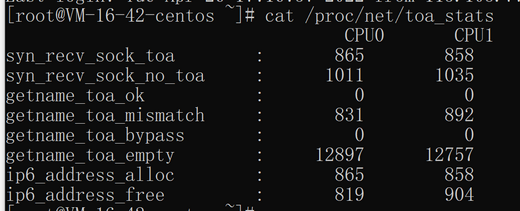
其中主要的监控指标对应的含义如下所示:
指标名称 | 说明 |
syn_recv_sock_toa | 接收带有 TOA 信息的连接个数。 |
syn_recv_sock_no_toa | 接收并不带有 TOA 信息的连接个数。 |
getname_toa_ok | 调用 getsockopt 获取源 IP 成功即会增加此计数,另外调用 accept 函数接收客户端请求时也会增加此计数。 |
getname_toa_mismatch | 调用 getsockopt 获取源 IP 时,当类型不匹配时,此计数增加。例如某条客户端连接内存放的是 IPv4 源 IP,并非为 IPv6 地址时,此计数便会增加。 |
getname_toa_empty | 对某一个不含有 TOA 的客户端文件描述符调用 getsockopt 函数时,此计数便会增加。 |
ip6_address_alloc | 当 TOA 内核模块获取 TCP 数据包中保存的源 IP、源 Port 时,会申请空间保存信息。 |
ip6_address_free | 当连接释放时,toa 内核模块会释放先前用于保存源 IP、源 port 的内存,在所有连接都关闭的情况下,所有 CPU 的此计数相加应等于 ip6_address_alloc 的计数。 |
文档反馈