Overview
HTTP Strict Transport Security (HSTS) is a web security protocol promoted by the Internet Engineering Task Force (IETF). The protocol is used to instruct web browsers to access a site over the more secure HTTPS protocol. You can configure HSTS to improve the security and credibility of your website if you have any of the following needs: to prevent malicious attackers from stealing sensitive user information through man-in-the-middle attacks, to comply with data privacy protection regulations, or to enhance users' trust in your website.
When a client initiates a request to an EdgeOne node over HTTP, this HTTP request may still be intercepted or tampered even though forced HTTPS access is enabled.
To improve access security, HSTS can be used to force browsers to directly initiate HTTPS requests. When HSTS is enabled, EdgeOne adds the Strict-Transport-Security header to HTTPS responses. The header tells browsers to send HTTPS requests in a specified period of time.
Note:
1. The Strict-Transport-Security header applies to only HTTPS requests. Therefore, we recommend that you configure forced HTTPS access before you enable HSTS. This ensures that a user's initial access request is made over HTTPS and the configuration takes effect. 2. When the HSTS header is included in responses, browsers will alert users and intercept the access to the current site if a certificate security risk is detected. This further protects user data security.
Scenario 1: Enabling HSTS for All Domain Names
To enable HSTS for all domain names used to access the current site, refer to the following information.
Prerequisites
You have configured SSL certificates for all domain names used to access the current site as instructed in Certificate Configuration. Directions
1. Log in to the Tencent Cloud EdgeOne console, enter Service Overview in the left menu bar, and click the site to be configured under Website Security Acceleration. 2. On the site details page, click Site Acceleration to enter the global site configuration page. Then click HTTPS in the right sidebar.
3. On the HSTS configuration card, toggle on the Site-wide setting switch to configure HSTS.
4. Configure the Strict-Transport-Security header in the pop-up window.
On/Off: Enable or disable HSTS.
Cache time: The value of the max-age field, which can be set to an integer from 1 to 31536000.
Contain subdomain name: When enabled, the includeSubDomains instruction is contained.
Preload: When enabled, the preload instruction is contained.
Scenario 2: Enabling HSTS for Specified Domain Names
To enable HSTS for specified domain names or differentiate the HSTS configuration for different domain names, refer to the following information.
Prerequisites
You have configured SSL certificates for the domain names for which you want to enable HSTS as instructed in Certificate Configuration. Directions
1. Log in to the Tencent Cloud EdgeOne console, enter Service Overview in the left menu bar, and click the site to be configured under Website Security Acceleration. 2. On the site details page, click Site Acceleration to enter the global site configuration page. Then click the Rule Engine tab.
3. On the rule engine management page, click Create rule and select Add blank rule.
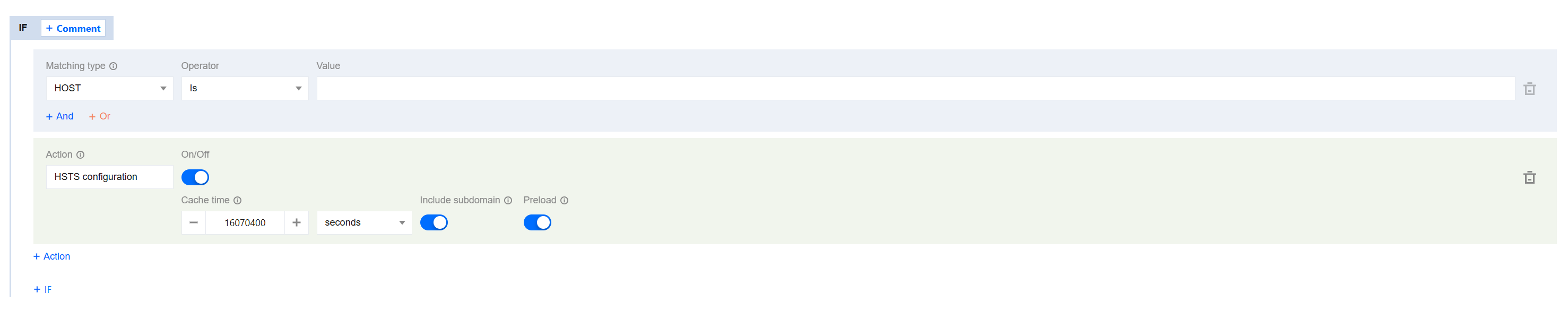
4. On the page that appears, select HOST from Matching type and specify an operator and a value to match the requests of specified domain names.
5. From the Action drop-down list, select HSTS. Then, configure the settings that appear.Then, click Switch.
6. Click Save and publish.
More Information
The following table describes fields in the Strict-Transport-Security header:
|
max-age=<expire-time>
| The validity period of the HSTS header, measured in seconds. Within this period, browsers always send requests over HTTPS. |
includeSubDomains (optional)
| Enable HSTS for the current domain name and all of its subdomain names. |
preload (optional)
| Add the current domain name to the HSTS preload list of all major browsers. In this case, the browsers always send HTTPS requests to the domain name. Requirements: max-age is no less than 31536000 (one year).
includeSubDomains is contained.
preload is contained.
You can view the HSTS preload list to check if the current domain name is in the browser's preload list. Major browsers regularly write the HSTS preload list into their version updates by hard coding. |