If you are a customer of a Tencent Cloud partner, the rules regarding resources when there are overdue payments are subject to the agreement between you and the partner.
EO Notifications and Alerts
Account Overdue Notice
When your account balance or credit is not enough to pay for the PAYG resources, your account goes overdue. In this case, notices are sent to recipients specified in Message Center according to your preset configuration (phone calls, SMS, emails, and Message Center messages).
Plan Expiration Alerts
1. For prepaid EdgeOne plans, notices are sent 7 days before the expiration date to recipients specified in Message Center according to your preset configuration (phone calls, SMS, emails, and Message Center messages).
2. Meanwhile, a reminder is displayed on the Plan Management page in the EdgeOne console.
EO Service Suspension Policies
If your EdgeOne prepaid plan expires and is not renewed within the service suspension buffer period, or if your Tencent Cloud account has an overdue payment that is not cleared within 24 hours, the system will suspend your service. After suspension, you can only view the suspended resources and cannot use any of their capabilities. To ensure normal use of EdgeOne services, please pay attention to your prepaid plan status and account balance, and renew or top up in a timely manner.
Account Overdue
If your Tencent Cloud account stays overdue for over 24 hours, the EdgeOne service is suspended. You can top up or make up the overdue payment and manually re-enable the domain/four-layer proxy.
Note
1. After the account is in overdue, all services will be suspended, including prepaid packages, enterprise packages, and other value-added services.
2. After the account top up or make up the overdue payment, you need to manually re-enable the domain/four-layer proxy to restore the service.
Prepaid Plan Expiration
If your EdgeOne prepaid plan has expired and you do not renew it within the service suspension buffer period, the plan will be isolated (suspended) after the buffer period ends. You can renew it to restore normal use.
Example of Service Suspension Due to Prepaid Plan Expiration
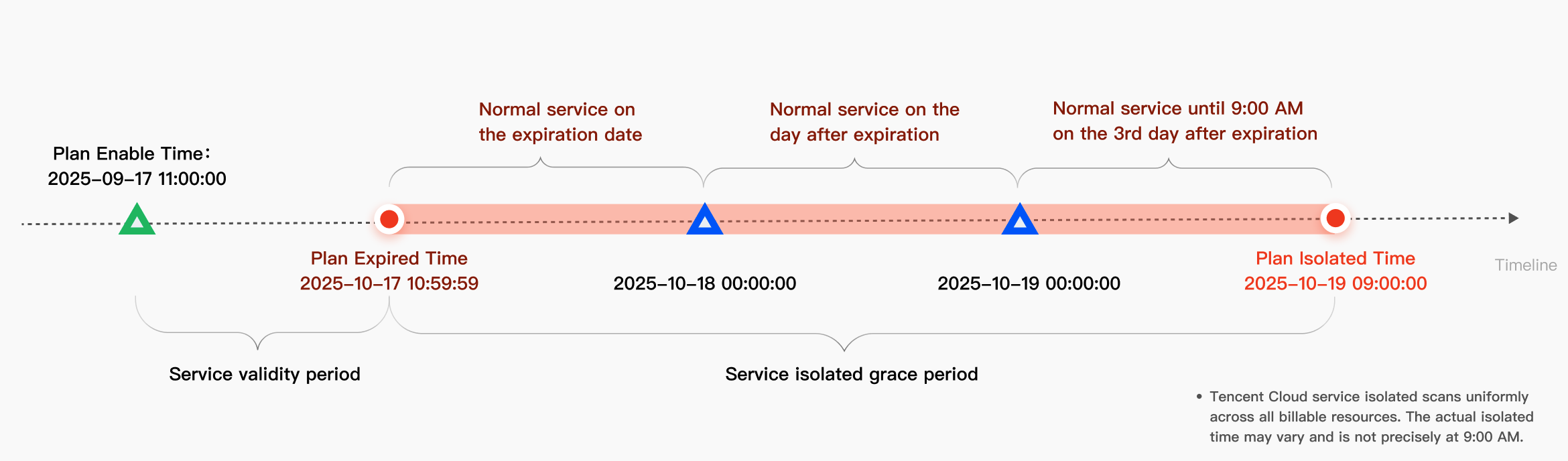
Assuming a user purchased a personal edition plan on September 17, 2025 at 11:00:00 with a duration of 1 month, the package expiration date is October 17, 2025 at 10:59:59.
Normal service on the day of expiration: Oct 17, 2025 10:59:59 – Oct 18, 2025 00:00:00
Service resumes on the following day after expiration: October 18, 2025 00:00:00 – October 19, 2025 00:00:00
Normal service before 9:00 AM on the third day after expiration: October 19, 2025 00:00:00 – October 19, 2025 09:00:00
If renewal is not completed during the period, the package will be isolated and suspended at 9:00 AM on October 19, 2025.
Note
1. Package expiration – The package isolation period serves as the service suspension buffer period. Within this timeframe, the data traffic and requests included in the package are not deducted, and the generated usage will be settled as Fees for Out-of-plan Resource Usage (Pay-as-You-Go).
2. If a free edition plan exists under your account, it will be automatically downgraded to the free plan after the service suspension buffer period ends. For details, see Free Edition Plan Downgrade Instructions.
Account or Site Suspension
If your account or site is banned for violating compliance requirements, the system will suspend the service for the affected site(s). The status of your plan will vary depending on the type of ban:
Account-Level Suspension
All plans and sites under the account will be banned. Once a plan enters the banned state, you cannot bind new sites to it, and no fees will be incurred during the ban period.
Site / Domain-Level Suspension
Service is suspended only for the banned sites or domains, while the plan itself remains in a normal state. You can continue to bind the plan to other sites for use, and the plan fees will be charged as usual.
EO Resource Termination
After the service suspension, your EdgeOne resources will be stored for 60 days. Within this period, you can renew the plan or make up the overdue payment to resume the service. After that, your resources will be released and all related configurations will be deleted permanently.
Note
1. After the account is in overdue, all services will be suspended, including prepaid packages, enterprise packages, and other value-added services.
2. After the account top up or make up the overdue payment, you need to manually re-enable the domain/four-layer proxy to restore the service.
3. If your account is a reseller sub-account, services will be suspended immediately upon overdue, and the resource termination period is 15 days. For specific details, refer to the official note from the reseller platform.
DDoS Service Suspension & Resource Termination Policies
Note:
The following description applies to customers onboarded after January 12, 2026.