tencent cloud

Tencent Effect SDK

Release Notes and Announcements
Release Notes
Tencent Effect SDK V3.5 Version Released
Tencent Effects SDK V3.0 Version Related API and Material Changes
Product Introduction
Overview
Features
Basic Concepts
Strengths
Use Cases
Purchase Guide
Pricing Overview
Purchase Guide
Payment Overdue and Refund
Tutorial
Demos
Free Trial License
Licenses
Adding and Renewing a License (Mobile)
Adding and Renewing a License (Desktop)
Adding and Renewing a License (Web)
FAQs
SDK Download
Features
SDK Download
Version History
SDK Integration Guide(No UI)
General Integration of Tencent Effect
Integrating Capabilities
SDK Integration Guide(Including UI)
General Integration of Tencent Effect
Integrating Tencent Effect into MLVB SDK
Integrating Tencent Effect into TRTC SDK
Integrating Tencent Effect into UGSV SDK
Virtual Avatars
API Documentation
iOS
Android
Flutter
Web
Feature Guide
Reducing SDK Size
SDK Integration Issue Troubleshooting
Performance Fine-Tuning
Effect Fine-Tuning
Material Usage
Effect Parameters
Recommended Parameters in Beautification Scenarios
UGSV Enterprise Edition Migration Guide
Integrating Tencent Effect for Third-Party Publishers (Flutter)
Integrating Beauty AR Web into Mini Programs
Tencent Effect Studio Usage
Beauty AR Web
Overview
Quick Start
SDK Integration
Parameters and APIs
Console Guide
Demos
Preset Effect List
Practical Tutorial
FAQs
FAQs
General
Technical
License
Legacy Documentation
Recommended Parameters in Beautification Scenarios
Beauty Parameters Table
One-Minute Integration of TRTC
One-Minute Integration of Live Streaming
TE SDK Policy
Privacy Policy
Data Processing And Security Agreement
Contact Us

Tutorial

PDF
Focus Mode
Font Size
Last updated: 2024-09-14 10:04:49
Tencent Effect SDK enables you to quickly implement beauty filters, filters, sticker props, and background segmentation effects in live streaming or short videos. We provide UI components that include interface code, as well as a pure SDK form for UI-free integration. For the differences between the two solutions, refer to Differences between UI and UI-Free Integration Solutions.

Steps of Using Tencent Effect:

1. Experience Effect

Download the package for the corresponding platform from the Demo Experience Page, install, and try it out.
Choose the package that suits you based on the experience and the Beauty Filter feature description.

2. Apply for License Information

Since the Beauty Filter SDK requires authentication, you need to apply for License information, and only after successful authentication in the project can you use the Beauty Filter feature.

3. Run the Demo project

Demo Experience Page offers Demo projects for various scenarios. You can choose the corresponding Demo based on the instructions.

4. Download and integrate the SDK

On the SDK Download page, download the SDK corresponding to your package. If you are unsure which package to use at the start, you can directly choose S1-07 SDK for download. This SDK includes all features of Tencent Special Effects. You can replace it once you decide on the package.
Based on your business scenario, refer to the following documents for integration:
To integrate Tencent Special Effects into TRTC, see Integrating Tencent Effect into TRTC SDK
To integrate Tencent Special Effects into Tencent Live, see Integrating Tencent Effect into MLVB SDK
To integrate Tencent Special Effects into short videos, see Integrating Tencent Effect into UGSV SDK
To integrate Tencent Special Effects into other vendors' RTC or custom camera feeds, see General Integration of Tencent Effect

5. Obtain Materials

Based on your Demo experience in the first step, and in conjunction with the feature overview of your package, choose the corresponding materials (filters and stickers) included in the selected features, and send the material names to Tencent Special Effects staff. The staff will provide the corresponding materials based on your selection.
Note:
Stickers in the SDK and Demo project are for testing purposes only.

Common Issue Investigation

For integration issues, see SDK Integration Issues
For performance issues, see Performance Issues Investigation
For effectiveness issues, see Effectiveness Issues Investigation

The difference between Integration (No UI) and Integration (UI)

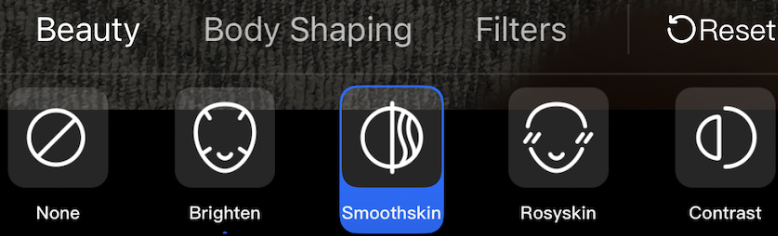
Integration (UI Included) provides a default beauty filter panel UI based on the original SDK, reducing UI development costs and accelerating the integration of Tencent special effects.
The beauty filter panel with UI is as follows:


Integration Solution (No UI) means using the original SDK of Tencent special effects for integration. You need to handle the beauty filter panel UI development and beauty filter property management yourself, suitable for requirements with special needs for the beauty filter panel.
Help and Support

Was this page helpful?

Help us improve! Rate your documentation experience in 5 mins.

Feedback