效果问题排查
Download
聚焦模式
字号
1. 画面出现噪点怎么办?
如果您在灯光弱的环境下,画面中出现了噪点,可以开启降噪属性。
2. 分割效果不太好怎么办?
在使用背景分割效果时,建议背景不要太复杂,背景颜色和衣服颜色不能太相似,否则分割效果会降低。
3. 美妆素材中的美颜跟美颜关系是什么?
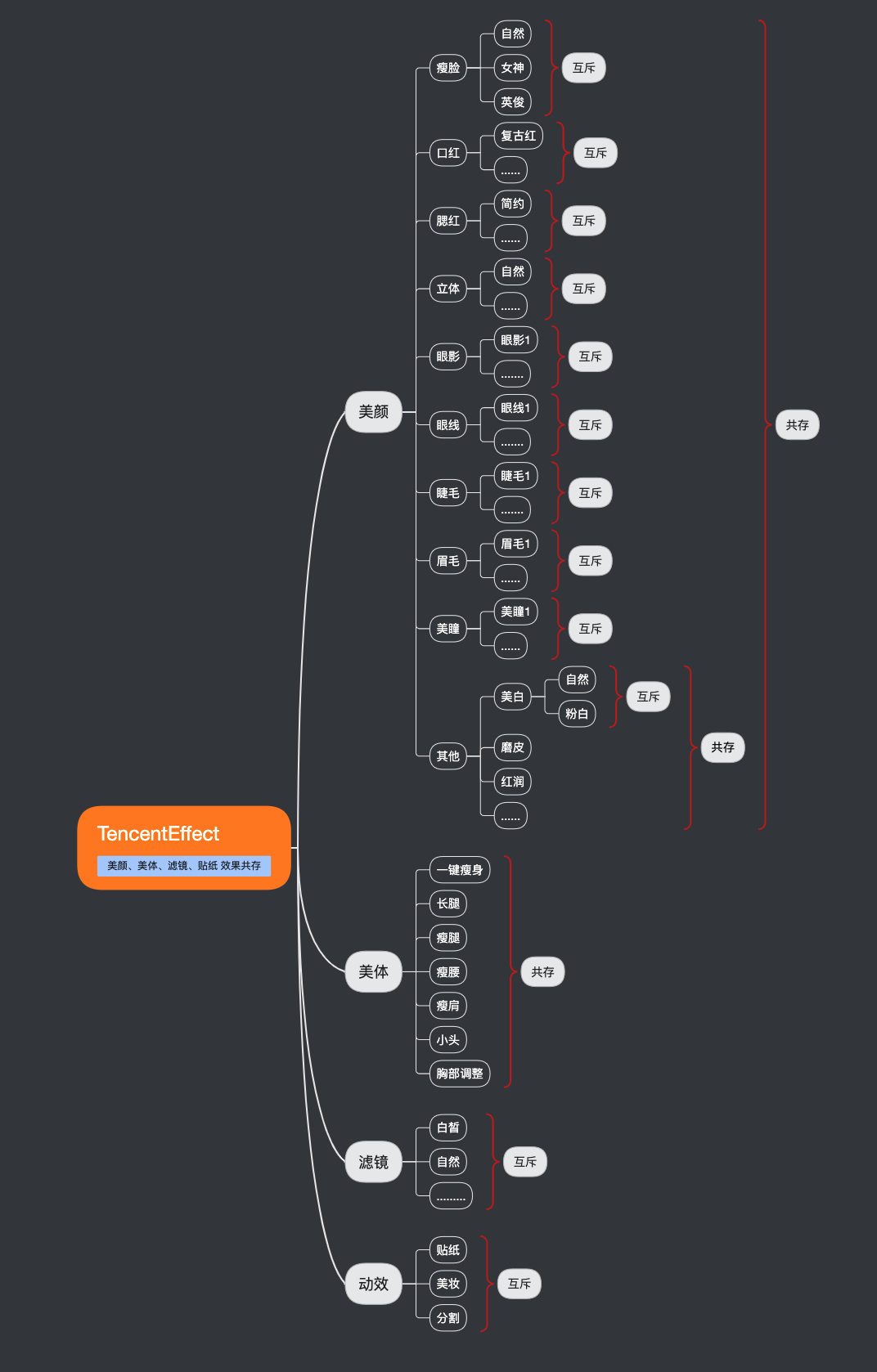
4. 使用某一项美颜没有效果怎么办?
这里可能是 license 权限问题,可能是参数问题(例如滤镜和动效的路径问题),建议检查属性参数。
5. 美颜之后画面边缘模糊问题怎么办?

这种情况是因为开了瘦脸特效(瘦脸特效会导致拉伸脸部周围像素),如果脸比较靠屏幕边缘,边缘的拉伸就更多。可通过裁剪画面边缘的方式进行处理,裁剪方法可以参考 demo。
6. 横屏时瘦脸或者口红等没有效果?
检查画面中人脸方向,设置对应的偏移角度。
方式1:如果您的 license 开通了贴纸权限,那么可以使用下方的贴纸找出对应的角度。
在使用美颜功能时设置此贴纸,通过
setImageOrientation 调整角度,该角度对应人物头顶的方向上显示的角度。具体操作如下: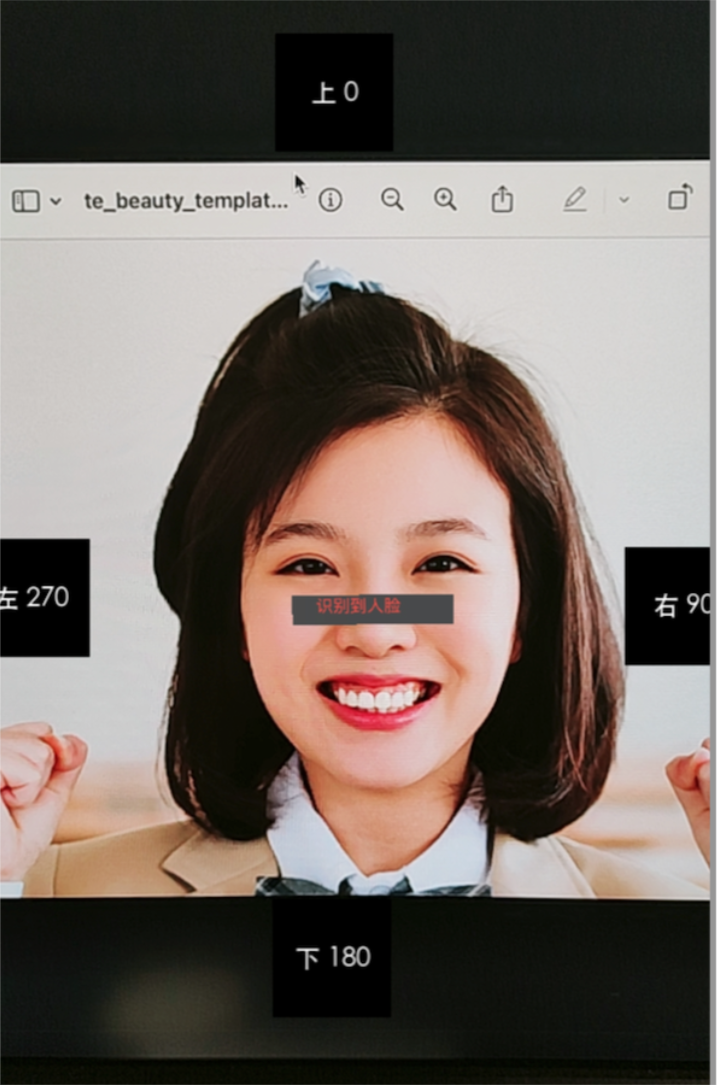 | 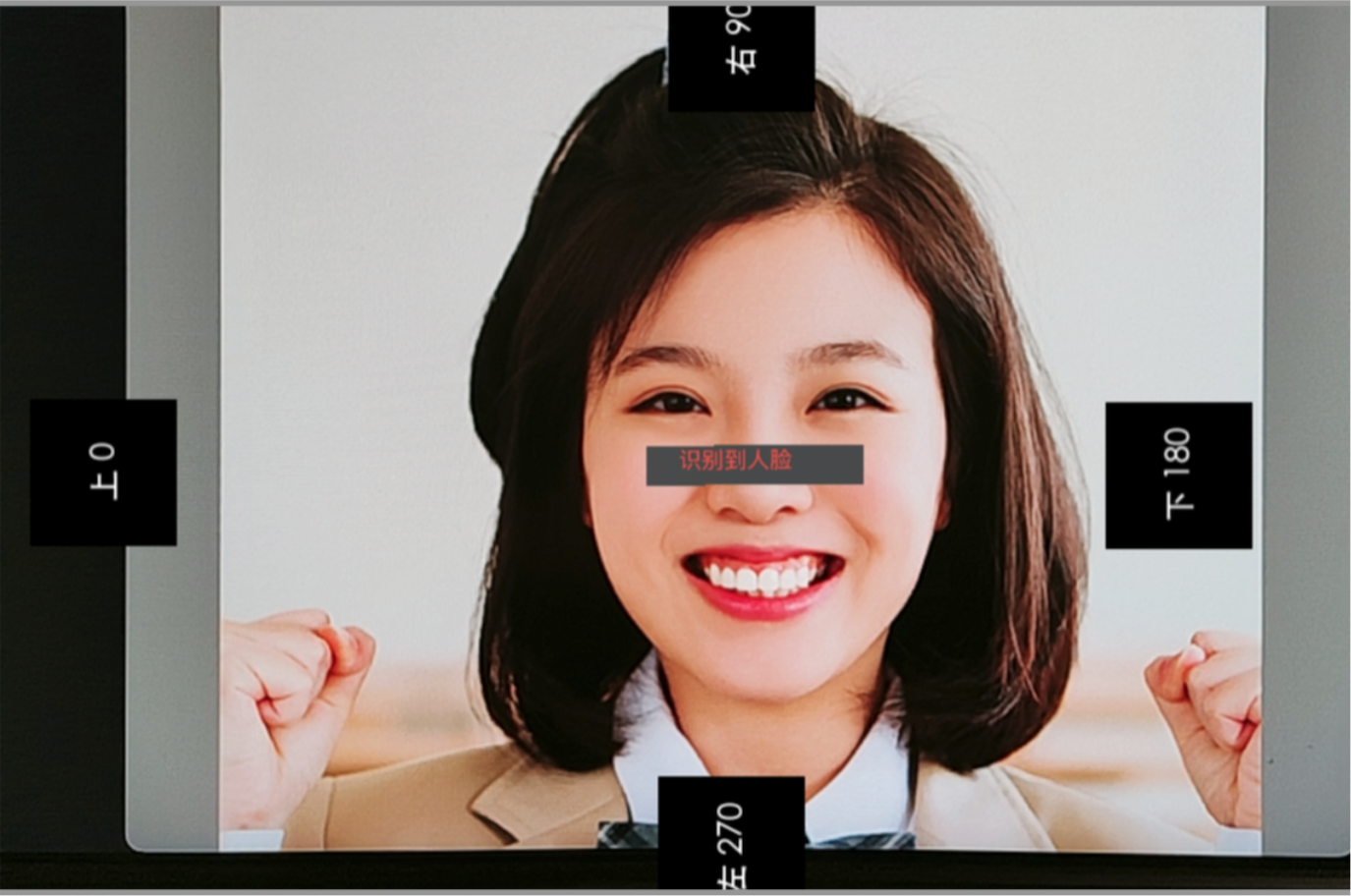 | 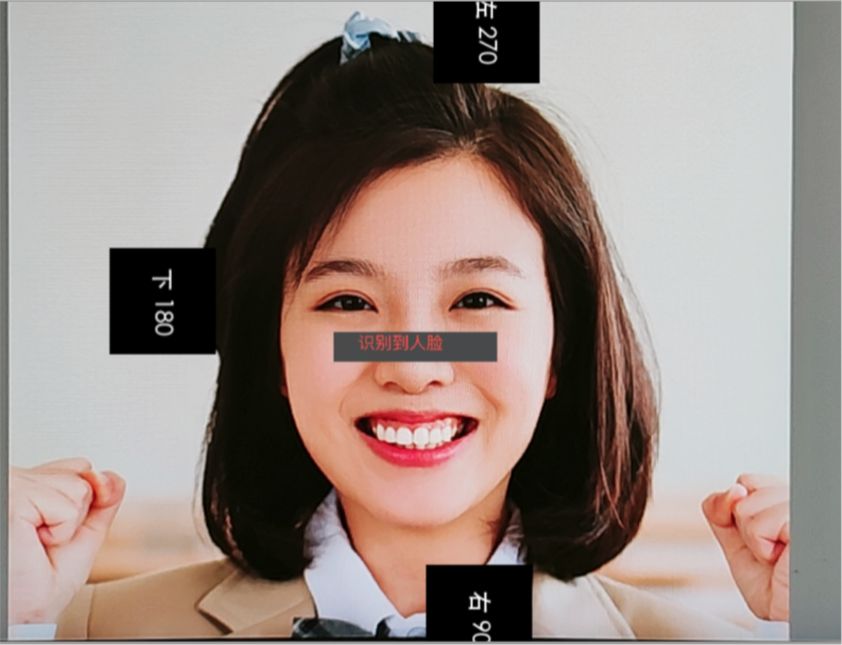 | 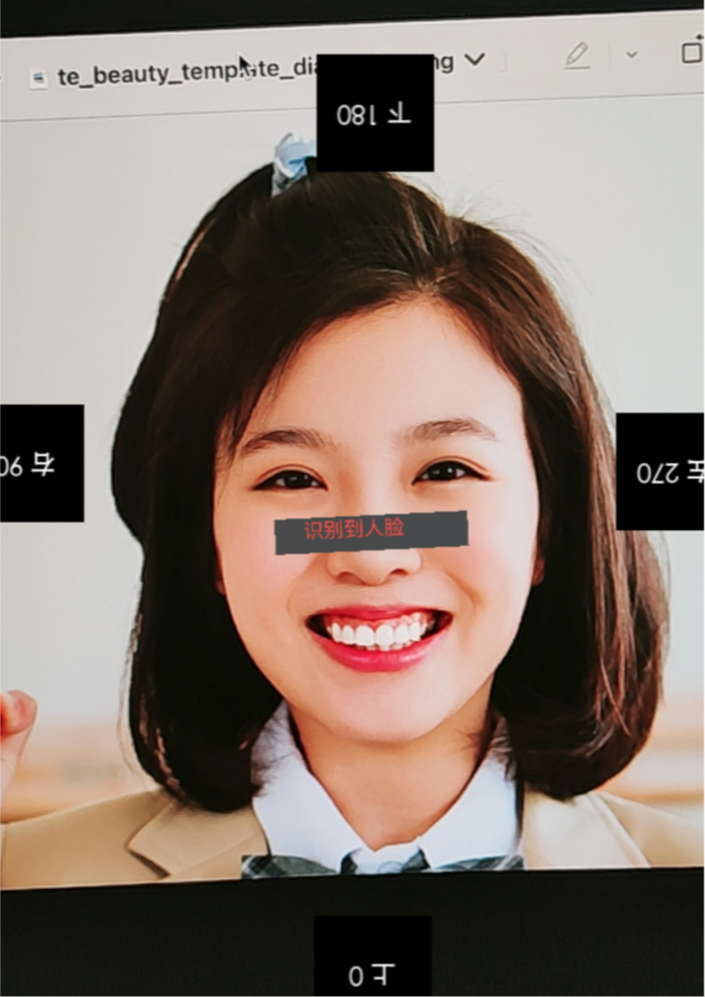 |
方式2:可以通过添加下边的代码,读取画面,然后对照下表。
1. Android 中可以使用
readTexture 方法获取当前画面,查看画面中人脸的方向,根据下图设置对应的角度。public static Bitmap readTexture(int texture, int width, int height) { int[] frame = new int[1]; GLES20.glGenFramebuffers(1, frame, 0); GLES20.glBindFramebuffer(GLES20.GL_FRAMEBUFFER, frame[0]); GLES20.glFramebufferTexture2D(GLES20.GL_FRAMEBUFFER, GLES20.GL_COLOR_ATTACHMENT0, GLES20.GL_TEXTURE_2D, texture, 0); byte[] data = new byte[width * height * 4]; ByteBuffer buffer = ByteBuffer.wrap(data); GLES20.glPixelStorei(GLES20.GL_PACK_ALIGNMENT, GLES20.GL_TRUE); GLES20.glReadPixels(0, 0, width, height, GLES20.GL_RGBA, GLES20.GL_UNSIGNED_BYTE, buffer); Bitmap bitmap = Bitmap.createBitmap(width, height, Bitmap.Config.ARGB_8888); bitmap.copyPixelsFromBuffer(buffer); GLES20.glBindFramebuffer(GLES20.GL_FRAMEBUFFER, 0); GLES20.glDeleteFramebuffers(1, frame, 0); return bitmap; }
2. Android 中调用
setImageOrientation 方法。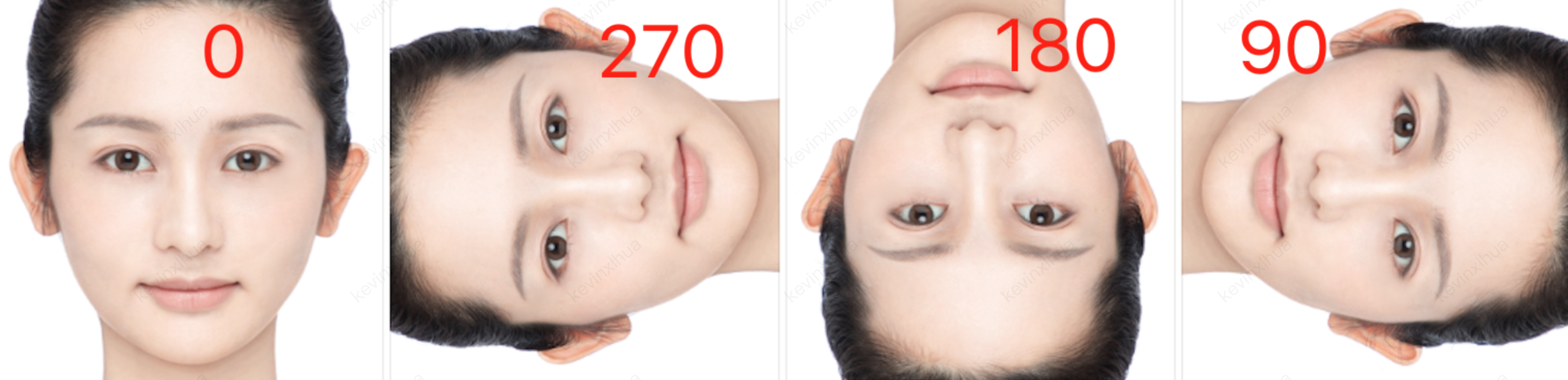
1. iOS 中,可以使用
readTexture 方法获取当前画面,查看画面中人脸的方向,根据下图设置对应的角度。#import <OpenGLES/ES2/gl.h>-(void)readTexture:(int)textureId width:(int)width height:(int)height{glBindTexture(GL_TEXTURE_2D, textureId);GLuint framebuffer;glGenFramebuffers(1, &framebuffer);glBindFramebuffer(GL_FRAMEBUFFER, framebuffer);glFramebufferTexture2D(GL_FRAMEBUFFER, GL_COLOR_ATTACHMENT0, GL_TEXTURE_2D, textureId, 0);GLenum status = glCheckFramebufferStatus(GL_FRAMEBUFFER);if (status != GL_FRAMEBUFFER_COMPLETE) {NSLog(@"Framebuffer is not complete.");}GLubyte *pixels = (GLubyte *)malloc(width * height * 4 * sizeof(GLubyte));glReadPixels(0, 0, width, height, GL_RGBA, GL_UNSIGNED_BYTE, pixels);glBindFramebuffer(GL_FRAMEBUFFER, 0);glDeleteFramebuffers(1, &framebuffer);CVPixelBufferRef pixelBuffer = NULL;CVPixelBufferCreateWithBytes(NULL, width, height, kCVPixelFormatType_32BGRA, pixels, width * 4, NULL, NULL, NULL, &pixelBuffer);free(pixels);CVPixelBufferRelease(pixelBuffer);}
2. iOS 中调用
setImageOrientation 方法。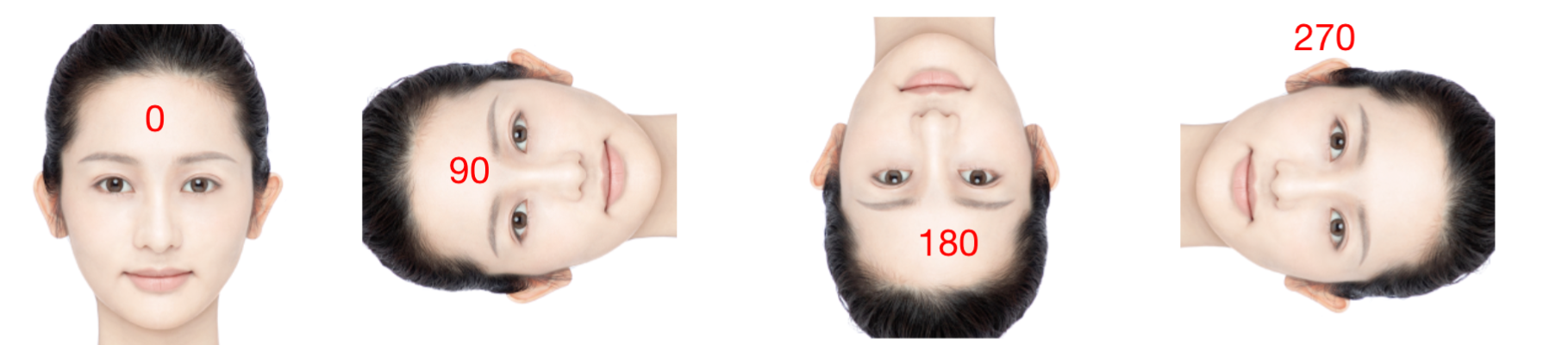
文档反馈